ORA-04031: unable to allocate 3896 bytes of shared memory

I have faced the below error in Oracle 11gR2 (11.2.0.3) release.

ORA-04031: unable to allocate 3896 bytes of shared memory (“shared pool”,”ALTER

DATABASE CLOSE NORMAL”,”sga heap(1,0)”,”kglsim object batch”)

this error indicates that you need to re-adjust your SGA memory in your database.

To Resolve this problem:

You need to increase the size of the shared_pool_size &  java_pool_size in your init.ora file

Then you need to reboot your database after changing the parameters.

Hope This Helps

In-Memory Database Management Certificate (Open HPI)

I am please to announce that i have taken the Open HPI course and passed the quizzes + Final Exam and rewarded with ‘Record of Achievement’ .

openHPI is a platform for massive open online courses (MOOC) in the field of computer science and information technology. It is hosted at the Hasso Plattner Institute (HPI) in Potsdam, Germany. openHPI is open for everyone, participation is free of costs. Everybody can register and enroll for courses without any prerequisites. openHPI’s courses are derived from HPI’s bachelor and master programs in IT-Systems Engineering and cover both, foundations of information technology as well as highly topical innovations.

The Course was  taught by Prof. Hasso Plattner ( He is the Co-founder of SAP-AG Company and currently Chairman of the company), he is the person who envisioned SAP HANA and saw the importance of in-memory database in Enterprise Systems. He is an AMAZING pioneer & very well in teaching !!

My Certificate:

OpenHPI Certificate - In-Memory Data Management Implications on Enterprise Systems
OpenHPI Certificate – In-Memory Data Management Implications on Enterprise Systems

For certificate verification and authentication:

https://open.hpi.de/verify/xuhip-luvum-setin-lyheh-garop

The Course is amazing and beneficial for DBA’s, IT Professionals, Project Managers, Enterprise System Architects.

Cheers.

🙂

EXPDP ORA-31693 ORA-02354 ORA-01555

while taking an export  (my Oracle Release is 11.2.0.3), i have faced with the below errors in the log file:

Processing object type SCHEMA_EXPORT/TABLE/CONSTRAINT/REF_CONSTRAINT
Processing object type SCHEMA_EXPORT/TABLE/STATISTICS/TABLE_STATISTICS
ORA-31693: Table data object “TESTSCHMA”.”VALUE_TABLE” failed to load/unload and is being skipped due to error:
ORA-02354: error in exporting/importing data
ORA-01555: snapshot too old: rollback segment number 9 with name “_SYSSMU9_2795927347$” too small

To Resolve this problem perform the following:

sqlplus

SQL>set pages 1000
SQL>set lines 300
SQL> show parameter undo;

NAME TYPE VALUE
———————————— ———– ——————————
undo_management string AUTO
undo_retention integer 900
undo_tablespace string UNDOTBS1
increase the undo_retention size:

SQL> alter system set undo_retention = 16500 scope = BOTH;

The LOB “retention” will not change automatically for LOB segements to verify this use the below query:

select table_name, column_name, nvl(retention, 0) retention, pctversion from dba_lobs where OWNER=’TESTSCHMA’;

To find all columns that have lobs use the following query:

select table_name, column_name from dba_lobs where OWNER=’TESTSCHMA’;

Then, use the “alter” command to change invidually each lob:

SQL> alter table TESTSCHMA.GRID_TABLE modify lob (SQLSTATEMENT) (retention);

Oracle Patch Update for October 2014 and ArcSDE Geodatabase

if you have applied the latest Oracle Security Patches released in October 2014 to your enterprise database. You need to roll back the patch OR grant elevated permissions.

for myself, i have granted each geodatabase user the “select” permission to the view “v_$parameter” and it fixed the problem. Of course, this is a workaround but not advisable implementation from security perspective since the normal oracle/geodaabase account should not have permission on this view.

The Bug ID Number is: BUG-000082555

ESRI Link for this issue: http://support.esri.com/en/knowledgebase/techarticles/detail/43293/

i will update my blog  whenever esri provides a permanent fix.

Update **** 11 November 2014 ****

Esri Provided a patch fixing the issue for multiple ArcGIS Versions:

http://support.esri.com/en/downloads/patches-servicepacks/view/productid/67/metaid/2143

Good Luck,

How to install the SQL Loader for Oracle 11g

In order to install SQL Loader you need first to install Oracle 11g Client on your machine.

1. after that invoke the OUI (Oracle Universal Installer) , you can see check the OUI in windows under starts—->programs—> Oracle Client. (Make sure to run OUI as “administrator“, by right clicking on the OUI).

2. Then Choose the file path where you want to install the SQL Loader in.

3. choose “custom” instillation type.

4. In “Available Product Component” list choose “Oracle Database Utilities” check box
5.Press next button to install this component.

the below image snapshots are used for visual illustration:

image001

Click “NEXT”

image002

Then Choose “Custom”

image003

Then Choose the appropriate path

image004

Choose “Oracle Database Utilities” where Oracle SQL Loader is part of it.

image005

Cheers !

ORA-01693: max # extents (120) reached in lob segment

one of the developers have faced the below error in his application:

ORA-01693: max # extents (120) reached in lob segment SCHEMA1.SYS_LOB0000377024C00009

This error is caused by the LOB segment ran out of database space.

To resolve this:

first, make sure that your tablespace of schema1 is sufficient enough.

Second, use the below query to find out more information about the segment:

select SEGMENT_NAME, SEGMENT_TYPE, MAX_EXTENTS
from dba_segments
where segment_name = ‘SYS_LOB0000705396C00006$$’;

Final step: increase the “maxextent” for the lob segment by using the below command:

SQL> ALTER TABLE  SCHEMA1.T_INCIDENT_REPORT

MODIFY LOB (ATTACH_DOC) (STORAGE (MAXEXTENTS UNLIMITED));

Remark: “ATTACH_DOC”  is the column in the table that is stored in “LOB” format.

Hope This will help.

Regards,

Emad

ORA-31633: unable to create master table while performing expdp operation

Problem description:

while performing an export datapump operation on Oracle 11g database i have faced the below error:

Export: Release 11.2.0.3.0 – Production on Thu Sep 4 07:17:58 2014

Copyright (c) 1982, 2011, Oracle and/or its affiliates.  All rights reserved.

Connected to: Oracle Database 11g Enterprise Edition Release 11.2.0.3.0 – 64bit Production

With the Partitioning, OLAP, Data Mining and Real Application Testing options

ORA-31626: job does not exist

ORA-31633: unable to create master table “SYS.HOT_DB_EXPORT”

ORA-06512: at “SYS.DBMS_SYS_ERROR”, line 95

ORA-06512: at “SYS.KUPV$FT”, line 1020

ORA-00955: name is already used by an existing object

Solution:

this means there are orphan datapump job export hanging & not running.

use this query first to check:

SELECT owner_name, job_name, operation, job_mode,

state, attached_sessions

FROM dba_datapump_jobs;
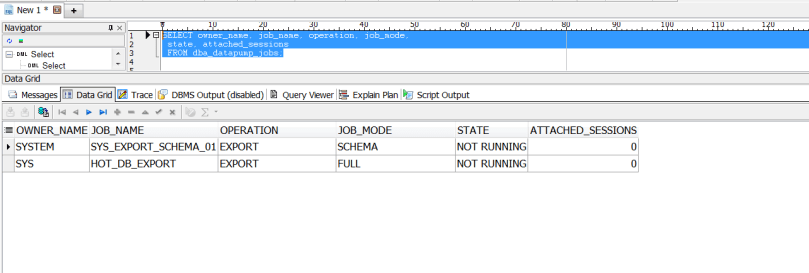
datapump query check

as shown in the above image there is infact an orphan export job.

Then, check that there is no currently running export scheduled script, using the query:

select OWNER_NAME,JOB_NAME,SESSION_TYPE from dba_datapump_sessions;
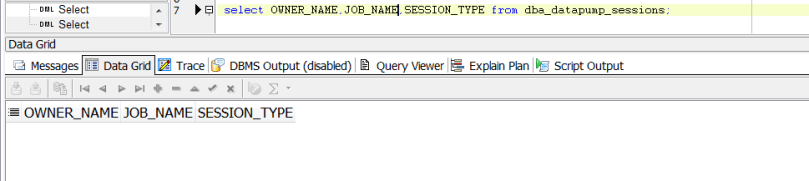
checking if there jobs currently running

as shown in the above, there are no running jobs……..Now Let us go directly to the main solution.

what you need is to drop the Master Oracle Export table, using the commands:

SQL> drop table SYS.HOT_DB_EXPORT;

Table dropped.

SQL> purge table SYS.HOT_DB_EXPORT;

purge table SYS.HOT_DB_EXPORT

*

ERROR at line 1:

ORA-38307: object not in RECYCLE BIN

SQL> purge recyclebin;

Recyclebin purged.

SQL> drop table system.sys_export_schema_01;

Table dropped.

SQL> purge table system.sys_export_schema_01;

purge table system.sys_export_schema_01

*

ERROR at line 1:

ORA-38307: object not in RECYCLE BIN

SQL> purge recyclebin;

Recyclebin purged.

Then try to re-perform the export process and it will be completed successfully.

Hope This Helps…

Cheers!

ORA-24247: network access denied by access control list – (ACL)

part of Oracle Security Implementation is that you can’t only grant an oracle user direct execution privilege on packages such as (UTL_TCP , UTL_SMTP, UTL_MAIL , UTL_HTTP). An access control mechanism is implemented as a second tier security.


if you receive the following error, then you need to configure the ACL:

ERROR MESSAGE: ORA-24247: network access denied by access control list (ACL)

*** SOLUTION:

BEGIN

DBMS_NETWORK_ACL_ADMIN.CREATE_ACL(

    acl => ‘TEST_ACL.xml’,

    description => ‘This Access is used for TEST Application user external mailing services’,

    principal => ‘TEST’,

    is_grant => true,

    privilege => ‘connect’);

COMMIT;

END;

/

**// where TEST_ACL: is the name of the ACL XML file

TEST: is the oracle user //**


BEGIN

  DBMS_NETWORK_ACL_ADMIN.ADD_PRIVILEGE(

    acl => ‘TEST_ACL.xml’,

    principal => ‘TEST’,

    is_grant => true,

    privilege => ‘resolve’);

COMMIT;

END;

/


BEGIN

  DBMS_NETWORK_ACL_ADMIN.ASSIGN_ACL(

    acl => ‘TEST_ACL.xml’,

    host => ‘*’);


   COMMIT;

END;

/

 SQL statement for verification:

select host, lower_port, upper_port, acl from dba_network_acls;

 if you want to drop the ACL:

begin

  dbms_network_acl_admin.drop_acl(

    ‘TEST_ACL.xml’

  );

end;


Exploration of New Features of Oracle 12c – PART 1

Feature No.1 : Invisible Columns


Let us take example of a table as shown below with the following table columns defined.

1

In 12c you can add a new column and set it as “invisible”.


Sql statement: alter table VGCDBA.T_VGC_CAL_EXP add (test_column varchar2(20) invisible);

2

The sql statement using the “describe” command won’t show the invisible column:

3

Set it to “visible again”: alter table VGCDBA.T_VGC_CAL_EXP modify (test_column visible);

4

And after re-excuting the describe again, the column will be shown

5


Feature No.2 : Creating Multiple Indexes on the same column


Before 12cR1 you could not have the ability to create multiple indexes on the same column (or set of columns), now you can do that but it will invisible.


This can be beneficial to test application performance and different queries with affecting the current setup.


Example,


SQL> CREATE BITMAP INDEX VGCDBA.IX_TEST ON VGCDBA.T_VGC_CAL_EXP (TIME_UID)  INVISIBLE;

6

In the below table you can see two indexes on the same column

7

Feature No.3 : enable_ddl_logging


After enabling the ddl loggin, all “ddl statements” will be tracked and written in the alert log.


In my current 12cR1 database the parameter is set to false.

8

SQL> ALTER SYSTEM SET ENABLE_DDL_LOGGING=TRUE;


9

After performing multiple SQL DDL operations using the oracle user “vgcdba”


10

Location of the log can be found here: /oraclex/[db_name]/diag/rdbms/[db_name]/ [db_name]/log/ddl


The below “log.xml” file shows enteries for all DDL statement that has been executed:


11

For Further Refrence:

http://docs.oracle.com/database/121/REFRN/refrn10302.htm

http://www.oracle-base.com/articles/12c/automatic-diagnostics-repository-adr-enhancements-12cR1.php


Feature No.4 : executing SQL statements in RMAN

In 12c you can directly execute SQL & PL/SQL statements in an RMAN session, which gives extra flexibility for the DBA.

sql rman


i will post Part 2 for the new features soooooon 🙂


Thanks,


Oracle Database 12.1.0.2 has been released

Oracle has released Oracle database version 12.1.0.2 and it has many new features, and a major one every body is waiting for (in-memory).

The release is a “full instillation” so no need to install first 12.1.0.1

**other features in the new release are:

  • Improvements to Oracle Multi-tenant
  • Advanced Index Compression
  • Zone Maps
  • Approximate Count Distinct
  • Attribute Clustering
  • Full Database Caching
  • Rapid Home Provisioning

this new “Enterprise Edition” is certified on Linux and Solaris platforms so far.

a very good paper released by Oracle for the new in-memory feature can be found here:

http://www.oracle.com/technetwork/database/in-memory/overview/twp-oracle-database-in-memory-2245633.html

Oracle Blog Reference & instillation link reference:

https://blogs.oracle.com/UPGRADE/entry/oracle_database_12_1_0


as an Oracle DBA Excited  🙂

cheers !