RESOURCE ROLE in ORACLE

the “resource” is a pre-defined oracle database system role that consists of the following permissions:

CREATE CLUSTER
CREATE INDEXTYPE
CREATE OPERATOR
CREATE PROCEDURE
CREATE SEQUENCE
CREATE TABLE
CREATE TRIGGER
CREATE TYPE

starting from Oracle 12cR1 this role doesn’t have “UNLIMITED TABLESPACE” system privilege, which is considered a security enhancement so the database user account won’t have any unlimited access to all tablespaces within the database. The DBA will be required to manually grant the specific tablespace quota to the user.



revoking a tablespace quota from user

to revoke a tablespace quota from an oracle database user, you can use the command as follows:


ALTER USER DB_USER QUOTA 0 ON TABLESPACE_NAME;


where

DB_USER is the oracle database user.

TABLESPACE_NAME is the tablespace name that you want to revoke quota from.


Hope This Helps !   🙂


how to find installed patches in Oracle Database 12c

In oracle database 12c release, you can use the package DBMS_QOPATCH to find information about patches currently applied in your database.


this package can only be executed by “sys” user account.


examples of the package sub-functions used:

DBMS_QOPATCH.GET_OPATCH_DATA (
patchnum IN VARCHAR2);
RETURN XMLYPE;

*.* returns information about Patch ID, patch creation time.

DBMS_QOPATCH.GET_OPATCH_INSTALL_INFO
RETURNS XMLTYPE;

*.* information about th patch and oracle inventory location.

DBMS_QOPATCH.GET_OPATCH_LSINVENTORY
RETURN XMLYPE;

*.* returns full patch inventory in XML format


Also, you can use the query:

SQL> select dbms_qopatch.get_opatch_lsinventory() from dual;


Reference: http://docs.oracle.com/cd/E16655_01/appdev.121/e17602/d_qopatch.htm#ARPLS74923


Oracle Database 12c Administrative System Accounts

in Oracle Database 12c, the following are the list of system administration accounts:

Image


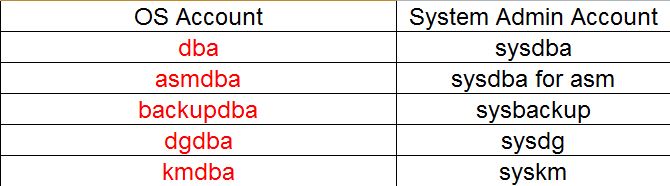
and the following is the list of Operating System Accounts (OS Accounts) and its corresponding Oracle 12c System Admin Accounts:


Image


to view all accounts in your database and their status, use the following query:

SELECT
username
,account_status
,lock_date
,created
FROM dba_users
ORDER BY username;


you can also use this query, from root container in 12c:

SELECT
c.name
,u.username
,u.account_status
,u.lock_date
,u.created
FROM cdb_users u
,v$containers c
WHERE u.con_id = c.con_id
ORDER BY c.name, u.username;


Oracle Database 12c Multitenant Architecture – CDB & PDB

The New Oracle Database release named “12c” is based on Multitenant Architecture. Moreover, you have the option either to upgrade with this architecture with CDB (Container Database) and PDB (Pluggable Databases) OR you can you use the traditional Oracle Database Architecture.

In this article I will talk about the overview of the architecture.

The 12c CDB database will consists of the following major elements:

CDB$ROOT, which has the data dictionary views for the root and all pluggable databases.

PDB$SEED is a template database that a DBA can use to create other databases.

PDB is a pluggable database, which you can have zero,one, or more within a CDB. The maximum number of PDB in one CDB is “252 pluggable databases”. Each pluggable database has “CON_ID” which is a unique container identification.

High level architecture overview:

 Image

CDB level Architecture Image:

 Image

The Following Points will describe different 12c CDB architecture information:

  • Container Database(CDB$ROOT) will host all metadata for all PDB within CDB.


  • Each PDB will have the following tablespaces: SYSTEM, SYSAUX.  TEMP tablespace can be “optionally” created under a PDB, otherwise PDB will use the TEMP tablespace for the root container.


  • In 12c Character Set is set at CDB level, and will be applied to all associated PDB.


  • Using SYS to access root CDB, the DBA can stop/start CDB instance. This is not applicable if connecting to PDB.


  • All pluggable databases use a common UNDO tablespace under root CDB.


  • There is a centralized (common) CDB alert log, so all error/informative messages for each PDB are being written to one common alert log and set of trace files.


Final Remark: what I like about Multitenant Architecture from “Security” perspective is that applications will be deployed on database-level instead of a schema-level which gives you more “data isolation”, freedom of using public synonyms, provisioning, and portability.

In 11g if you use an excessive permission such as “SELECT ANY TABLE” the user can access the data from any schema within the database, which means other applications data. So when you deploy your application on database-level this is not applicable since all objects within the database is primarily owned by your application.


References: http://docs.oracle.com/cd/E16655_01/server.121/e17633/cdbovrvw.htm#CNCPT89340

Oracle Database Initialization File

Oracle initialization file existence is a “mandatory” pre-requisite before starting up the database, otherwise you won’t be able to startup the database.

The initialization file is a configuration file used for example to adjust memory parameters and control file locations.

There are 2 types of initialization files:

  • Server parameter file (spfile)
  • Init.ora text file


The first type (spfile) can be used if you require to change the contents of the file using sql statement (ALTER SYSTEM) command. Also, if you use spfile you can remotely start the database from your client machine.

The second type (init.ora) text file can be edited using OS text editor, and you can add hash comments while performing modifications. I personally prefer using this type of initialization file.

The location of initialization of file is under $ORACLE_HOME/dbs  directory

The init file would like the following:

spfile<SID>.ora       OR    spfile.ora     OR    int<SID>.ora

Where <SID> is the oracle database instance system id

Recommendation:

In 11g and 12c set the memory_target and memory_max_target initialization parameters, this setting will enable automatic memory management.

ORA-00600: internal error code, arguments: [kcratr_nab_less_than_odr], [1], [90], [46191], [46469], [], [], [], [], [], [], []

My Oracle database have crashed for some reason, and while trying to start up:


SQL> startup
ORACLE instance started.

Total System Global Area 7071333376 bytes
Fixed Size 1675792 bytes
Variable Size 829809390 bytes
Database Buffers 431527320 bytes
Redo Buffers 4405509 bytes
Database mounted.
ORA-00600: internal error code, arguments: [kcratr_nab_less_than_odr], [1],
[90], [46191], [46469], [], [], [], [], [], [], []


Solution:

in order to resolve this you need t perform recovery, per the following steps:

SQL>Startup mount ;

SQL>Show parameter control_files

SQL> select a.member, a.group#, b.status from v$logfile a ,v$log b where a.group#=b.group# and b.status=’CURRENT’ ;

remark: write down the name of the redo logs and their paths…

SQL> Shutdown abort ;

remark:Take a OS Level backup of the controlfiles in different directory

SQL> Startup mount ;

SQL> recover database using backup controlfile until cancel ;

Remark: Enter location of redo logs (refer to the query where you have wrote down the location of redologs),then hit ‘Enter’

SQL> Alter database open resetlogs ;


ORA-08103: object no longer exists while revoking DBA privilege from user

while revoking “DBA” role from an Oracle users, i faced the following error:

SQL> revoke DBA from oracle_user;

ORA-08103: object no longer exists

Image


you have 2 methods to resolve this issue:

METHOD I :

  • create a new tablespace with new “data files”.
  • take a backup of the sql definition of the schema user.
  • use the data pump utility (expdp) to export the schema’s data.
  • drop the user schema.
  • drop the tablespace with the datafiles using the sql command:
  • DROP TABLESPACE TS_EMAPLOYEE_DATA INCLUDING CONTENTS AND DATAFILES;
  • re-create the tablespace with “NEW” data file(s) and and create the user schema again.
  • import the schema’s data again.


METHOD II:

  • create a new tablespace with new data files.
  • alter user and grant the schema user quota on the new tablespace:
  • alter user emaployee quota unlimited on tablespace ts_employee_data_02;
  • use the “ALTER MOVE” command to move oracle tables and indexes from tablepsace 1 to tablespace 2 (NEW)
  • you may require rebuilding indexes.


Important Remark:

This is faced with legacy databases that have been upgraded over the years from 9i……to 11g due data files header issue.


TDE in Oracle 11g

What is TDE ?

TDE stands for “transparent data encryption”. TDE is part of Oracle Advanced Security Option for Enterprise Edition. Data at rest are encrypted and ONLY authorized users who have access control privilege will read de-crypted data. So, TDE protects your from direct access to the database host server or backup media that has copies of your data files.

TDE Master Key encryption can be managed through Oracle Wallet Manager.

Example of column data encryption:

The following table will be created with column “salary_information”

SQL> create table EMPLOYEE.EMPLOYEE_INFORMATION(first_name varchar2(20),last_name varchar2(30), EMPLOYEE_ID char(18), salary_information number(10,2) ENCRYPT using ‘AES256’ NO SALT);


For Tablespace Encryption:

  • You cannot encrypt an existing tablespace.
  • You can use” Data Pump” method OR “alter table move” to move data to newly encrypted tablespace.


Example of creating encrypted tablespace :

CREATE TABLESPACE tablespace_new

DATAFILE  ‘/app/oracle/oradata/tablespace2.ORA’  SIZE 200M

ENCRYPTION USING ‘AES25’ DEFAULT STORAGE (ENCRYPT);