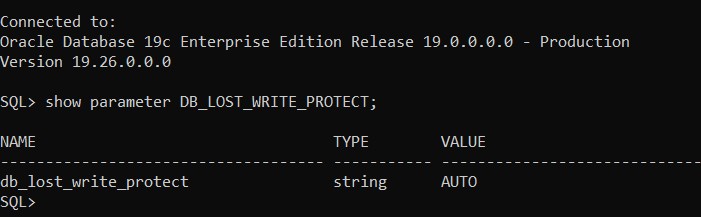
In Oracle January 2025 RU patches, a new and good change has been introduced. The default parameter DB_LOST_WRITE_PROTECT value changed from none to “AUTO” after applying the RU. This is a good move to ensure data protection and detecting problems early. I have talked about database lost write issue in an old blog post: https://geodatamaster.com/2020/09/04/oracle-database-lost-write-detection-recovery-options/
First create a database account called “vector” in FREEPDB1 pluggable database as follows:
SQL> CREATE USER VECTOR IDENTIFIED BY VECTOR123
DEFAULT TABLESPACE “USERS”
TEMPORARY TABLESPACE “TEMP”;
GRANT “DB_DEVELOPER_ROLE” TO “VECTOR”;
ALTER USER “VECTOR” DEFAULT ROLE ALL;
ALTER USER “VECTOR” QUOTA UNLIMITED ON USERS;
Starting in oracle 23ai you can define vector data type column in different ways:
23ai > sqlplus “vector/vector123″@FREEPDB1
SQL> create table t1 (v vector);
Table created.
SQL> desc t1
Name Null? Type
—————————————– ——– —————————-
V VECTOR(*, *)
The above column data type corresponds to —-> VECTOR(*, *) which means embedding vector data will be aribitary in terms of dimension and data type.
SQL> create table t2 (v vector(235,*));
Table created.
SQL> desc t2;
Name Null? Type
—————————————– ——– —————————-
V VECTOR(235, *)
The above means acceppted vector data must have 235 dimensions with arbitary data type.
SQL> create table t3 (v vector(444,int8));
Table created.
SQL> desc t3
Name Null? Type
—————————————– ——– —————————-
V VECTOR(444, INT8)
The above means acceppted vector data must have 444 dimensions with data type of INT8. Accepted data types for vector data are (INT8, FLOAT32,FLOAT64), worth stating that FLOAT32 is the default data type if format is not specified.
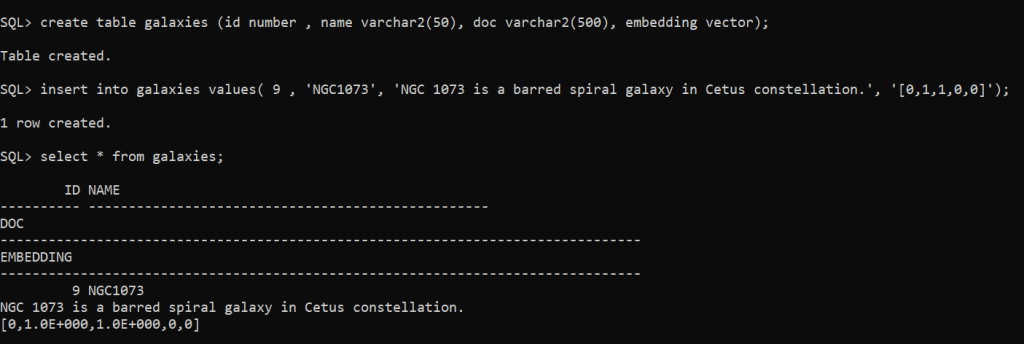
SQL> create table galaxies (id number , name varchar2(50), doc varchar2(500), embedding vector);
Table created.
SQL> insert into galaxies values( 9 , ‘NGC1073’, ‘NGC 1073 is a barred spiral galaxy in Cetus constellation.’, ‘[0,1,1,0,0]’);
1 row created.
SQL> commit;
Important Remark: restrictions with VECTOR column data type:
Can’t be used with external tables, IOTs, cluster tables, global temporary tables, primar key, foreing key, unique constraint,….etc.
Of course you can add multiple vector data type columns on the same table, no restriction is imposed on having multiple columns with vector data type.
The maximum number of dimensions a vector data type can have is 65,536.
In one of the environments (19c) after successfully applying Oracle patches at binary level, the following error was thrown when datapatch command was executed:
Error: prereq checks failed! patch XXXX: XML descriptor does not exist in either the file system or SQL registry Prereq check failed, exiting without installing any patches.
Please refer to MOS Note 1609718.1 and/or the invocation log /opt/oracle/cfgtoollogs/sqlpatch/sqlpatch_16524_2025_01_31_14_35_22/sqlpatch_invocation.log for information on how to resolve the above errors.
so the tool was searching for an old patch that doesn’t exist anymore under $ORACLE_HOME/sqlpatch directory.
— Possible Solutions:
Possible solution 1: if the patch number XXXX is related to old java patch, then apply latest OJVM patch…you can execute the following command to check: $ORACLE_HOME/OPatch/opatch lspatches
Possible solution 2: copy the missing patch folder from another database environment to this environment (the environment you are facing the error) , under this folder: $ORACLE_HOME/sqlpatch
very useful new feature in Oracle 23ai is the ability to insert multiple row values in one shot, unlike older releases where you need to repeat the SQL command multiple times for each row insertion.
To illustrate:
create table sh1.dummy (fname varchar2(20));
insert into sh1.dummy values (’emad’), (‘ricardo’), (‘john’);
By default in Linux operating systems especially (red hat, oracle linux) Transparent Huge Pages are enabled by default.
Per Oracle recommendation Transparent HugePages are known to cause unexpected node reboots and performance problems. So, its strongly recommended to disable Transparent HugePages on all Database servers running Oracle.
*** UPDATE AUGUST 2025: Oracle strategy has changed and now they are recommending to set Transparent HugePages to madvise
To check your current operating system configuration:
Now, THP is disabled after verifying this by running the above cat command and your database environment will be running in the best and recommended performance setup.
In Oracle container database architecture when you connect by default using bequeath protocol as SYSDBA you will connect against CDB$ROOT.
Is there a way to connect directly to a pluggable database as SYSDBA ?
Yes,
export ORACLE_PDB_SID=PDB3 sqlplus / as sysdba
as shown below:
In the past I used to switch to a pluggable database after accessing CDB$ROOT :
sqlplus / as sysdba
SQL> alter session set container=PDB3;
so no need for that with environment variable ORACLE_PDB_SID which will help a lot if you want to develop shell scripts to run against specific databases within the container.
There is an Oracle database parameter filesystemio_options that I found out most DBA’s are not aware of. First, this parameter can be used if your environment is NOT based on ASM setup.
In default behaviour…In buffered I/O, the Operating System maintains its own cache of disk data. Rather than directly reading to or writing from a process buffer, data is read from the disk into the cache and copied to the process buffer or copied from the process into the cache and written from there to the disk. Moreover, read requests are processed through cached data without having to read it again from the disk and can prefetch data from the disk into the cache before processes request it, speeding reads for data.
The catch here is that Oracle database system is already has in-place buffer cache for (read,write) to disk operations, so there will be “double” operations going on from DB & OS and will cause CPU performance overhead. However, direct IO will bypass the double buffering overhead.
Add the following parameter in init.ora and re-start the database instance:
filesystemio_options=setall
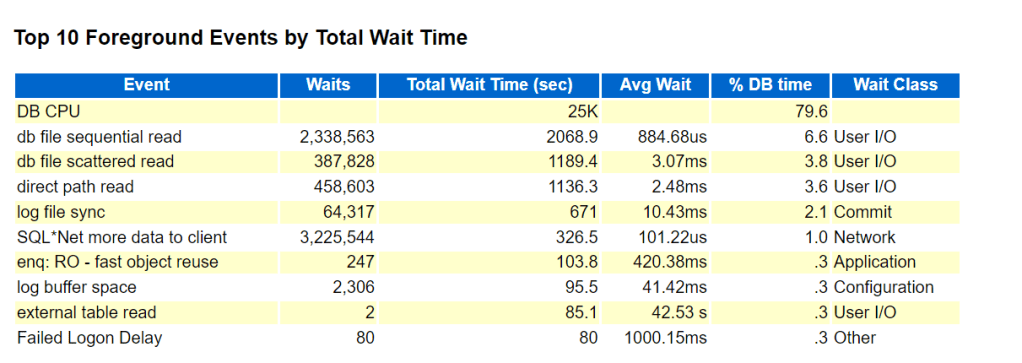
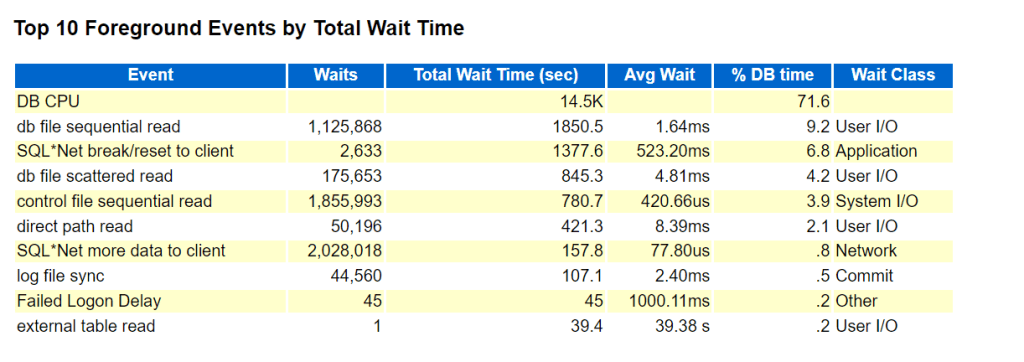
To observe the performance boost, generate AWR report before setting the parameter ( period of 1 week) and compare it after setting the parameter for 1 week report generation…..and the findings:
BEFORE PARAMETER SET:
AFTER PARAMETER SET:
DB CPU, db file sequential read, direct path read wait events are drastically improved as shown in BEFORE/AFTER figures.
A virtual private database (VPD) is a security feature that masks data so that only a subset of the data appears to exist, without actually segregating data into different tables, schemas or databases.
Whenever a SQL query is executed, the relevant predicates for the involved tables are transparently collected and query results are returned with “filtered” rows based on database account session context.
By Default “DBA”role is not granted EXEMPT ACCESS POLICY system privilege.
In 19c the following are granted EXEMPT ACCESS POLICY system privilege :
SQL> select * from dba_sys_privs where privilege like ‘%EXEMPT ACCESS POLICY%’;
In 23ai the following are granted EXEMPT ACCESS POLICY system privilege:
// Important Note: in 23ai you can’t define DBMS_RLS policy using sysadmin_vpd account, you can do that in 23ai using SYS account only….if you try in 23ai execute the below package an error [ORA-01031: insufficient privileges] will be thrown:




 Geodata Master