ORA-01693: max # extents (120) reached in lob segment

one of the developers have faced the below error in his application:

ORA-01693: max # extents (120) reached in lob segment SCHEMA1.SYS_LOB0000377024C00009

This error is caused by the LOB segment ran out of database space.

To resolve this:

first, make sure that your tablespace of schema1 is sufficient enough.

Second, use the below query to find out more information about the segment:

select SEGMENT_NAME, SEGMENT_TYPE, MAX_EXTENTS
from dba_segments
where segment_name = ‘SYS_LOB0000705396C00006$$’;

Final step: increase the “maxextent” for the lob segment by using the below command:

SQL> ALTER TABLE  SCHEMA1.T_INCIDENT_REPORT

MODIFY LOB (ATTACH_DOC) (STORAGE (MAXEXTENTS UNLIMITED));

Remark: “ATTACH_DOC”  is the column in the table that is stored in “LOB” format.

Hope This will help.

Regards,

Emad

ORA-31633: unable to create master table while performing expdp operation

Problem description:

while performing an export datapump operation on Oracle 11g database i have faced the below error:

Export: Release 11.2.0.3.0 – Production on Thu Sep 4 07:17:58 2014

Copyright (c) 1982, 2011, Oracle and/or its affiliates.  All rights reserved.

Connected to: Oracle Database 11g Enterprise Edition Release 11.2.0.3.0 – 64bit Production

With the Partitioning, OLAP, Data Mining and Real Application Testing options

ORA-31626: job does not exist

ORA-31633: unable to create master table “SYS.HOT_DB_EXPORT”

ORA-06512: at “SYS.DBMS_SYS_ERROR”, line 95

ORA-06512: at “SYS.KUPV$FT”, line 1020

ORA-00955: name is already used by an existing object

Solution:

this means there are orphan datapump job export hanging & not running.

use this query first to check:

SELECT owner_name, job_name, operation, job_mode,

state, attached_sessions

FROM dba_datapump_jobs;
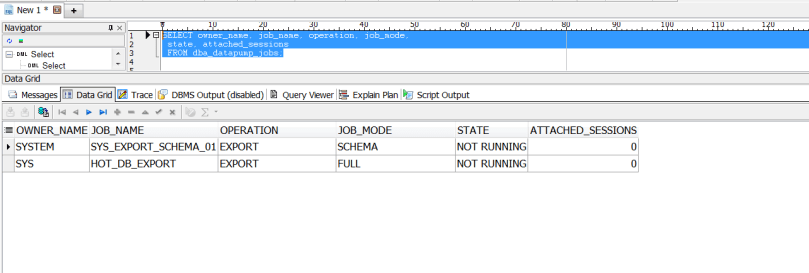
datapump query check

as shown in the above image there is infact an orphan export job.

Then, check that there is no currently running export scheduled script, using the query:

select OWNER_NAME,JOB_NAME,SESSION_TYPE from dba_datapump_sessions;
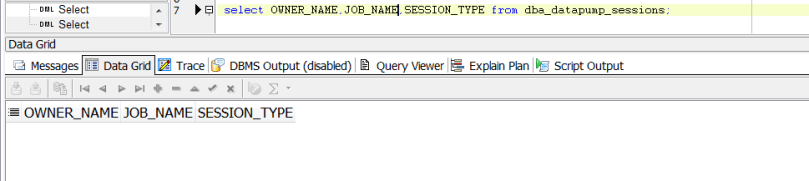
checking if there jobs currently running

as shown in the above, there are no running jobs……..Now Let us go directly to the main solution.

what you need is to drop the Master Oracle Export table, using the commands:

SQL> drop table SYS.HOT_DB_EXPORT;

Table dropped.

SQL> purge table SYS.HOT_DB_EXPORT;

purge table SYS.HOT_DB_EXPORT

*

ERROR at line 1:

ORA-38307: object not in RECYCLE BIN

SQL> purge recyclebin;

Recyclebin purged.

SQL> drop table system.sys_export_schema_01;

Table dropped.

SQL> purge table system.sys_export_schema_01;

purge table system.sys_export_schema_01

*

ERROR at line 1:

ORA-38307: object not in RECYCLE BIN

SQL> purge recyclebin;

Recyclebin purged.

Then try to re-perform the export process and it will be completed successfully.

Hope This Helps…

Cheers!

Exploration of New Features of Oracle 12c – PART 1

Feature No.1 : Invisible Columns


Let us take example of a table as shown below with the following table columns defined.

1

In 12c you can add a new column and set it as “invisible”.


Sql statement: alter table VGCDBA.T_VGC_CAL_EXP add (test_column varchar2(20) invisible);

2

The sql statement using the “describe” command won’t show the invisible column:

3

Set it to “visible again”: alter table VGCDBA.T_VGC_CAL_EXP modify (test_column visible);

4

And after re-excuting the describe again, the column will be shown

5


Feature No.2 : Creating Multiple Indexes on the same column


Before 12cR1 you could not have the ability to create multiple indexes on the same column (or set of columns), now you can do that but it will invisible.


This can be beneficial to test application performance and different queries with affecting the current setup.


Example,


SQL> CREATE BITMAP INDEX VGCDBA.IX_TEST ON VGCDBA.T_VGC_CAL_EXP (TIME_UID)  INVISIBLE;

6

In the below table you can see two indexes on the same column

7

Feature No.3 : enable_ddl_logging


After enabling the ddl loggin, all “ddl statements” will be tracked and written in the alert log.


In my current 12cR1 database the parameter is set to false.

8

SQL> ALTER SYSTEM SET ENABLE_DDL_LOGGING=TRUE;


9

After performing multiple SQL DDL operations using the oracle user “vgcdba”


10

Location of the log can be found here: /oraclex/[db_name]/diag/rdbms/[db_name]/ [db_name]/log/ddl


The below “log.xml” file shows enteries for all DDL statement that has been executed:


11

For Further Refrence:

http://docs.oracle.com/database/121/REFRN/refrn10302.htm

http://www.oracle-base.com/articles/12c/automatic-diagnostics-repository-adr-enhancements-12cR1.php


Feature No.4 : executing SQL statements in RMAN

In 12c you can directly execute SQL & PL/SQL statements in an RMAN session, which gives extra flexibility for the DBA.

sql rman


i will post Part 2 for the new features soooooon 🙂


Thanks,


Oracle Database 12.1.0.2 has been released

Oracle has released Oracle database version 12.1.0.2 and it has many new features, and a major one every body is waiting for (in-memory).

The release is a “full instillation” so no need to install first 12.1.0.1

**other features in the new release are:

  • Improvements to Oracle Multi-tenant
  • Advanced Index Compression
  • Zone Maps
  • Approximate Count Distinct
  • Attribute Clustering
  • Full Database Caching
  • Rapid Home Provisioning

this new “Enterprise Edition” is certified on Linux and Solaris platforms so far.

a very good paper released by Oracle for the new in-memory feature can be found here:

http://www.oracle.com/technetwork/database/in-memory/overview/twp-oracle-database-in-memory-2245633.html

Oracle Blog Reference & instillation link reference:

https://blogs.oracle.com/UPGRADE/entry/oracle_database_12_1_0


as an Oracle DBA Excited  🙂

cheers !

Scheduling Python arcpy script in windows task scheduler

The following steps illustrates how to schedule a python script in windows server task scheduler….this can also be applied to any other scripts if applicable:


1. create a new task

1

2.  under “General” tab setup the general task scheduler description & properties as shown below

2


3. under “triggers” tab schedule the specific time for the execution of the script

3


4.  under the “Actions” tab under the program/script section you should reference the python script.

under add arguments (option) you should reference the location of your arcgis desktop python libraries.

4


5.  under “conditions” tab

5


6. under “settings” tab:

6


ORA-00832: no streams pool created and cannot automatically create one / stream pool and expdp

if you face the following error while performing a datapump export operations:

Connected to: Oracle Database 10g Enterprise Edition Release 10.2.0.5.0 – Produc
tion
With the Partitioning, OLAP, Data Mining and Real Application Testing options
ORA-31626: job does not exist
ORA-31637: cannot create job SYS_EXPORT_SCHEMA_01 for user SYSTEM
ORA-06512: at “SYS.DBMS_SYS_ERROR”, line 95
ORA-06512: at “SYS.KUPV$FT_INT”, line 672
ORA-39080: failed to create queues “KUPC$C_1_20140711224328” and “KUPC$S_1_20140
711224328″ for Data Pump job
ORA-06512: at “SYS.DBMS_SYS_ERROR”, line 95
ORA-06512: at “SYS.KUPC$QUE_INT”, line 1606
ORA-00832: no streams pool created and cannot automatically create one

Solution:

check the current sizing of your shared_pool_size, by using the following command:

SQL> show parameter shared_pool_size 

10% of the value of the shared pool size will be assigned to the streams pool (also, buffer cache size will be reduced) 

So, alter the value using the command:

SQL> alter system set streams_pool_size = (10%of shared pool size) scope = spfile;

and then try use expdp command again….

*********EXPLANATION*******

Oracle DataPump utility which is frequently used by many Database Administrators will in fact be using “Streams Pool”, this stream pool size will be assigned 10% of the size of the shared pool and will reduce the amount of the buffer cache.
To avoid reduction of other memory structures sizes (shared pool,buffer cache) you need to configure the streams_pool_size with proper value as Data Pump operations will use streams !!!

if, sga_target is equal to zero then SGA is not auto-tuned

SQL> show parameter sga_target

NAME TYPE VALUE
———————————— ———– —–
sga_target big integer 0

so, its better to set a value for the SGA to be automatically tuned.


Unable to create logfile system tables. User perhaps lacks permissions or resources to create tables

while performing an editing session in ArcMap, you may receive the following error message:

Unable to create logfile system tables. User perhaps lacks permissions or resources to create tables


solution:

Your ArcSDE Geodatabase is configured for a “standalone log file architecture”.

for more information:http://resources.arcgis.com/en/help/main/10.2/index.html#/Log_file_table_configuration_options_for_geodatabases_in_Oracle/002n00000014000000/

use the “sdeconfig” command to list the parameters or the server_config system table under your SDE schema.

The user will require the following permissions granted to him:

CREATE SESSION
CREATE TABLE
CREATE TRIGGER
CREATE SEQUENCE
CREATE PROCEDURE


cheers!


ora-04021 timeout occurred while waiting to lock object package

Problem Description:


While trying to re-create an Oracle Package, the execution took long time and finally the following error was thrown:

ora-04021 timeout occurred while waiting to lock object


Resolution:


This means that the package is being locked by another user.


To figure out the session that is locking the user, use the following queries:


select * from v$access where OWNER=’schema_account’ and OBJECT=’database_object_name’;


//take the ‘SID’ from the previous query and search for more details about the session with v$session


select * from v$session where SID=XX;

//where XX is the number found in the v$access query


These sessions can be killed using the command:


SQL> ALTER SYSTEM KILL SESSION ‘sid,serial#’;


Then try to re-create the package and boooooom……package re-created 😉


Cheers!

ORA-29877: failed in the execution of the ODCIINDEXUPDATE routine ORA-20085: Insert Spatial Reference SRID 4326 does not match SDE.GDB_ITEMS.SHAPE registered Spatial Reference SRID 0 ORA-06512: in “SDE.ST_DOMAIN_METHODS”, line 2000

While trying to re-name a field in a layer in my ArcGIS 10.2 Enterprise Geodatabase hosted in Oracle Database, I faced the below error:

ORA-29877: failed in the execution of the ODCIINDEXUPDATE routine 
ORA-20085: Insert Spatial Reference SRID 4326 does not match 
SDE.GDB_ITEMS.SHAPE registered Spatial Reference SRID 0 
ORA-06512: in “SDE.ST_DOMAIN_METHODS”, line 2000 
ORA-06512: in “SDE.ST_DOMAIN_METHODS”, line 2372

error bug message

This error is related to ESRI bug NIM099594

Resolution:

SQL> SELECT index_name FROM user_ind_columns WHERE table_name = ‘GDB_ITEMS’ and column_name = ‘SHAPE’;

The Previous query will list for you the index associated with GDB_ITEMS table.


sql query to find the index related to GDB_ITEMS table


Then use the “drop” command to drop the index

SQL> DROP INDEX A8709_IX1;

Index dropped


For More information about this bug, check the following link resources:

http://support.esri.com/en/knowledgebase/techarticles/detail/42335

http://support.esri.com/en/bugs/nimbus/TklNMDk5NTk0


ORA-04063: package body “SYS.DBMS_DATAPUMP” has errors ORA-06508: PL/SQL: could not find program unit being called: “SYS.DBMS_DATAPUMP” ORA-06512: at line 6

if you face an error like the following:

ORA-04063: package body “SYS.DBMS_DATAPUMP” has errors
ORA-06508: PL/SQL: could not find program unit being called: “SYS.DBMS_DATAPUMP”
ORA-06512: at line 6

Solution:

SQL> select comp_id, comp_name, version, status from dba_registry;
 
if, there are invalid components then use utilrp to recompile all objects within your database:
 
SQL> @?/rdbms/admin/utlrp.sql
 
 
//——— another way is to manually check what is the problem:
 
SQL> alter package SYS.DBMS_DATAPUMP compile body;
 
SQL> show errors
 
** if the previous command doesn’t list the errors you can use the following query:
 
SQL> select * from dba_errors where OWNER=’SYS’ and NAME=’DBMS_DATAPUMP’;


Hope this helps……

Cheers !