How to Create ArcSDE Connection – Application Server (ArcGIS 10.1)

arcsdegeo's avatarGeodata Master

starting with ArcGIS 10.1 , the default connection to the geodatabase is (Direct Connection), which means directly connecting to the database without the need to connect to ArcSDE as an application server anymore (3-tier architecture). The ArcSDE libraries are already part of the ArcGIS Desktop software which means you can directly connect from Desktop the Enterprise Geodatabase (2-tier architecture).

I think this why ESRI are gradually shifting the name from ArcSDE Geodatabase, to Enterprise Geodatabase.

as you may know there are 3 types of Geodatabases provided by ESRI: File Geodatabase, Personal Geodatabase, and Enterprise Geodatabase.

To Create an ArcSDE Application Server Connection in ArcGIS Desktop 10.1:

1.in the search tool in ArcCatalog, search the word “ArcSDE“.

2.choose ‘Create ArcSDE Connection File (Data Management)(Tool)‘.

Image

3.you will find a GUI interface that have different fields to be filled.

for example:

ArcSDE Connection File Location:

View original post 71 more words

How to Create ArcSDE Connection – Application Server (ArcGIS 10.1)

starting with ArcGIS 10.1 , the default connection to the geodatabase is (Direct Connection), which means directly connecting to the database without the need to connect to ArcSDE as an application server anymore (3-tier architecture). The ArcSDE libraries are already part of the ArcGIS Desktop software which means you can directly connect from Desktop the Enterprise Geodatabase (2-tier architecture).

I think this why ESRI are gradually shifting the name from ArcSDE Geodatabase, to Enterprise Geodatabase.

as you may know there are 3 types of Geodatabases provided by ESRI: File Geodatabase, Personal Geodatabase, and Enterprise Geodatabase.

To Create an ArcSDE Application Server Connection in ArcGIS Desktop 10.1:

1.in the search tool in ArcCatalog, search the word “ArcSDE“.

2.choose ‘Create ArcSDE Connection File (Data Management)(Tool)‘.

Image

3.you will find a GUI interface that have different fields to be filled.

for example:

ArcSDE Connection File Location: is the file directory path on your local PC where ArcCatalog 10.1 SDE Connection Files are stored in.

ArcSDE Connection File Name: a name your propose for your geodatabase connection, usually ends with ‘.sde’ extension.

Server: is the server name where your Database is installed on.

Service: is your ArcSDE Application Server Port Number.

Username: is the Oracle Account name (already exists in your DBMS).
Password: password of your account.

Image


ArcSDE Performance Troubleshooting (SDEINTERCEPT)

if you are facing connection performance issue for your ArcSDE Geodatabase, there is a mechanism to perform troubleshooting using SDEINTERCEPT.

To configure the SDEINTERCEPT either you set it up on the server side if you are using ArcSDE as an application server. If you are using Direct-Connection then use the SDEINTERCEPT on the client machine where ArcGIS Desktop is installed.

the following example, shows you to set the environment variables on UNIX environment (C SHELL), for an ArcSDE application server Architecture (3-tier):

setenv SDEINTERCEPT crwtf
setenv SDEINTERCEPTLOC /apps/arcsde/

For direct connection, you need to add the parameters in your windows registry.


For More Detailed Information, use this ESRI reference documentation: http://support.esri.com/en/knowledgebase/techarticles/detail/35704

SAP HANA and ESRI ArcGIS

The famous SAP HANA “in-memory” database has partnered with ESRI to provide integration platform between ESRI ArcGIS platform and HANA.


This will enable the powerful power of in-memory database for Spatial Data, and adding Location based analysis for SAP systems. Moreover, this will also improve the analytic part based on “columnar spatial processing”.

Source Link: http://www.directionsmag.com/articles/sap-hana-delivers-advanced-geospatial-analytics-and-access-to-esris-ar/342944

Oracle 12c in-memory database option

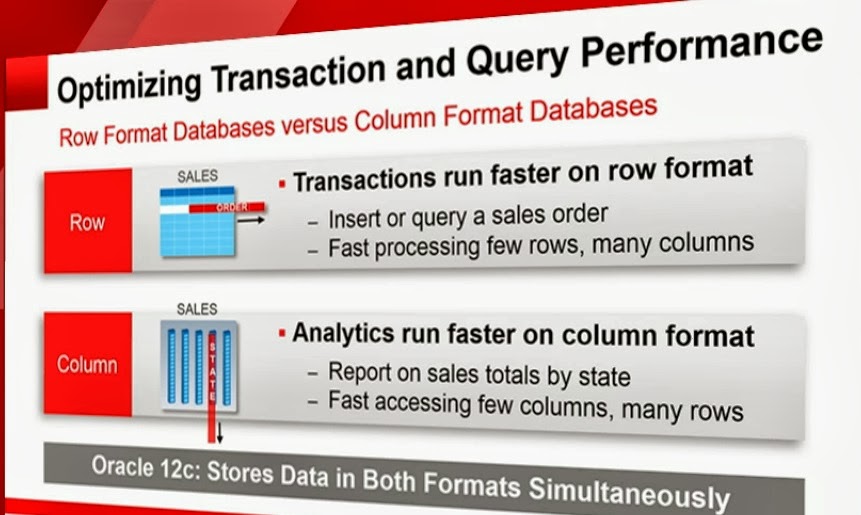
Larry Ellison announced in “Oracle Open World 2013” that in 12c database version and optional feature for “in-memory” is added for big data analytic. This will accelerate performance dramatically.

According to Ellison there is no need to do any data migration or application (in-house or off the shelf) changes.

Oracle is trying to compete with the successfully commercial in-memory database SAP HANA. SAP were successful in their implementation, and many customers have used the technology. The in-memory database is the future for big data implementation in the enterprises. Other companies like IBM and Microsoft are also catching up and are in the process of developing their own “in-memory” products solutions.

Oracle Official Link can be found here:

http://www.oracle.com/us/corporate/features/database-in-memory-option/index.html


oracle 12c in-memory optimization (transaction and query)

oracle 12c in-memory zero changes required

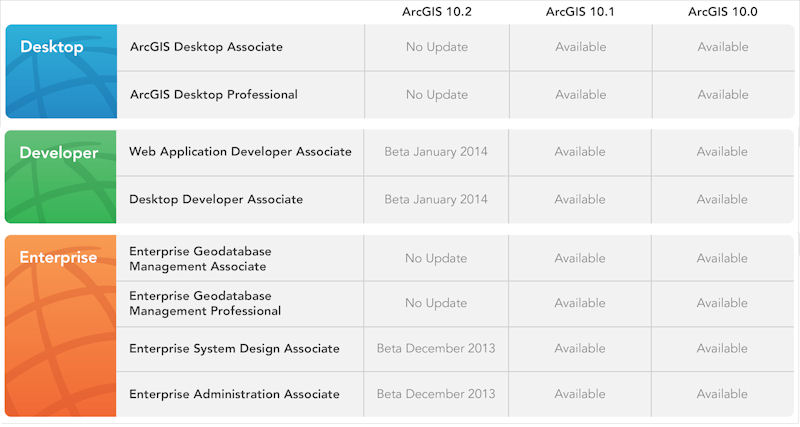
ArcGIS 10.2 online web courses

ArcGIS 10.2 online web courses Esri has started adding ArcGIS 10.2 web courses in their online training website. Esri web courses are very beneficial for people who don’t have the time to take instructor led-courses. these courses can be taken at your time convenience.   Link: http://training.esri.com/gateway/index.cfm?fa=search.results&searchterm=&search=Search&CourseTypeID=1&OrderBy=CourseTitle%20asc&ArcGISVersion=10.2

ArcSDE Geodatabase Maintenance

To do a regular ArcSDE Geodatabase Maintenance, you need to do the following:


  1. Rebuild Indexes (you can use python scripting for ArcGIS 10.1)
  2. Analyze (update statistics) (you can use python scripting for ArcGIS 10.1)
  3. Compress (you can either use ArcCatalog 10.1 , Command Line, or Python)


of course to perform the listed activities you need to have all connections disconnected , which could be a problem if you want to perform maintenance in a “production” environment.

you can schedule these activities either daily or weekly, depends wither your environment is intensive in “editing”, since you will be having a lot of versions.

From practice, ArcSDE Compress will give optimum results when the editors are performing Reconcile and POST and delete their versions. Otherwise, you will not benefit a lot from the compress operation.