The following are the steps in lengthy details for first timers:
The oracle user schema geodatabase (XXXX) should have the following privileges:
GRANT DBA TO XXXX;
GRANT CREATE TYPE TO XXXX;
GRANT CREATE ANY TRIGGER TO XXXX;
GRANT EXECUTE ANY PROCEDURE TO XXXX;
GRANT GRANT ANY ROLE TO XXXX;
GRANT CREATE ANY SEQUENCE TO XXXX;
GRANT CREATE ANY VIEW TO XXXX;
GRANT DROP ANY TABLE TO XXXX;
GRANT DROP ANY PROCEDURE TO XXXX;
GRANT CREATE OPERATOR TO XXXX;
GRANT CREATE ANY PROCEDURE TO XXXX;
GRANT CREATE VIEW TO XXXX;
GRANT ANALYZE ANY TO XXXX;
GRANT CREATE PUBLIC SYNONYM TO XXXX;
GRANT CREATE LIBRARY TO XXXX;
GRANT CREATE PROCEDURE TO XXXX;
GRANT CREATE ANY INDEX TO XXXX;
GRANT GRANT ANY OBJECT PRIVILEGE TO XXXX;
GRANT GRANT ANY PRIVILEGE TO XXXX;
GRANT DROP ANY SEQUENCE TO XXXX;
GRANT CREATE SEQUENCE TO XXXX;
GRANT DROP ANY VIEW TO XXXX;
GRANT DROP PUBLIC SYNONYM TO XXXX;
GRANT ALTER ANY INDEX TO XXXX;
GRANT CREATE ANY TABLE TO XXXX;
GRANT CREATE TABLE TO XXXX;
GRANT ADMINISTER DATABASE TRIGGER TO XXXX;
GRANT CREATE TRIGGER TO XXXX;
GRANT SELECT ANY SEQUENCE TO XXXX;
GRANT DROP ANY INDEX TO XXXX;
GRANT SELECT ANY TABLE TO XXXX;
GRANT ALTER ANY TABLE TO XXXX;
GRANT CREATE SESSION TO XXXX;
GRANT CREATE INDEXTYPE TO XXXX;
GRANT EXECUTE ON SYS.DBMS_LOCK TO SSDGDB;
GRANT EXECUTE ON SYS.DBMS_PIPE TO SSDGDB;
where XXXX is the user schema geodatabase.
you need to export your DBTUNE file and change the parameter DATA_DICTIONARY.
sdedbtune -o export -f DBTUNE_XXX -i 5151 -u sde
after exporting replace the DATA_DICTIONARY section with the following:
##DATA_DICTIONARY
UI_TEXT “”
XML_IDX_INDEX_STRING “PCTFREE 0 INITRANS 4 NOLOGGING”
XML_IDX_INDEX_PK “PCTFREE 0 INITRANS 4 NOLOGGING”
XML_IDX_INDEX_ID “PCTFREE 0 INITRANS 4 NOLOGGING”
XML_IDX_INDEX_DOUBLE “PCTFREE 0 INITRANS 4 NOLOGGING”
XML_DOC_VAL_LOB_STORAGE “NOCACHE NOLOGGING CHUNK 4K PCTVERSION 5 DISABLE STORAGE IN ROW”
XML_DOC_UNCOMPRESSED_TYPE “BLOB”
XML_DOC_TEXT_TYPE “LONGRAW”
XML_DOC_STORAGE “PCTFREE 0 INITRANS 4”
XML_DOC_MODE “COMPRESSED”
XML_DOC_LOB_STORAGE “NOCACHE NOLOGGING CHUNK 4K PCTVERSION 5 DISABLE STORAGE IN ROW”
XML_DOC_INDEX “PCTFREE 0 INITRANS 4 NOLOGGING”
XML_COLUMN_STORAGE “SDE_XML”
S_STORAGE “PCTFREE 10 PCTUSED 90 INITRANS 4 STORAGE (FREELISTS 4 MINEXTENTS 1 PCTINCREASE 0)”
S_INDEX_SP_FID “PCTFREE 10 INITRANS 4 STORAGE (FREELISTS 4 MINEXTENTS 1 PCTINCREASE 0) NOLOGGING”
S_INDEX_ALL “PCTFREE 10 INITRANS 4 STORAGE (FREELISTS 4 MINEXTENTS 1 PCTINCREASE 0) NOLOGGING”
RASTER_STORAGE “BLOB”
RAS_STORAGE “PCTFREE 10 PCTUSED 90 INITRANS 4 STORAGE ( MINEXTENTS 1 MAXEXTENTS UNLIMITED PCTINCREASE 0 FREELISTS 4)”
RAS_INDEX_ID “PCTFREE 10 INITRANS 4 STORAGE ( MINEXTENTS 1 MAXEXTENTS UNLIMITED PCTINCREASE 0 FREELISTS 4) NOLOGGING”
GEOMETRY_STORAGE “SDEBINARY”
F_STORAGE “PCTFREE 10 PCTUSED 90 INITRANS 4 STORAGE (FREELISTS 4 MINEXTENTS 1 PCTINCREASE 0)”
F_INDEX_LEN “PCTFREE 10 INITRANS 4 STORAGE (FREELISTS 4 MINEXTENTS 1 PCTINCREASE 0) NOLOGGING”
F_INDEX_FID “PCTFREE 10 INITRANS 4 STORAGE (FREELISTS 4 MINEXTENTS 1 PCTINCREASE 0) NOLOGGING”
F_INDEX_AREA “PCTFREE 10 INITRANS 4 STORAGE (FREELISTS 4 MINEXTENTS 1 PCTINCREASE 0) NOLOGGING”
D_STORAGE “PCTFREE 10 PCTUSED 90 INITRANS 4 STORAGE (FREELISTS 4 MINEXTENTS 1 PCTINCREASE 0)”
D_INDEX_STATE_ROWID “PCTFREE 10 INITRANS 4 STORAGE (FREELISTS 4 MINEXTENTS 1 PCTINCREASE 0) NOLOGGING”
D_INDEX_DELETED_AT “PCTFREE 10 INITRANS 4 STORAGE (FREELISTS 4 MINEXTENTS 1 PCTINCREASE 0) NOLOGGING”
BND_STORAGE “PCTFREE 10 PCTUSED 90 INITRANS 4 STORAGE ( MINEXTENTS 1 MAXEXTENTS UNLIMITED PCTINCREASE 0 FREELISTS 4)”
BND_INDEX_ID “PCTFREE 10 INITRANS 4 STORAGE ( MINEXTENTS 1 MAXEXTENTS UNLIMITED PCTINCREASE 0 FREELISTS 4) NOLOGGING”
BND_INDEX_COMPOSITE “PCTFREE 10 INITRANS 4 STORAGE ( MINEXTENTS 1 MAXEXTENTS UNLIMITED PCTINCREASE 0 FREELISTS 4) NOLOGGING”
BLK_STORAGE “PCTFREE 10 PCTUSED 90 INITRANS 4 STORAGE ( MINEXTENTS 1 MAXEXTENTS UNLIMITED PCTINCREASE 0 FREELISTS 4)”
BLK_INDEX_COMPOSITE “PCTFREE 10 INITRANS 4 STORAGE ( MINEXTENTS 1 MAXEXTENTS UNLIMITED PCTINCREASE 0 FREELISTS 4) NOLOGGING”
B_INDEX_XML “PCTFREE 0 INITRANS 4 NOLOGGING”
B_INDEX_TO_DATE “PCTFREE 0 INITRANS 4 NOLOGGING”
B_INDEX_SHAPE “PCTFREE 10 INITRANS 4 STORAGE (FREELISTS 4 MINEXTENTS 1 PCTINCREASE 0) NOLOGGING”
B_INDEX_RASTER “PCTFREE 0 INITRANS 4 NOLOGGING”
AUX_STORAGE “PCTFREE 10 PCTUSED 90 INITRANS 4 STORAGE ( MINEXTENTS 1 MAXEXTENTS UNLIMITED PCTINCREASE 0 FREELISTS 4)”
AUX_INDEX_COMPOSITE “PCTFREE 10 INITRANS 4 STORAGE ( MINEXTENTS 1 MAXEXTENTS UNLIMITED PCTINCREASE 0 FREELISTS 4) NOLOGGING”
A_STORAGE “PCTFREE 10 PCTUSED 90 INITRANS 4 STORAGE (FREELISTS 4 MINEXTENTS 1 PCTINCREASE 0)”
A_INDEX_XML “PCTFREE 0 INITRANS 4 NOLOGGING”
A_INDEX_USER “PCTFREE 10 INITRANS 4 STORAGE (FREELISTS 4 MINEXTENTS 1 PCTINCREASE 0) NOLOGGING”
A_INDEX_STATEID “PCTFREE 10 INITRANS 4 STORAGE (FREELISTS 4 MINEXTENTS 1 PCTINCREASE 0) NOLOGGING”
A_INDEX_SHAPE “PCTFREE 10 INITRANS 4 STORAGE (FREELISTS 4 MINEXTENTS 1 PCTINCREASE 0) NOLOGGING”
A_INDEX_ROWID “PCTFREE 10 INITRANS 4 STORAGE (FREELISTS 4 MINEXTENTS 1 PCTINCREASE 0) NOLOGGING”
A_INDEX_RASTER “PCTFREE 0 INITRANS 4 NOLOGGING”
ATTRIBUTE_BINARY “BLOB”
MVTABLES_MODIFIED_INDEX “INITRANS 4 TABLESPACE SDE STORAGE (INITIAL 2M) NOLOGGING “
VERSIONS_INDEX “INITRANS 4 TABLESPACE SDE STORAGE (INITIAL 128K) NOLOGGING “
VERSIONS_TABLE “INITRANS 4 TABLESPACE SDE STORAGE (INITIAL 256K) “
STATES_TABLE “INITRANS 4 TABLESPACE SDE STORAGE (INITIAL 1M) “
STATE_LINEAGES_INDEX “PCTFREE 0 INITRANS 4 TABLESPACE SDE STORAGE (INITIAL 5M) NOLOGGING “
B_INDEX_USER “PCTFREE 0 INITRANS 4 TABLESPACE SDE STORAGE (INITIAL 40K) NOLOGGING “
B_STORAGE “PCTFREE 0 INITRANS 4 TABLESPACE SDE STORAGE (INITIAL 40K) “
XMLDB_INDEX_TAG “YES”
XMLDB_INDEX_FULLTEXT “NO”
XML_IDX_TEXT_UPDATE_METHOD “NONE”
XML_IDX_TEXT_UPDATE_MEMORY “”
XML_IDX_TEXT_TAG_STORAGE “”
XML_IDX_STORAGE “PCTFREE 0 INITRANS 4”
XML_IDX_INDEX_TEXT “”
XML_IDX_INDEX_TAG “PCTFREE 0 INITRANS 4 NOLOGGING”
XML_INDEX_TAGS_INDEX “INITRANS 5 TABLESPACE SDE STORAGE (INITIAL 1M) “
XML_INDEX_TAGS_TABLE “INITRANS 4 TABLESPACE SDE STORAGE (INITIAL 1M) “
MVTABLES_MODIFIED_TABLE “INITRANS 4 TABLESPACE SDE STORAGE (INITIAL 2M) “
STATES_INDEX “INITRANS 5 TABLESPACE SDE STORAGE (INITIAL 128K) NOLOGGING “
STATE_LINEAGES_TABLE “PCTFREE 0 INITRANS 4 TABLESPACE SDE STORAGE (INITIAL 7M) “
B_INDEX_ROWID “PCTFREE 0 INITRANS 4 TABLESPACE SDE STORAGE (INITIAL 40K) NOLOGGING “
END
Then Import the DBTUNE file again:
sdedbtune -o import -f DBTUNE_XXX -i 5151 -u sde
after that you can proceed with executing the sdesetup command to create the user schema geodatabse:
sdesetup –o install –d ORACLE11G –u XXXX –i 5151:XXXX
Where XXXX: is the schema geodatabase name
Then Execute the following SDE Command:
sdesetup –o install –d ORACLE11G –u XXXX –i 5151:XXXX
XXXX: is your user schema geodatabase
Notes:
If for some reason the geodatabase was not successfully created. You can deleted it using:
sdesetup -o delete -d ORACLE11G -u XXXX -i 5151:XXXX
You Need to check under your SDE Schema that the system table “INSTANCE” has a new entry with your new user schema geodatabase “XXXX”.
Also you need to check under the newly created user schema geodatbase “XXXX” that in the system table “VERSIONS” has an entry:
NAME – OWNER – VERSION_ID – STATUS – STATE_ID – DESCRIPTION
DEFAULT XXXX 1 1 0 Instance default version.
The new schema’s created under the user schema geodatabase should be created using “SDE” user. you can grant the schema the following privileges:
GRANT RESOURCE TO “schema”
ALTER USER “schema”DEFAULT ROLE ALL;
GRANT CREATE TABLE TO “schema”;
GRANT CREATE SESSION TO “schema”;
you can create multiple schemas under your user schema geodatbase, and those will be isolated from the master SDE schema geodatabase. if you look under “TABLE_REGISTRY” in your user schema geodatbase you will find only the tables and objects you have created under the schema user geodatabase.
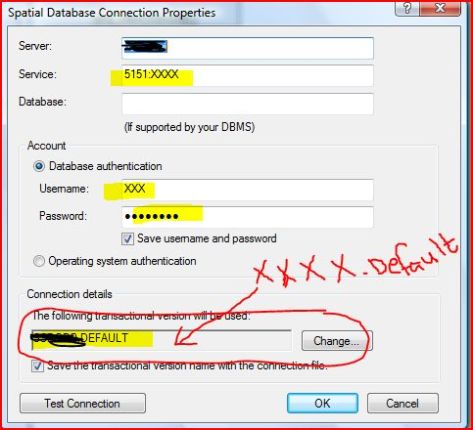
The below image shows how to connect in ArcCatalog 10.0 for user schema geodatabase:
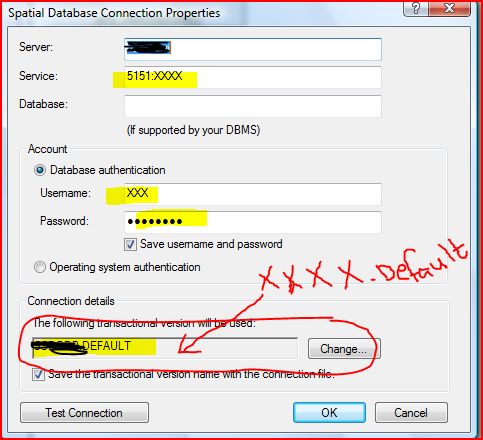
For ArcCatalog 10.2 the connection is described in this link:
http://resources.arcgis.com/en/help/main/10.2/index.html#//002n00000031000000
 Geodata Master