Overcoming Blocking & Locking in Oracle 19c with max_idle_blocker_time parameter

To illustrate and simulate locking and blocking let me first prepare a dummy table and two database accounts for simulation:

create table SH1.purchase_orders ( product varchar2(20), sales number (5));

SQL> insert into SH1.purchase_orders values (‘milk’, 20);

SQL> insert into SH1.purchase_orders values (‘corn_flakes’, 40);

SQL> insert into SH1.purchase_orders values (‘cheese’, 16);

SQL> create user jerry identified by jerry;

SQL> grant create session to jerry;

SQL> grant select,update on SH1.purchase_orders to jerry;

SQL> create user donald identified by donald;

SQL> grant create session to donald;

SQL> grant select,update on SH1.purchase_orders to donald;

// as shown below both max_idle_time, max_idle_blocker_time are set to “0” which means unlimited

SQL> show parameter idle

NAME                                 TYPE        VALUE

———————————— ———– ——————————

max_idle_blocker_time                integer     0

max_idle_time                        integer     0

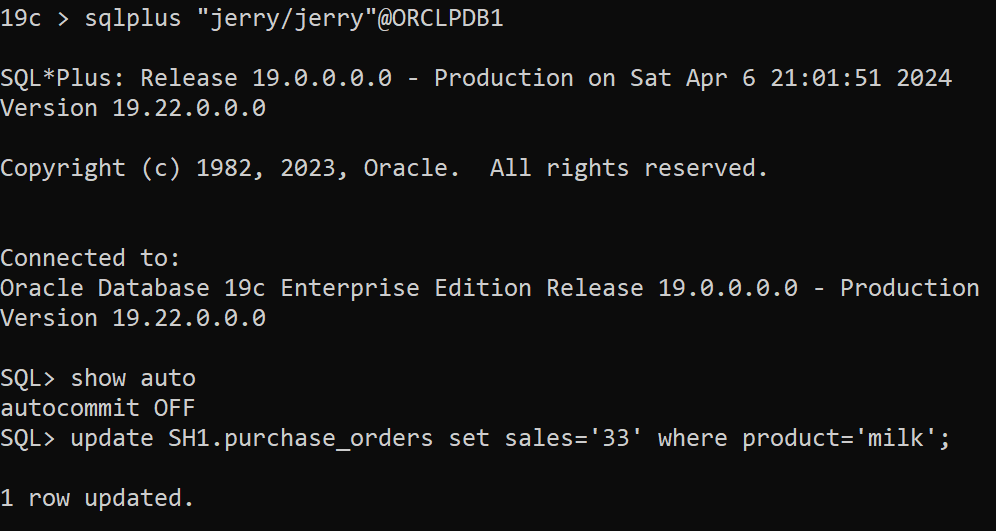
In the first session as user jerry and auto-commit is to “FALSE” as shown below so you will need to explicitly end the transaction either by “commit” or “rollback”:

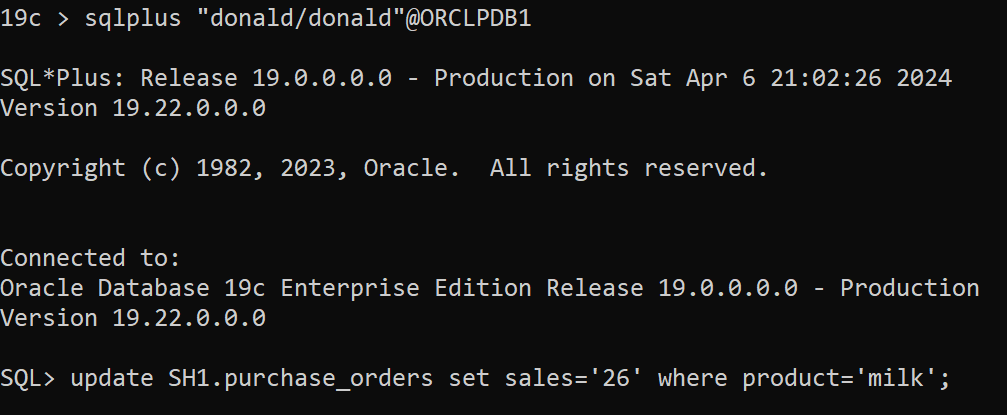
In the second session as user donald [ donald session is hanging because there is already shared row lock on the table]

To find blocking session:

SQL> select * from v$lock where block >0;

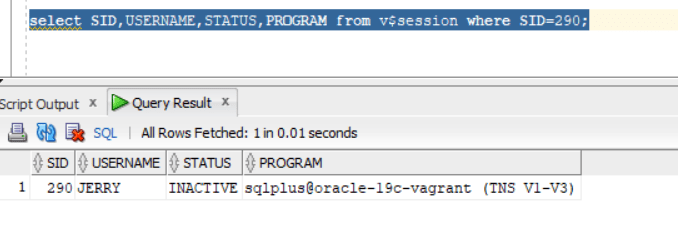
SQL> select SID,USERNAME,STATUS,PROGRAM from v$session where SID=290;

To  find locking:

SQL> select * from V$SESSION_EVENT where WAIT_CLASS=’Application’ and EVENT like ‘enq: TX – row lock contention’;

SID 283 is for account “donald”

So, based on the above scenario lock/block will remain unless jerry’s session commit or rollback.

Let us now explore max_idle_blocker_time parameter and set to 1 minute at the pluggable database level:

sqlplus / as sysdba

SQL> alter session set container=ORCLPDB1;

Session altered.

SQL> alter system set max_idle_blocker_time=1;

System altered.

SQL> show parameter idle

NAME                                 TYPE        VALUE

———————————— ———– ——————————

max_idle_blocker_time                integer     1

max_idle_time                        integer     0

Repeat the scenario again….

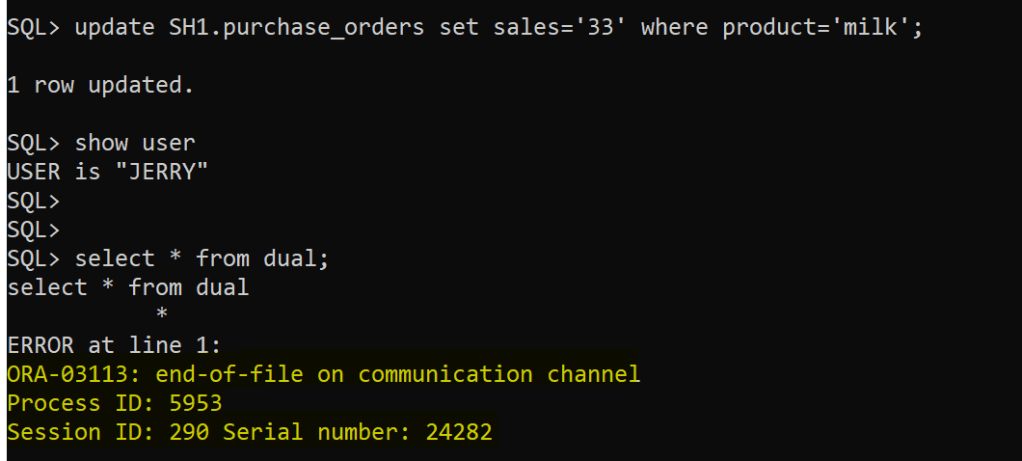
After 1 minute in jerry’s session:

The session is terminated as expected after 1 minute

And, blocking disappears however locking from “donald” session will remain so it will require either “commit” or “rollback” for the transaction being executed.

Enhancing Oracle Database System IO Performance: filesystemio_options Parameter

There is an Oracle database parameter filesystemio_options that I found out most DBA’s are not aware of.  First, this parameter can be used if your environment is NOT based on ASM setup.

In default behaviour…In buffered I/O, the Operating System maintains its own cache of disk data. Rather than directly reading to or writing from a process buffer, data is read from the disk into the cache and copied to the process buffer or copied from the process into the cache and written from there to the disk. Moreover, read requests are processed through cached data without having to read it again from the disk and can prefetch data from the disk into the cache before processes request it, speeding reads for data.

The catch here is that Oracle database system is already has in-place buffer cache for (read,write) to disk operations, so there will be “double” operations going on from DB & OS and will cause CPU performance overhead. However, direct IO will bypass the double buffering overhead.

Add the following parameter in init.ora and re-start the database instance:

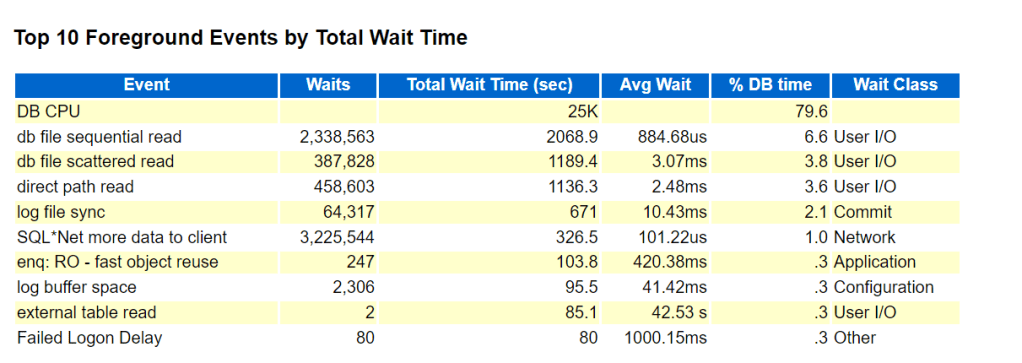
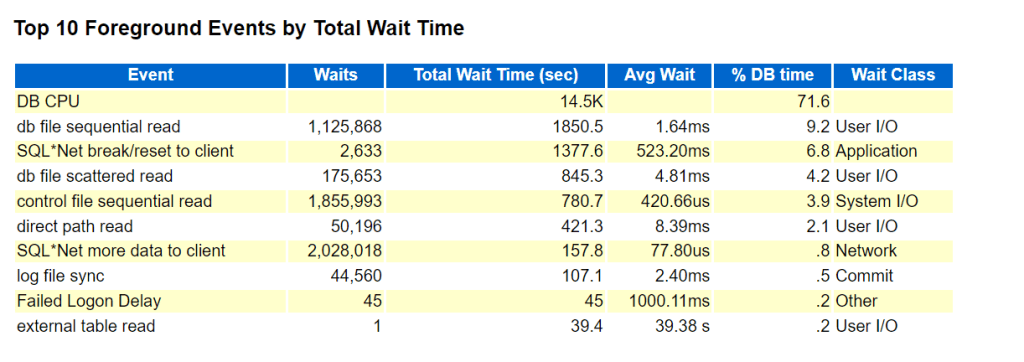
To observe the performance boost, generate AWR report before setting the parameter ( period of 1 week) and compare it after setting the parameter for 1 week report generation…..and the findings:

BEFORE PARAMETER SET:

AFTER PARAMETER SET:

DB CPU, db file sequential read, direct path read wait events are drastically improved as shown in BEFORE/AFTER figures.

Installing and Setting Up Oracle 23ai database release

I have an already existing virtual machine with oracle linux 8 in-place, so the next step is to download the RPM package for oracle 23ai from this website:

https://www.oracle.com/sa/database/free/get-started

Download the following RPM: oracle-database-free-23ai-1.0-1.el8.x86_64.rpm

As “root”user will start executing the following commands:

dnf install -y oracle-database-preinstall-23ai –skip-broken

dnf install -y /vagrant/oracle-database-free-23ai-1.0-1.el8.x86_64.rpm

Then executed the command:

/etc/init.d/oracle-free-23ai configure

Specify a password to be used for database accounts. Oracle recommends that the password entered should be at least 8 characters in length, contain at least 1 uppercase character, 1 lower case character and 1 digit [0-9]. Note that the same password will be used for SYS, SYSTEM and PDBADMIN accounts:

Confirm the password:

dummy password used====> 23ai#2024

After that set your environment variables as follows:

export ORACLE_BASE=/opt/oracle

export ORACLE_HOME=/opt/oracle/product/23ai/dbhomeFree

export ORACLE_SID=FREE

export PATH=$PATH:$ORACLE_HOME/bin

Then connect as sysdba:

sqlplus / as sysdba

dbms_dictionary_check package back-ported to 19c [19.22]

DBMS_DICTIONARY_CHECK package has been back-ported from 23c to oracle 19c when applying January 2024 RU [19.22]. The package is a read-only PL/SQL package procedure that helps you identify Oracle Database dictionary. its in some sense the evolution of hcheck.sql script that you need to download and install, this is not needed anymore … this package is now available as built-in is really a positive move.

To Run the Package to examine your database state:

SQL> set serveroutput on size unlimited
SQL> execute dbms_dictionary_check.full;

A detailed report will be generated as shown below:

To Check “Critical” Findings and the status:

SQL> execute dbms_dictionary_check.critical

The following are the 3 main areas that package will consider and flag “Critical”and should be in “PASS” or valid state otherwise it has negative impact and will require your attention/fix:

To Run a FULL Repair for the reported findings:

SQL> set serveroutput on size unlimited
SQL> EXECUTE dbms_dictionary_check.full(repair=>TRUE);

For further reference documentation: https://docs.oracle.com/en/database/oracle/oracle-database/23/arpls/dbms-dictionary-check.html#GUID-BD44F6AB-437B-4351-9CAE-9190675FAD21