Oracle 23ai Enhancement To  Monitor DATA PUMP Operations Through New Built-In Views

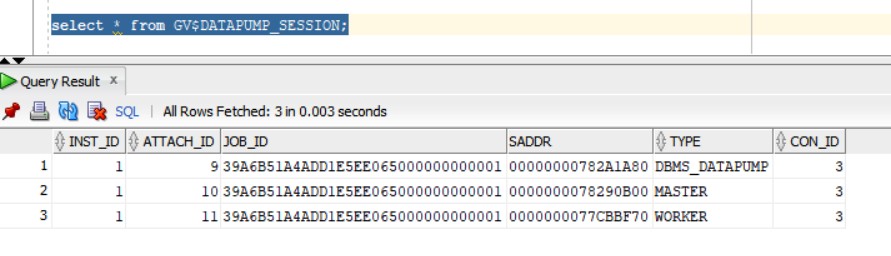
New and nice feature introduced in 23ai is the ability to view the progress of datapump operations through database views:

I will create a dummy account called “tim” and will grant the account “DBA” role.

SQL> alter session set container=FREEPDB1;

Session altered.

SQL> create user tim identified by tim123;

User created.

SQL> grant DBA to tim;

Grant succeeded.

SQL> alter user tim default role all;

User altered.

And I will define a directory :

SQL> create directory tmp as ‘/tmp’;

I will then execute the following export datapump command for simualtion (will take full pluggable database export backup):

expdp tim/tim123@//localhost:1521/FREEPDB1 directory=tmp FULL=Y dumpfile=test_dump.dmp logfile=EXP_TEST.log

The following view will show the account used for the export and operating system process id’s (SPID):

Wait event as shown below is “db file sequential read” for the datapump job:


Oracle database 23ai  unified_audit_trail_exclude_columns parameter

A very intresting parameter  unified_audit_trail_exclude_columns is introduced in 23.6 release. This parameter has no official documentation about it so I played with it to understand what is used for.

The parameter by default is set to “none”. However, the parameter can accept one of the following values:  none, dp_clob_parameters1,  rls_info, sql_binds,  sql_text

Not sure why this parameter is introduced, what is the objective this parameter will serve.

I have set the parameter to sql_text as shown below:

SQL> alter system set unified_audit_trail_exclude_columns=’sql_text’;

If you create a dumy user and checking the unified audit log after setting the parameter unified_audit_trail_exclude_columns to “sql_text”:

SQL> create user c##dummy99 identified by dummy123;

Then, checking audit logs:

SQL> select OS_USERNAME,DBUSERNAME,action_name,SQL_TEXT,OBJECT_NAME from unified_audit_trail where ACTION_NAME=’CREATE USER’ order by event_timestamp desc;

So, the parameter effectively took place and the SQL_TEXT column is empty and not showing the SQL statement for the user creation, the event itself is of course recorded as shown in the above picture.
 

Oracle 23ai new feature: INSERT INTO VALUES ACCEPT MULTIPLE ROWS

very useful new feature in Oracle 23ai is the ability to insert multiple row values in one shot, unlike older releases where you need to repeat the SQL command multiple times for each row insertion.

To illustrate:

create table sh1.dummy (fname varchar2(20));

insert into sh1.dummy values (’emad’),
(‘ricardo’),
(‘john’);

Then, you can query the whole table to verify:

select * from sh1.dummy;