Prior to Oracle 23c release you have two options for OPEN_MODE with pluggable databases either read/write (default mode) or read only.
With read-only mode all types of accounts (local PDB accounts) or common-user accounts can perform read-only operations on the pluggable database tables.
In oracle 23c a new mode is introduced which is hybrid read-only mode…(local PDB accounts) can perform ONLY read operations against tables while common-user accounts can performed read/write operations against tables in the pluggable database system.
Let us check the traditional v$pdbs view to check my current 23c pluggable databases OPEN_MODE
SQL> select name, open_mode from v$pdbs;
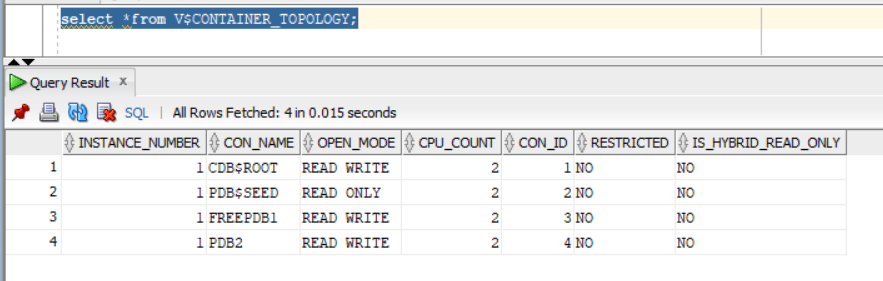
Also, let us explore the NEW database view V$CONTAINER_TOPOLOGY that includes the column IS_HYBRID_READ_ONLY:
SQL> select *from V$CONTAINER_TOPOLOGY;
— will create common user called C##DBA granted DBA role
SQL> CREATE USER C##DBA IDENTIFIED BY test123 CONTAINER=ALL;
SQL> grant dba to C##DBA CONTAINER=ALL;
SQL> alter user C##DBA default role all;
— will create local user in pluggable database PDB2 with the name dba1
SQL> create user dba1 identified by test123;
SQL> grant dba to dba1;
SQL> alter user dba1 default role all;
Now, Let us enable hybrid read only mode:
sqlplus / as sysdba
SQL> ALTER PLUGGABLE DATABASE PDB2 CLOSE IMMEDIATE;
Pluggable database altered.
SQL> ALTER PLUGGABLE DATABASE PDB2 OPEN HYBRID READ ONLY;
Pluggable database altered.
Checking from container level the pluggable database PDB2 is now open with “Hybrid Read Only”mode:
Let us test the expected functionality:
As local user I will be able to perform “SELECT” queries only….any data modification queries such as insert,update,delete will not work:
sqlplus “dba1/test123″@PDB2
SQL> select * from hr.table1;
FNAME LANAME
——————– ——————–
EMAD AL-MOUSA
Tim Allen
SQL> insert into hr.table1 values (‘Adam’,’Smith’);
insert into hr.table1 values (‘Adam’,’Smith’)
*
ERROR at line 1:
ORA-16000: Attempting to modify database or pluggable database that is open for
read-only access.
Now, let us try with common-user C##DBA….the account should be able to do all kind of operations (SELECT,INSERT,UPDATE,DELETE) unlike “local”database account:
sqlplus “C##DBA/test123″@PDB2
SQL> select * from hr.table1;
FNAME LANAME
——————– ——————–
EMAD AL-MOUSA
Tim Allen
SQL> insert into hr.table1 values (‘Adam’,’Smith’);
1 row created.
SQL> commit;
Commit complete.
Someone would ask…nice feature but what benefits does it provide ?
It will help with “maintenance” activities where you want to restrict application account from performing any data modifications for some time and only DBA container level can modify data.
It will help with patching especially with datapatch step where SQL code modification is required to be done with NO locking in-place.
It can help with forensics activities and investigation, to limit accounts within pluggable database level from performing any data modification while analysis and investigation is in-place.
Oracle has introduced a very good and much needed feature which is the ability to grant object level permissions on schema level scope. In the past if you have a schema with many tables under it and you want to grant the application account SELECT permission on these tables…you have 2 options:
Option 1: performing the grant select explicitly on each table in the schema…so if you have 300 tables in your schema “HR”…you will execute : GRANT SELECT on HR.XXXX to HR_APP for each table. And any newly introduced set of tables will require the re-grant operation against them.
Option 2: granting the application account “HR_APP” select any table permissions….which is very excessive permission and violates the security boundary if you are in a multi-hosting environment as the account will have access to tables in other schemas.
Let us explore 23c feature:
I will create two tables in HR schema and populate it with dummy data.
insert into HR.DEPARTMENTS values(‘IT’,’CG981258′,320,’IT-1′);
commit;
insert into HR.DEPARTMENTS values(‘FINANCE’,’CG96251′,166,’FIN-1′);
commit;
insert into HR.DEPARTMENTS values(‘AUDIT’,’CG400311′,320,’AUD-1′);
commit;
Now, using the new SQL command feature:
SQL> grant select any table on schema HR to HR_APP;
When accessing the database using application account HR_APP , the account will be able to view the data for the two existing tables:
This is great….and this will be applied automatically to newly created tables….I will create a dummy table based on departments table and HR_APP will be able to view the data:
SQL> create table HR.DUMMY as select * from HR.DEPARTMENTS;




 Geodata Master