A very intresting parameter unified_audit_trail_exclude_columns is introduced in 23.6 release. This parameter has no official documentation about it so I played with it to understand what is used for.
The parameter by default is set to “none”. However, the parameter can accept one of the following values: none, dp_clob_parameters1, rls_info, sql_binds, sql_text
Not sure why this parameter is introduced, what is the objective this parameter will serve.
I have set the parameter to sql_text as shown below:
SQL> alter system set unified_audit_trail_exclude_columns=’sql_text’;
If you create a dumy user and checking the unified audit log after setting the parameter unified_audit_trail_exclude_columns to “sql_text”:
SQL> create user c##dummy99 identified by dummy123;
Then, checking audit logs:
SQL> select OS_USERNAME,DBUSERNAME,action_name,SQL_TEXT,OBJECT_NAME from unified_audit_trail where ACTION_NAME=’CREATE USER’ order by event_timestamp desc;
So, the parameter effectively took place and the SQL_TEXT column is empty and not showing the SQL statement for the user creation, the event itself is of course recorded as shown in the above picture.
First create a database account called “vector” in FREEPDB1 pluggable database as follows:
SQL> CREATE USER VECTOR IDENTIFIED BY VECTOR123
DEFAULT TABLESPACE “USERS”
TEMPORARY TABLESPACE “TEMP”;
GRANT “DB_DEVELOPER_ROLE” TO “VECTOR”;
ALTER USER “VECTOR” DEFAULT ROLE ALL;
ALTER USER “VECTOR” QUOTA UNLIMITED ON USERS;
Starting in oracle 23ai you can define vector data type column in different ways:
23ai > sqlplus “vector/vector123″@FREEPDB1
SQL> create table t1 (v vector);
Table created.
SQL> desc t1
Name Null? Type
—————————————– ——– —————————-
V VECTOR(*, *)
The above column data type corresponds to —-> VECTOR(*, *) which means embedding vector data will be aribitary in terms of dimension and data type.
SQL> create table t2 (v vector(235,*));
Table created.
SQL> desc t2;
Name Null? Type
—————————————– ——– —————————-
V VECTOR(235, *)
The above means acceppted vector data must have 235 dimensions with arbitary data type.
SQL> create table t3 (v vector(444,int8));
Table created.
SQL> desc t3
Name Null? Type
—————————————– ——– —————————-
V VECTOR(444, INT8)
The above means acceppted vector data must have 444 dimensions with data type of INT8. Accepted data types for vector data are (INT8, FLOAT32,FLOAT64), worth stating that FLOAT32 is the default data type if format is not specified.
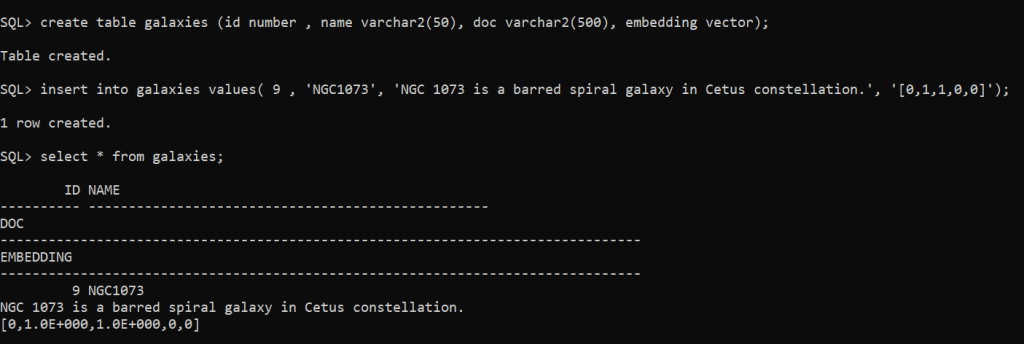
SQL> create table galaxies (id number , name varchar2(50), doc varchar2(500), embedding vector);
Table created.
SQL> insert into galaxies values( 9 , ‘NGC1073’, ‘NGC 1073 is a barred spiral galaxy in Cetus constellation.’, ‘[0,1,1,0,0]’);
1 row created.
SQL> commit;
Important Remark: restrictions with VECTOR column data type:
Can’t be used with external tables, IOTs, cluster tables, global temporary tables, primar key, foreing key, unique constraint,….etc.
Of course you can add multiple vector data type columns on the same table, no restriction is imposed on having multiple columns with vector data type.
The maximum number of dimensions a vector data type can have is 65,536.
Prior to Oracle 23c release you have two options for OPEN_MODE with pluggable databases either read/write (default mode) or read only.
With read-only mode all types of accounts (local PDB accounts) or common-user accounts can perform read-only operations on the pluggable database tables.
In oracle 23c a new mode is introduced which is hybrid read-only mode…(local PDB accounts) can perform ONLY read operations against tables while common-user accounts can performed read/write operations against tables in the pluggable database system.
Let us check the traditional v$pdbs view to check my current 23c pluggable databases OPEN_MODE
SQL> select name, open_mode from v$pdbs;
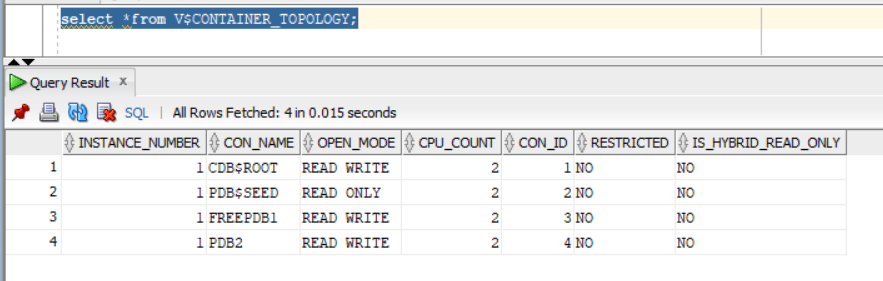
Also, let us explore the NEW database view V$CONTAINER_TOPOLOGY that includes the column IS_HYBRID_READ_ONLY:
SQL> select *from V$CONTAINER_TOPOLOGY;
— will create common user called C##DBA granted DBA role
SQL> CREATE USER C##DBA IDENTIFIED BY test123 CONTAINER=ALL;
SQL> grant dba to C##DBA CONTAINER=ALL;
SQL> alter user C##DBA default role all;
— will create local user in pluggable database PDB2 with the name dba1
SQL> create user dba1 identified by test123;
SQL> grant dba to dba1;
SQL> alter user dba1 default role all;
Now, Let us enable hybrid read only mode:
sqlplus / as sysdba
SQL> ALTER PLUGGABLE DATABASE PDB2 CLOSE IMMEDIATE;
Pluggable database altered.
SQL> ALTER PLUGGABLE DATABASE PDB2 OPEN HYBRID READ ONLY;
Pluggable database altered.
Checking from container level the pluggable database PDB2 is now open with “Hybrid Read Only”mode:
Let us test the expected functionality:
As local user I will be able to perform “SELECT” queries only….any data modification queries such as insert,update,delete will not work:
sqlplus “dba1/test123″@PDB2
SQL> select * from hr.table1;
FNAME LANAME
——————– ——————–
EMAD AL-MOUSA
Tim Allen
SQL> insert into hr.table1 values (‘Adam’,’Smith’);
insert into hr.table1 values (‘Adam’,’Smith’)
*
ERROR at line 1:
ORA-16000: Attempting to modify database or pluggable database that is open for
read-only access.
Now, let us try with common-user C##DBA….the account should be able to do all kind of operations (SELECT,INSERT,UPDATE,DELETE) unlike “local”database account:
sqlplus “C##DBA/test123″@PDB2
SQL> select * from hr.table1;
FNAME LANAME
——————– ——————–
EMAD AL-MOUSA
Tim Allen
SQL> insert into hr.table1 values (‘Adam’,’Smith’);
1 row created.
SQL> commit;
Commit complete.
Someone would ask…nice feature but what benefits does it provide ?
It will help with “maintenance” activities where you want to restrict application account from performing any data modifications for some time and only DBA container level can modify data.
It will help with patching especially with datapatch step where SQL code modification is required to be done with NO locking in-place.
It can help with forensics activities and investigation, to limit accounts within pluggable database level from performing any data modification while analysis and investigation is in-place.
Oracle has introduced a very good and much needed feature which is the ability to grant object level permissions on schema level scope. In the past if you have a schema with many tables under it and you want to grant the application account SELECT permission on these tables…you have 2 options:
Option 1: performing the grant select explicitly on each table in the schema…so if you have 300 tables in your schema “HR”…you will execute : GRANT SELECT on HR.XXXX to HR_APP for each table. And any newly introduced set of tables will require the re-grant operation against them.
Option 2: granting the application account “HR_APP” select any table permissions….which is very excessive permission and violates the security boundary if you are in a multi-hosting environment as the account will have access to tables in other schemas.
Let us explore 23c feature:
I will create two tables in HR schema and populate it with dummy data.
insert into HR.DEPARTMENTS values(‘IT’,’CG981258′,320,’IT-1′);
commit;
insert into HR.DEPARTMENTS values(‘FINANCE’,’CG96251′,166,’FIN-1′);
commit;
insert into HR.DEPARTMENTS values(‘AUDIT’,’CG400311′,320,’AUD-1′);
commit;
Now, using the new SQL command feature:
SQL> grant select any table on schema HR to HR_APP;
When accessing the database using application account HR_APP , the account will be able to view the data for the two existing tables:
This is great….and this will be applied automatically to newly created tables….I will create a dummy table based on departments table and HR_APP will be able to view the data:
SQL> create table HR.DUMMY as select * from HR.DEPARTMENTS;
*** This post has been updated in 24 October 2025 *****
Oracle has just changed their product life cycle support for their database technology especially.
26ai was released in 2025 (re-branded from the former 23ai version)
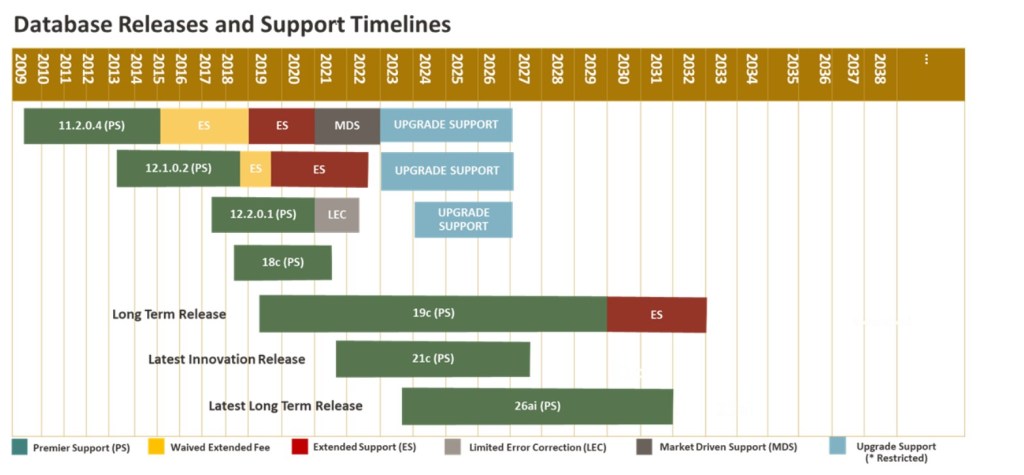
There are two types of releases now: Long Term Release , and Innovation Release
Long Term Release: are ideal for use cases that benefit from less frequent upgrades to newer releases. This type of release offers highest stability. The long term release will have 5 years of Premier Support.
Innovation Release: is a release between long term releases. This type of releases will provide new enhancements and capabilities. it will have short period of Premier support which is 2 years. The idea here is to provide cutting edge technologies for rapidly evolving technologies.
Oracle 12cR2 support will end 31st March 2022 [out of support]
Oracle 18c (is considered innovation release now !!): 8th June 2021 (already out of support)
Oracle 19c (long term release):Premier Support (PS) ends December 31, 2029. Extended Support (ES) will be Jan 01, 2030 through December 31, 2032
Oracle 21c (innovation release):July 31, 2027
Oracle 26ai (long term release): Premier Support ends December 31, 2031. Extended Support : To Be Declared
Oracle official reference documentation: Doc ID 742060.1








 Geodata Master