In Oracle 26ai There are two types of indexes when dealing with vector data:
- IVF Inverted File Flat it’s a disk based index
- Hierarchical Navigable Small World (HNSW) index an in-memory based index
Let us first explore IVF index:
I will create a dummy table called galaxies and insert some data:
sqlplus vector_user/vectorai@FREEPDB1
create table galaxies (id number, name varchar2(50), doc varchar2(500), embedding vector);
insert into galaxies (id, name,doc, embedding)
select 1,’M31′,’Messier 31 is a barred spiral galaxy in the Andromeda constellation which has a lot of barred spiral galaxies’,TO_VECTOR(VECTOR_EMBEDDING(doc_model USING ‘Messier 31 is a barred spiral galaxy in the Andromeda constellation which has a lot of barred spiral galaxies’ as data));
commit;
insert into galaxies (id, name,doc, embedding)
select 2,’M33′,’Messier 33 is a spiral galaxy in the Triangulum constellation’,TO_VECTOR(VECTOR_EMBEDDING(doc_model USING ‘Messier 33 is a spiral galaxy in the Triangulum constellation’ as data));
commit;
insert into galaxies (id, name,doc, embedding)
select 3,’M58′,’Messier 58 is an intermediate barred spiral galaxy in the Virgo constellation’,TO_VECTOR(VECTOR_EMBEDDING(doc_model USING ‘Messier 58 is an intermediate barred spiral galaxy in the Virgo constellation’ as data));
commit;
insert into galaxies (id, name,doc, embedding)
select 4,’M63′,’Messier 63 is a spiral galaxy in the Canes Venatici constellation’,TO_VECTOR(VECTOR_EMBEDDING(doc_model USING ‘Messier 63 is a spiral galaxy in the Canes Venatici constellation’ as data));
commit;
insert into galaxies (id, name,doc, embedding)
select 5,’M77′,’Messier 77 is a barred spiral galaxy in the Cetus constellation’,TO_VECTOR(VECTOR_EMBEDDING(doc_model USING ‘Messier 77 is a barred spiral galaxy in the Cetus constellation’ as data));
commit;
insert into galaxies (id, name,doc, embedding)
select 6,’M91′,’Messier 91 is a barred spiral galaxy in the Coma Berenices constellation’,TO_VECTOR(VECTOR_EMBEDDING(doc_model USING ‘Messier 91 is a barred spiral galaxy in the Coma Berenices constellation’ as data));
commit;
insert into galaxies (id, name,doc, embedding)
select 7,’M49′,’Messier 49 is a giant elliptical galaxy in the Virgo constellation’,TO_VECTOR(VECTOR_EMBEDDING(doc_model USING ‘Messier 49 is a giant elliptical galaxy in the Virgo constellation’ as data));
commit;
insert into galaxies (id, name,doc, embedding)
select 8,’M60′,’Messier 60 is an elliptical galaxy in the Virgo constellation’,TO_VECTOR(VECTOR_EMBEDDING(doc_model USING ‘Messier 60 is an elliptical galaxy in the Virgo constellation’ as data));
commit;
insert into galaxies (id, name,doc, embedding)
select 9,’NGC1073′,’NGC 1073 is a barred spiral galaxy in Cetus constellation’,TO_VECTOR(VECTOR_EMBEDDING(doc_model USING ‘NGC 1073 is a barred spiral galaxy in Cetus constellation’ as data));
commit;
Then, let us run explain plan against a SELECT Query as shown below:
explain plan for select id, name,DOC
from galaxies
order by vector_distance(embedding, TO_VECTOR(VECTOR_EMBEDDING(doc_model USING ‘Vigro’ as data)), COSINE)
fetch approx first 2 rows only;
select * from table(dbms_xplan.display);
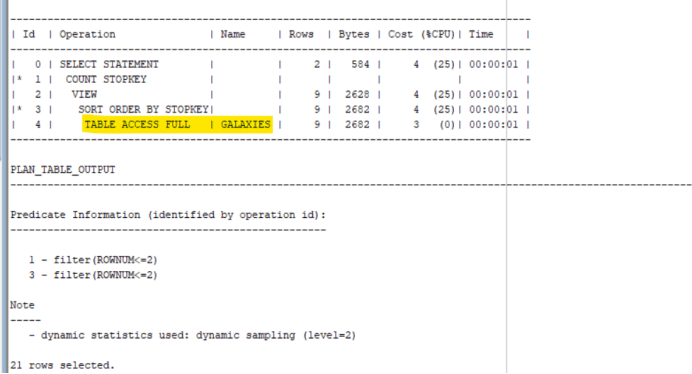
A Full table scan has occurred as shown below:
// don’t execute the following command in production environment as it clears out data from memory !!
SQL> alter system FLUSH BUFFER_CACHE;
// run the following query to check performance without index:
SQL> set timing on
SQL> select id, name,DOC
from galaxies
order by vector_distance(embedding, TO_VECTOR(VECTOR_EMBEDDING(doc_model USING ‘Vigro’ as data)), COSINE)
fetch approx first 2 rows only;
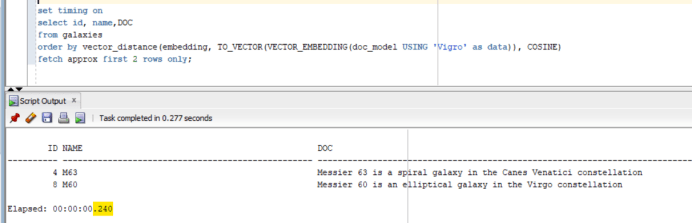
The execution time was 240 millisecond
Will create an index:
SQL> CREATE VECTOR INDEX galaxies_ivf_idx ON galaxies (embedding) ORGANIZATION NEIGHBOR PARTITIONS
DISTANCE COSINE
WITH TARGET ACCURACY 95;
// don’t execute the following command in production environment as it clears out data from memory !!
SQL> alter system FLUSH BUFFER_CACHE;
SQL> alter system flush shared_pool;
// checking the run time of the SELECT statement after adding an index:
SQL> set timing on
SQL> select id, name,DOC
from galaxies
order by vector_distance(embedding, TO_VECTOR(VECTOR_EMBEDDING(doc_model USING ‘Vigro’ as data)), COSINE)
fetch approx first 2 rows only;
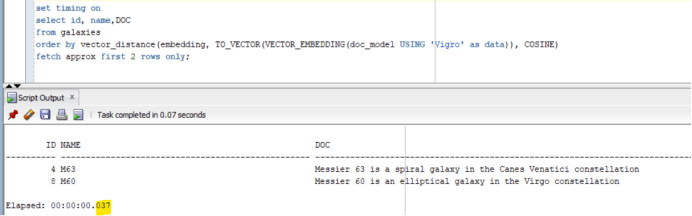
The execution time was 37 milliseconds
So, indexes are very important when dealing with vector data in your Oracle database system.