Overcoming Blocking & Locking in Oracle 19c with max_idle_blocker_time parameter

To illustrate and simulate locking and blocking let me first prepare a dummy table and two database accounts for simulation:

create table SH1.purchase_orders ( product varchar2(20), sales number (5));

SQL> insert into SH1.purchase_orders values (‘milk’, 20);

SQL> insert into SH1.purchase_orders values (‘corn_flakes’, 40);

SQL> insert into SH1.purchase_orders values (‘cheese’, 16);

SQL> create user jerry identified by jerry;

SQL> grant create session to jerry;

SQL> grant select,update on SH1.purchase_orders to jerry;

SQL> create user donald identified by donald;

SQL> grant create session to donald;

SQL> grant select,update on SH1.purchase_orders to donald;

// as shown below both max_idle_time, max_idle_blocker_time are set to “0” which means unlimited

SQL> show parameter idle

NAME                                 TYPE        VALUE

———————————— ———– ——————————

max_idle_blocker_time                integer     0

max_idle_time                        integer     0

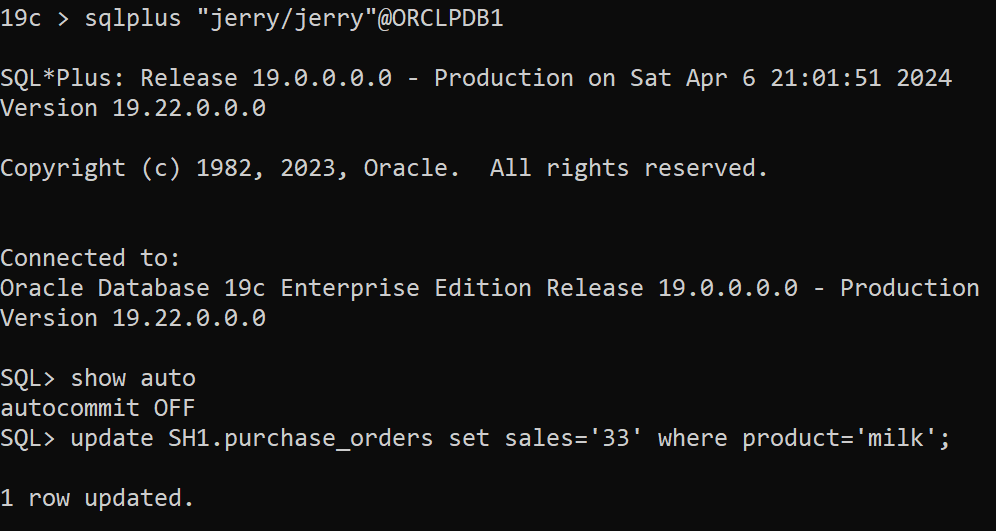
In the first session as user jerry and auto-commit is to “FALSE” as shown below so you will need to explicitly end the transaction either by “commit” or “rollback”:

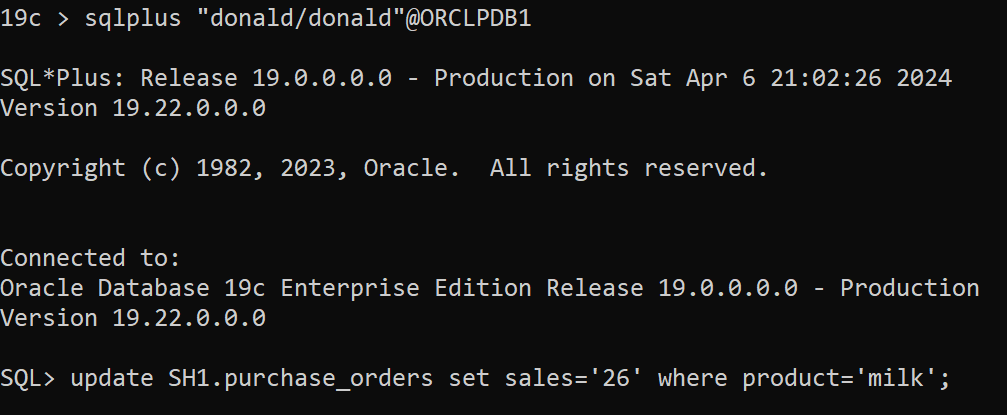
In the second session as user donald [ donald session is hanging because there is already shared row lock on the table]

To find blocking session:

SQL> select * from v$lock where block >0;

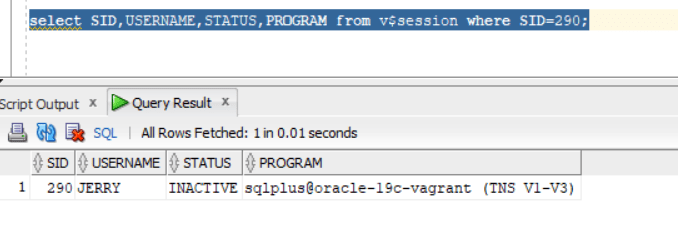
SQL> select SID,USERNAME,STATUS,PROGRAM from v$session where SID=290;

To  find locking:

SQL> select * from V$SESSION_EVENT where WAIT_CLASS=’Application’ and EVENT like ‘enq: TX – row lock contention’;

SID 283 is for account “donald”

So, based on the above scenario lock/block will remain unless jerry’s session commit or rollback.

Let us now explore max_idle_blocker_time parameter and set to 1 minute at the pluggable database level:

sqlplus / as sysdba

SQL> alter session set container=ORCLPDB1;

Session altered.

SQL> alter system set max_idle_blocker_time=1;

System altered.

SQL> show parameter idle

NAME                                 TYPE        VALUE

———————————— ———– ——————————

max_idle_blocker_time                integer     1

max_idle_time                        integer     0

Repeat the scenario again….

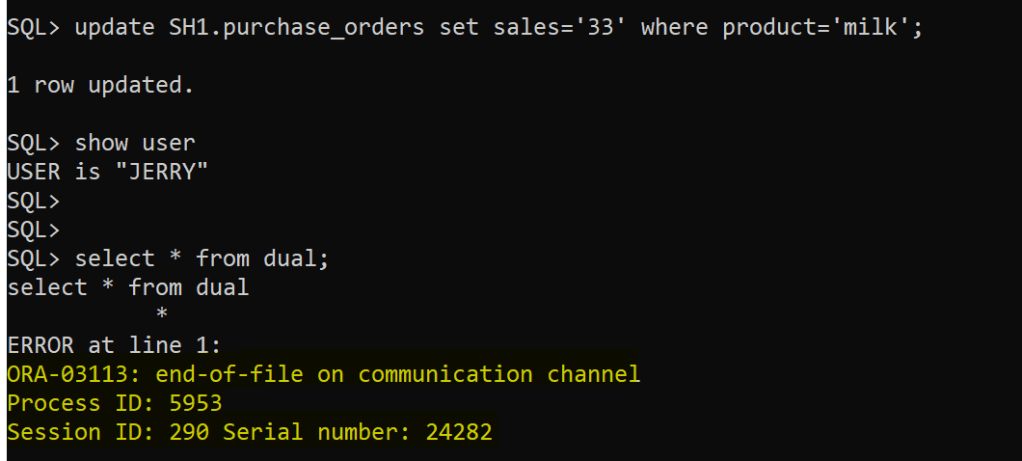
After 1 minute in jerry’s session:

The session is terminated as expected after 1 minute

And, blocking disappears however locking from “donald” session will remain so it will require either “commit” or “rollback” for the transaction being executed.

Datapatch error patch XXXX: XML descriptor does not exist in either the file system or SQL registry

In one of the environments (19c) after successfully applying Oracle patches at binary level, the following error was thrown when datapatch command was executed:

so the tool was searching for an old patch that doesn’t exist anymore under $ORACLE_HOME/sqlpatch directory.

— Possible Solutions:

Possible solution 1: if the patch number XXXX is related to old java patch, then apply latest OJVM patch…you can execute the following command to check:
$ORACLE_HOME/OPatch/opatch lspatches

Possible solution 2: copy the missing patch folder from another database environment to this environment (the environment you are facing the error) , under this folder: $ORACLE_HOME/sqlpatch

Enhancing Oracle Database System IO Performance: filesystemio_options Parameter

There is an Oracle database parameter filesystemio_options that I found out most DBA’s are not aware of.  First, this parameter can be used if your environment is NOT based on ASM setup.

In default behaviour…In buffered I/O, the Operating System maintains its own cache of disk data. Rather than directly reading to or writing from a process buffer, data is read from the disk into the cache and copied to the process buffer or copied from the process into the cache and written from there to the disk. Moreover, read requests are processed through cached data without having to read it again from the disk and can prefetch data from the disk into the cache before processes request it, speeding reads for data.

The catch here is that Oracle database system is already has in-place buffer cache for (read,write) to disk operations, so there will be “double” operations going on from DB & OS and will cause CPU performance overhead. However, direct IO will bypass the double buffering overhead.

Add the following parameter in init.ora and re-start the database instance:

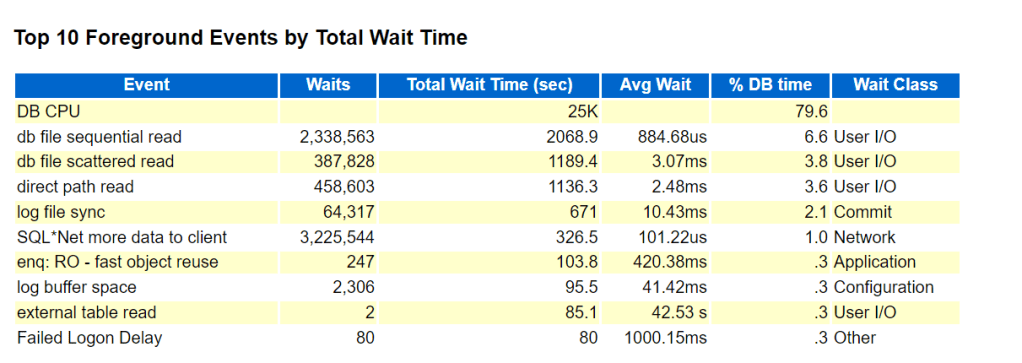
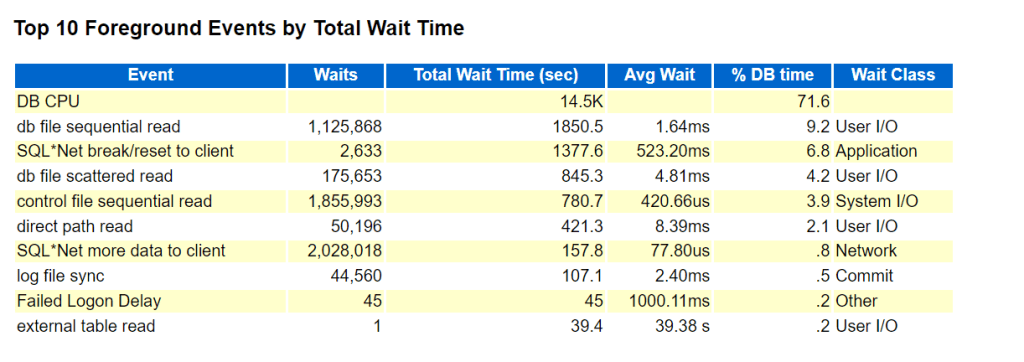
To observe the performance boost, generate AWR report before setting the parameter ( period of 1 week) and compare it after setting the parameter for 1 week report generation…..and the findings:

BEFORE PARAMETER SET:

AFTER PARAMETER SET:

DB CPU, db file sequential read, direct path read wait events are drastically improved as shown in BEFORE/AFTER figures.