Oracle Database Error: ORA-00600: internal error code, arguments: [qosdExpStatRead: expcnt mismatch], [65562], [26], [1144616], [1], [], [], [], [], [], [], []

SQL> exec DBMS_STATS.FLUSH_DATABASE_MONITORING_INFO;
BEGIN DBMS_STATS.FLUSH_DATABASE_MONITORING_INFO; END;

*
ERROR at line 1:
ORA-00600: internal error code, arguments: [qosdExpStatRead: expcnt mismatch],
[65562], [26], [1144616], [1], [], [], [], [], [], [], []
ORA-06512: at “SYS.DBMS_STATS”, line 2141
ORA-06512: at “SYS.DBMS_STATS”, line 43486
ORA-06512: at line 1

DDE: Problem Key ‘ORA 600 [qosdExpStatRead: expcnt mismatch]’ was flood controlled (0x4) (incident: 2017148)
ORA-00600: internal error code, arguments: [qosdExpStatRead: expcnt mismatch], [65562], [26], [1144616], [1], [], [], [], [], [], [], []
2025-07-29T11:33:58.617971+03:00
Incident 2017643 created, dump file: /oraclex/oradbp25/diag/rdbms/oradbp25/oradbp25/incident/incdir_2017643/oradbp25_dw00_3988067_i2017643.trc
ORA-00600: internal error code, arguments: [qosdExpStatRead: expcnt mismatch], [65562], [26], [1144616], [1], [], [], [], [], [], [], []
ORA-06512: at “SYS.DBMS_STATS”, line 2141
ORA-06512: at “SYS.DBMS_STATS”, line 57633
ORA-06512: at “SYS.DBMS_STATS”, line 57866
ORA-06512: at “SYS.KUPW$WORKER”, line 30029
ORA-06512: at “SYS.KUPW$WORKER”, line 3503
ORA-06512: at “SYS.KUPW$WORKER”, line 13746
ORA-06512: at “SYS.KUPW$WORKER”, line 2439
ORA-06512: at line 2

SOLUTION/FIX:

SQL> alter system set “_fix_control”=’31143146:on’,’32005394:on’ scope=both;

of course, its highly recommended to open a case with ORACLE.

Overcoming Blocking & Locking in Oracle 19c with max_idle_blocker_time parameter

To illustrate and simulate locking and blocking let me first prepare a dummy table and two database accounts for simulation:

create table SH1.purchase_orders ( product varchar2(20), sales number (5));

SQL> insert into SH1.purchase_orders values (‘milk’, 20);

SQL> insert into SH1.purchase_orders values (‘corn_flakes’, 40);

SQL> insert into SH1.purchase_orders values (‘cheese’, 16);

SQL> create user jerry identified by jerry;

SQL> grant create session to jerry;

SQL> grant select,update on SH1.purchase_orders to jerry;

SQL> create user donald identified by donald;

SQL> grant create session to donald;

SQL> grant select,update on SH1.purchase_orders to donald;

// as shown below both max_idle_time, max_idle_blocker_time are set to “0” which means unlimited

SQL> show parameter idle

NAME                                 TYPE        VALUE

———————————— ———– ——————————

max_idle_blocker_time                integer     0

max_idle_time                        integer     0

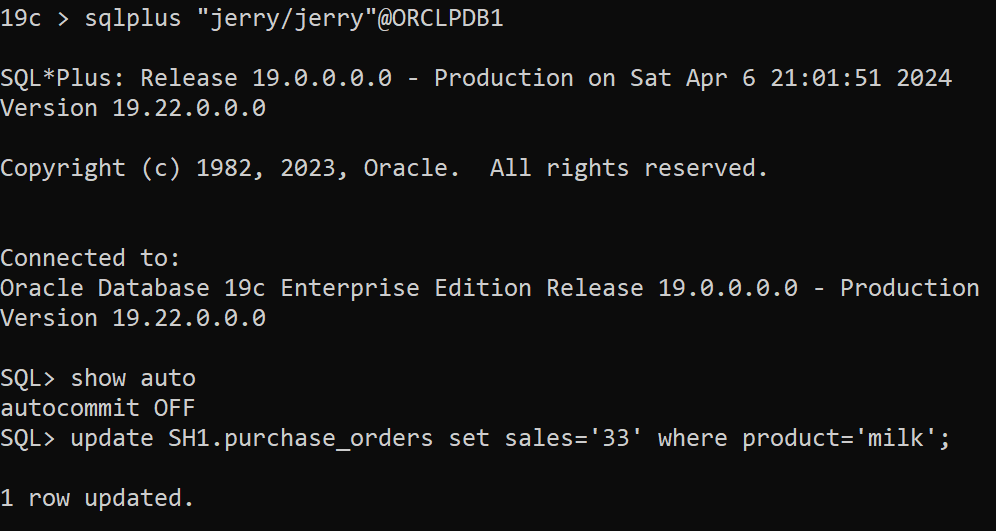
In the first session as user jerry and auto-commit is to “FALSE” as shown below so you will need to explicitly end the transaction either by “commit” or “rollback”:

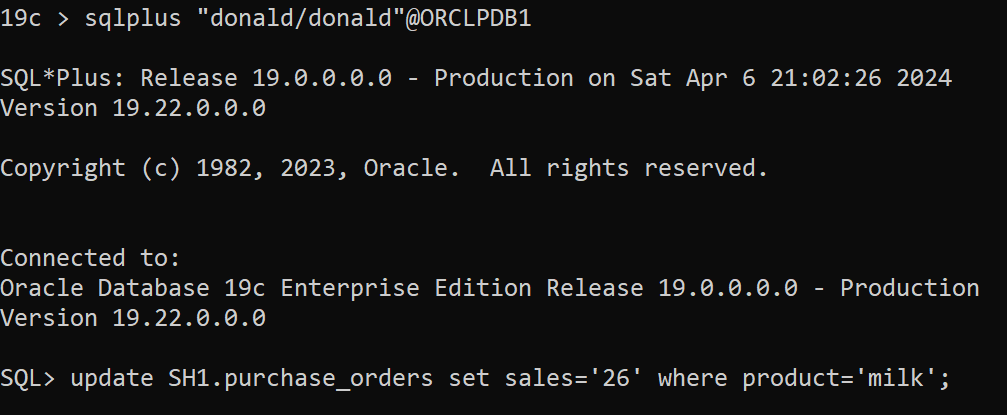
In the second session as user donald [ donald session is hanging because there is already shared row lock on the table]

To find blocking session:

SQL> select * from v$lock where block >0;

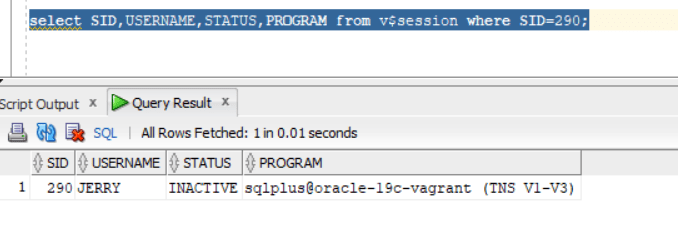
SQL> select SID,USERNAME,STATUS,PROGRAM from v$session where SID=290;

To  find locking:

SQL> select * from V$SESSION_EVENT where WAIT_CLASS=’Application’ and EVENT like ‘enq: TX – row lock contention’;

SID 283 is for account “donald”

So, based on the above scenario lock/block will remain unless jerry’s session commit or rollback.

Let us now explore max_idle_blocker_time parameter and set to 1 minute at the pluggable database level:

sqlplus / as sysdba

SQL> alter session set container=ORCLPDB1;

Session altered.

SQL> alter system set max_idle_blocker_time=1;

System altered.

SQL> show parameter idle

NAME                                 TYPE        VALUE

———————————— ———– ——————————

max_idle_blocker_time                integer     1

max_idle_time                        integer     0

Repeat the scenario again….

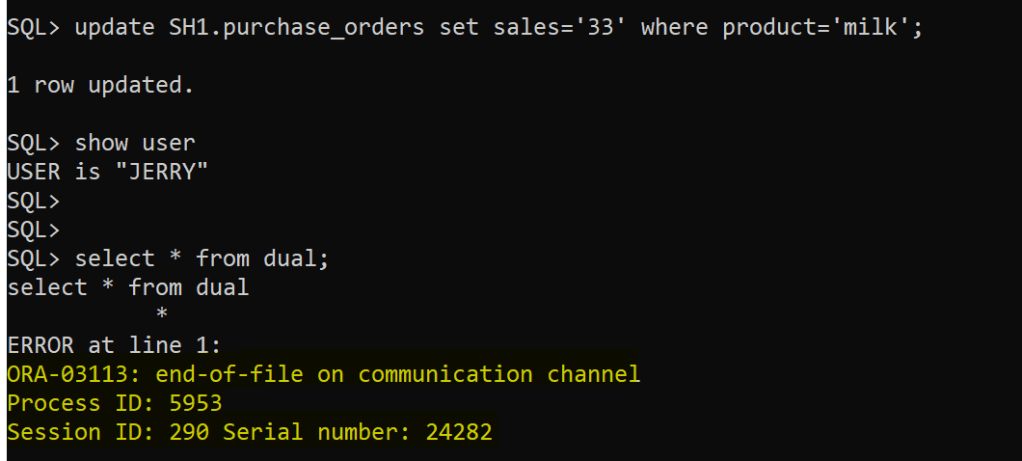
After 1 minute in jerry’s session:

The session is terminated as expected after 1 minute

And, blocking disappears however locking from “donald” session will remain so it will require either “commit” or “rollback” for the transaction being executed.

Dropping AWR Snapshot is failing with ORA-13516: AWR Operation failed: AWR Schema is unavailable due maintenance

A very interesting case I have faced in an Oracle database environment patched with 19.27 RU, I tried dropping an AWR snapshot and it failed as shown below:

BEGIN

    DBMS_WORKLOAD_REPOSITORY.DROP_SNAPSHOT_RANGE(low_snap_id => ‘62386’, high_snap_id => ‘62387’);

   END;

   / 


ERROR at line 1:
ORA-13516: AWR Operation failed: AWR Schema is unavailable due maintenance
ORA-06512: at “SYS.DBMS_WORKLOAD_REPOSITORY”, line 193
ORA-06512: at line 2

Its unfortunately a bug !

// Index WRH$_SGASTAT_U in “WRH$_SGASTAT” table was in UNUSABLE state:

select * from dba_indexes where index_name=’WRH$_SGASTAT_U’;

// Drop the constraint:
alter table wrh$_sgastat drop constraint wrh$_sgastat_u;

// Turn off partition check:


alter session set events ‘14524 trace name context forever, level 1’;

// Add the constraint back:
alter table wrh$_sgastat add constraint wrh$_sgastat_u unique (dbid, snap_id, instance_number, name, pool, con_dbid, stattype) using index local tablespace SYSAUX;

// Turn on partition check:
alter session set events ‘14524 trace name context off’;

Then, Try dropping the AWR Snapshot again….should work.

BEGIN

   DBMS_WORKLOAD_REPOSITORY.DROP_SNAPSHOT_RANGE(low_snap_id => ‘62386’, high_snap_id => ‘62387’);

   END;

   / 

PL/SQL procedure successfully completed.

What’s New in Oracle 19.28 [19c with July 2025 RU]

Oracle has just released their quarterly Oracle database security patches (july 2025). This quarter 6 security vulnerabilities were patched and new features and enhancements were introduced.

Lately (for the last few quarters) Oracle has introduced many good and new features in 19c [ so far the long term release] !

After Applying 19.28 RU a new set of system parameter were introduced:

NAME TYPE VALUE


mfa_duo_api_host string
mfa_oma_iam_domain_url string
mfa_sender_email_displayname string
mfa_sender_email_id string
mfa_smtp_host string
mfa_smtp_port integer 587

its related to : Oracle Database Multifactor Authentication (MFA) : https://blogs.oracle.com/database/post/new-mfa-jul2025

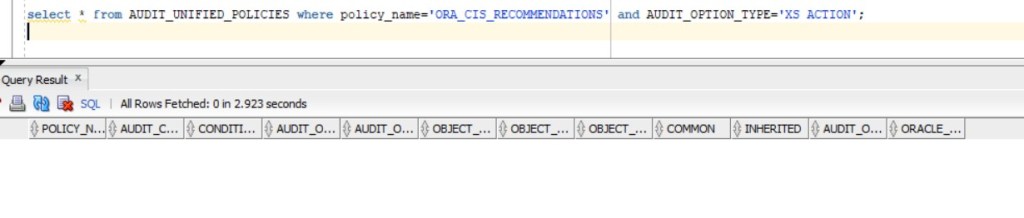
Another new enhancement is in Unified Auditing where a set of “Real Application Security” Audit actions were added to multiple pre-configured audit policies such as ORA_CIS_RECOMMENDATIONS

in 19.27 :

select * from AUDIT_UNIFIED_POLICIES where policy_name=’ORA_CIS_RECOMMENDATIONS’ and AUDIT_OPTION_TYPE=’XS ACTION’;

in 19.28:

select * from AUDIT_UNIFIED_POLICIES where policy_name=’ORA_CIS_RECOMMENDATIONS’ and AUDIT_OPTION_TYPE=’XS ACTION’;

Oracle 23ai Enhancement To  Monitor DATA PUMP Operations Through New Built-In Views

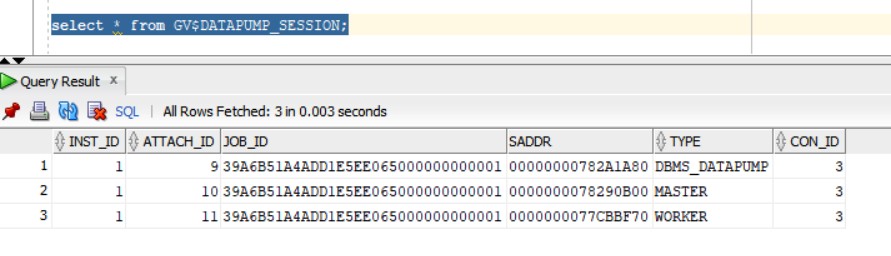
New and nice feature introduced in 23ai is the ability to view the progress of datapump operations through database views:

I will create a dummy account called “tim” and will grant the account “DBA” role.

SQL> alter session set container=FREEPDB1;

Session altered.

SQL> create user tim identified by tim123;

User created.

SQL> grant DBA to tim;

Grant succeeded.

SQL> alter user tim default role all;

User altered.

And I will define a directory :

SQL> create directory tmp as ‘/tmp’;

I will then execute the following export datapump command for simualtion (will take full pluggable database export backup):

expdp tim/tim123@//localhost:1521/FREEPDB1 directory=tmp FULL=Y dumpfile=test_dump.dmp logfile=EXP_TEST.log

The following view will show the account used for the export and operating system process id’s (SPID):

Wait event as shown below is “db file sequential read” for the datapump job:

Oracle database 23ai  unified_audit_trail_exclude_columns parameter

A very intresting parameter  unified_audit_trail_exclude_columns is introduced in 23.6 release. This parameter has no official documentation about it so I played with it to understand what is used for.

The parameter by default is set to “none”. However, the parameter can accept one of the following values:  none, dp_clob_parameters1,  rls_info, sql_binds,  sql_text

Not sure why this parameter is introduced, what is the objective this parameter will serve.

I have set the parameter to sql_text as shown below:

SQL> alter system set unified_audit_trail_exclude_columns=’sql_text’;

If you create a dumy user and checking the unified audit log after setting the parameter unified_audit_trail_exclude_columns to “sql_text”:

SQL> create user c##dummy99 identified by dummy123;

Then, checking audit logs:

SQL> select OS_USERNAME,DBUSERNAME,action_name,SQL_TEXT,OBJECT_NAME from unified_audit_trail where ACTION_NAME=’CREATE USER’ order by event_timestamp desc;

So, the parameter effectively took place and the SQL_TEXT column is empty and not showing the SQL statement for the user creation, the event itself is of course recorded as shown in the above picture.
 

Newly Introduced parameters in Oracle Database 19.27 RU [ Oracle April 2025 Critical Patch Update]

In oracle database 19c release update (19.27) , two new parameters were introduced in the database system:


https://docs.oracle.com/en/database/oracle/oracle-database/19/refrn/OPTIMIZER_CAPTURE_SQL_QUARANTINE.html


https://docs.oracle.com/en/database/oracle/oracle-database/19/refrn/OPTIMIZER_USE_SQL_QUARANTINE.html

It enables the automatic creation of SQL Quarantine configurations.

Oracle 19.26 RU changed DB_LOST_WRITE_PROTECT parameter

reference: https://docs.oracle.com/en/database/oracle/oracle-database/19/refrn/DB_LOST_WRITE_PROTECT.html

Oracle 23ai vector column data type

First create a database account called “vector” in FREEPDB1 pluggable database as follows:

SQL> CREATE USER VECTOR IDENTIFIED BY VECTOR123

DEFAULT TABLESPACE “USERS”

TEMPORARY TABLESPACE “TEMP”;

GRANT “DB_DEVELOPER_ROLE” TO “VECTOR”;

ALTER USER “VECTOR” DEFAULT ROLE ALL;

ALTER USER “VECTOR” QUOTA UNLIMITED ON USERS;

Starting in oracle 23ai you can define vector data type column in different ways:

23ai > sqlplus “vector/vector123″@FREEPDB1

SQL> create table t1 (v vector);

Table created.

SQL> desc t1

 Name                                      Null?    Type

 —————————————– ——– —————————-

 V                                                  VECTOR(*, *)

The above column data type corresponds to —-> VECTOR(*, *) which means embedding vector data will be aribitary in terms of dimension and data type.

SQL> create table t2 (v vector(235,*));

Table created.

SQL> desc t2;

 Name                                      Null?    Type

 —————————————– ——– —————————-

 V                                                  VECTOR(235, *)

The above means acceppted vector data must have 235 dimensions with arbitary data type.

SQL>  create table t3 (v vector(444,int8));

Table created.

SQL> desc t3

 Name                                      Null?    Type

 —————————————– ——– —————————-

 V                                                  VECTOR(444, INT8)

The above means acceppted vector data must have 444 dimensions with data type of INT8. Accepted data types for vector data are (INT8, FLOAT32,FLOAT64), worth stating that FLOAT32 is the default data type if format is not specified.

SQL> create table galaxies (id number , name varchar2(50), doc varchar2(500), embedding vector);

Table created.

SQL> insert into galaxies values( 9 , ‘NGC1073’, ‘NGC 1073 is a barred spiral galaxy in Cetus constellation.’, ‘[0,1,1,0,0]’);

1 row created.

SQL> commit;

Important Remark: restrictions with VECTOR column data type:

Can’t be used with external tables, IOTs, cluster tables, global temporary tables, primar key, foreing key, unique constraint,….etc.

  • Of course you can add multiple vector data type columns on the same table, no restriction is imposed on having multiple columns with vector data type.
  • The maximum number of dimensions a vector data type can have is 65,536.