Oracle Database XBD instillation,de-instillation, verification

***The following is being referenced by Oracle Doc ID 1292089.1 ******

//========================================================================//

** XDB Removal and Reinstall **

XDB Removal

The catnoqm.sql script drops XDB.

spool xdb_removal.log
set echo on;
connect / as sysdba
shutdown immediate;
startup
@?/rdbms/admin/catnoqm.sql
spool off;

Some XDB related objects in the SYS schema are not dropped during the removal of XDB. Also, the SYS.KU$_% views will become invalid. Please see the following document for cleaning up these objects:

(Doc ID 1269470.1) XDB Deinstallation script catnoqm.sql leads to Invalid SYS Objects

** XDB Installation **

The catqm.sql script requires the following parameters be passed to it when run:

A. XDB user password
B. XDB user default tablespace
(Any tablespace other than SYSAUX, SYSTEM, UNDO and TEMP can be specified.
The specified tablespace must already exist prior to running the script.
Sample tablespace creation:
create tablespace xdb datafile ‘<$ORACLE_BASE>/oradata/<SID>/xdb01.dbf’ size 350M autoextend on segment space management auto; )
C. XDB user temporary tablespace
D. YES or NO
(If YES is specified, the XDB repository will use SecureFile storage.
If NO is specified, LOBS will be used.
To use SecureFiles, compatibility must be set to 11.2.
The tablespace specified for the XDB repository must be using
Automatic Segment Space Management (ASSM) for SecureFiles to be used.)

Therefore the syntax to run catqm.sql is the following:
SQL> catqm.sql A B C D

For Example:
SQL> @?/rdbms/admin/catqm.sql XDB XDB TEMP YES

## IMPORTANT: You must shutdown and restart the database between removal and reinstall ##

spool xdb_install.log
set echo on;
connect / as sysdba
shutdown immediate;
startup;
@?/rdbms/admin/catqm.sql <XDB pwd> <XDB default tbs> <XDB temporary tbs> <YES or NO> — substitute the parameters with appropriate values
@?/rdbms/admin/utlrp.sql
spool off

 —————————————————————————————————————-

** XDB in Oracle 12c is Mandatory **

Oracle XML DB is now a mandatory component of Oracle Database. You cannot uninstall it, and if Oracle XML DB is not already installed in your database prior to an upgrade to Oracle Database 12c Release 1 (12.1.0.1) or later, then it is automatically installed in tablespace SYSAUX during the upgrade. If Oracle XML DB has thus been automatically installed, and if you want to use Oracle XML DB, then, after the upgrade operation, you must set the database compatibility to at least 12.1.0.1. If the compatibility is less than 12.1.0.1 then an error is raised when you try to use Oracle XML DB.


Verify XDB Installation

spool xdb_status.txt

set echo on;
connect / as sysdba
set pagesize 1000
col comp_name format a36
col version format a12
col status format a8
col owner format a12
col object_name format a35
col name format a25

— Check status of XDB

select comp_name, version, status
from dba_registry
where comp_id = ‘XDB’;

— Check for invalid objects

select owner, object_name, object_type, status
from dba_objects
where status = ‘INVALID’
and owner in (‘SYS’, ‘XDB’);

spool off;

//=========================================================================//

 

Oracle Spatial General Information

The following is a “general” information about Oracle Spatial to give the reader a brief overview, and links to useful reading resources:

1. the difference between Oracle Locator and Oracle Spatial:

Oracle Locator: a feature of Oracle Database (Standard and Enterprise Editions), provides core location functionality needed by most customer applications and partner solutions. (Locator is not a solution for complex GIS applications .)  Developers can extend existing Oracle-based applications, since with Locator they can easily incorporate location information directly in their applications and services. This is possible because location data is fully integrated in the Oracle server itself. Geographic and location data are manipulated using the same semantics applied to the CHAR, DATE or INTEGER types that are familiar to all users of SQL.


Oracle Spatial: an option to Oracle Database Enterprise Edition, augments Locator, and provides a robust foundation for complex GIS applications which require more spatial analysis and processing in Oracle Database. It includes spatial functions (including area, buffer, centroid calculations), advanced coordinate systems support, linear referencing system, and aggregate functions. Significant new capabilities in this release address the challenging business-critical requirements from the public sector, defense, logistics, energy exploration, and business geographics domains.


2. to check if oracle spatial component is “installed” and “valid” in your database use the following query: SELECT COMP_NAME,VERSION,STATUS FROM DBA_REGISTRY;


3. when you have spatial data stored in your database, you can view it using “Oracle Fusion Middleware MapViewer“:http://www.oracle.com/technetwork/middleware/mapviewer/overview/index.html


OR

you can integrate your Oracle Spatial data with ESRI ArcGIS software and view the data in their ArcGIS Desktop , this requires registering the oracle spatial data with ArcGIS Geodatabase, this paper is very good paper to read: http://download.oracle.com/otndocs/products/spatial/pdf/spatial_wp09_bestprac.pdf


shrinking (resizing) undo tablespace in oracle

To shrink (re-size) undo tablespace in Oracle DBMS, please follow the following steps:

1. Create a temporary tablespace for swapping

CREATE undo TABLESPACE undotbs_2 DATAFILE
‘/orad001/data_files/undotbs2_02.dbf’ size 10000M;

2. Use it as default UNDO tablespace

ALTER SYSTEM SET undo_tablespace=undotbs_2;

3. Drop the old UNDO tablespace

DROP TABLESPACE UNDOTBS1 including contents;

****** if you face an error that you can’t drop the undo tablespace then you need to check the sessions that requires (commit or rollback).

you may face the error “Undo Tablespace X moved to Pending Switch-Out state”

To Fix this use the following query to check the session,oracleuser, program that requires either a commit transaction or a rollback.

**********************
SELECT
a.usn,
a.name,
b.status,
c.tablespace_name,
d.addr,
e.sid,
e.serial#,
e.username,
e.program,
e.machine,
e.osuser
FROM
v$rollname a,
v$rollstat b,
dba_rollback_segs c,
v$transaction d,
v$session e
WHERE
a.usn=b.usn AND
a.name=c.segment_name AND
a.usn=d.xidusn AND
d.addr=e.taddr AND
b.status=’PENDING OFFLINE’;
**************************

4. Create back the original UNDO tablespace

CREATE undo TABLESPACE UNDOTBS1 DATAFILE
‘/orad001/data_files/undo01.dbf’ size 5000M REUSE,
‘/orad001/data_files/undo02.dbf’ size 5000M REUSE;

5. Set the default UNDO tablespace back to the original one

ALTER SYSTEM SET undo_tablespace=UNDOTBS1;

6. Drop the temporary one

DROP TABLESPACE undotbs2 including contents and datafiles;

7. do verification using this command:

SQL> show parameter undo_tablespace


the case of st_geometry in Enterprise Geodatabase design

st_geometry is one of ESRI Geodatabase storage format for Oracle database environment.

This geometry has the following highlights:

  • st_geometry is the “default” geometry storage for creating an enterprise geodatabase in Oracle DB.


  • If you migrated your storage from sdelob to stgeometry you’ll need to recreate your multiversion view because the structure is different.


  • Drop the users using the ST_GEOMETRY, before dropping the SDE user, not the other way around.Otherwise you will face ORA-21700: object does not exist or is marked for delete and as a consequence your Oracle instance is corrupted.


  • User defined data types such as (st_geometry) has issues with export/import database dump process in oracle.

Remark: some of these highlights are my “own” technical observation, and some are referenced by ESRI technical documentation.

Controlling Accessing Oracle Database using TCP.VALIDNODE_CHECKING

you can control which client can access your database through the parameter TCP.VALIDNODE_CHECKING

to configure this feature, follow the following steps:

under $ORACLE_HOME/network/admin/sqlnet.ora file add the parameter

TCP.VALIDNODE_CHECKING=ON

you can use the ‘vi’ editor if you are using Unix environment, to add the previous line.

Then, you Either specify the nodes you want them to be allowed OR the nodes that are NOT allowed (excluded):

TCP.INVITED_NODES= {machineA}     

*** here machineA are the only machine allowied to access the database

TCP.EXCLUDED_NODES={machineB}

** here machineB is denied to access the database

you can use them both lines at the same time, but the precedence will be for TCP.INVITED

after adding the required lines under sqlnet.ora either “Reload the listener” OR “stop/start” the listener.

commands used:

lsnrctl reload listenter_db

or

lsnrctl stop listenter_db

then

lsnrctl start listenter_db

******** When an attempt to access the database through sqlplus, the following oracle error is thrown(ORA-12537: TNS:connection closed) for non-authorized client nodes.

Important Remark: valid node can be bypassed through IP spoofing however, you can overcome this by enabling ip spoofing protection at kernel level in your Operating System.

Ora-21700 Object Does Not Exist Or Is Marked For Delete When Dropping a User With ST_GEOMETRY

When trying to drop the SDE user, you are getting the error:

ORA-21700: object does not exist or is marked for delete

A corruption is introduced in your ArcSDE Geodatabase instance:

1. Try to drop user SDE using drop user cascade command: DROP USER SDE CASCADE;
This will generate error if there are objects created using SDE.ST_GEOMETRY because of dependencies

2. Try to drop the tables in other schemas using the SDE.ST_GEOMETRY type
Get also error ORA-21700: object does not exist or is marked for delete

3. Back to SDE and try to drop the SDE.ST_GEOMETRY type gives error
ORA-21700: object does not exist or is marked for delete 

The Cause of this issue:

Dictionary gets corrupted when tables using a specific object type (SDE.ST_GEOMETRY) are tried to be dropped after the type was tried to get dropped 

The Solution:

the objects cannot be dropped after this type of corruption is introduced

The objects can be left there and create a new database for this cartridge to be reinstalled or create a new database and do full exp/imp

In order to avoid this problem the objects using the SDE.ST_GEOMETRY type have to be dropped before dropping the SDE schema. Also the drop user SDE cascade should not be used.


ESRI Reference Link: http://support.esri.com/en/knowledgebase/techarticles/detail/34483

Oracle Metal ink reference document number 9876

Oracle Compilation errors using “show errors” commands – no errors

sometimes when you try to recompile an oracle object such as a “package” for example using the command line in “sqlplus”, you face a message that compiled with errors.

when you type: show errors

in sqlplus , the prompt states “no errors found”.

while actually there are errors and issue with the oracle object, to resolve this either check this oracle object under the schema using TOAD or sqldeveloper and go the “errors” tab and check what exactly is the issue.

OR

use the following query to fetch the error information in sqlplus:

select text from dba_errors where name = ‘[OBJECT_NAME]‘ and owner = ‘[schema_object]‘;

Where [OBJECT_NAME] is then name of Database object which is having the problem.

Where [schema_object] is the name of the schema user.

ora-30757 cannot access type information – oracle spatial

i have faced the following error: ora-30757 cannot access type information

 while trying to copy data from non-oracle spatial layer to an oracle spatial layer in ESRI ArcGIS Desktop.

so, I Checked  oracle spatial component status (valid/invalid) in the database using this query:

select COMP_NAME,VERSION,STATUS from dba_registry;

and i found out that was invalid:

Image
spatial invalid

Check what is causing the oracle spatial to be invalid, using this query:

select owner, object_type, object_name from dba_objects where status <>’VALID’ and owner=’MDSYS’; 

if there are invalid objects such as (packages,procedures,views,..etc) , try to re-compile them. Then check what is the error generated for compilation errors.

then, next step is to find out what is the issue with each (package,procedure,…etc) you got from the previous query. You can do that either through sql developer or TOAD. by going under the MDSYS schema and trying to compile these objects and check the “error” tab it will show what is causing this issue (it could be a permission issue for ‘mdsys’ schema).

if you don’t have Toad or sql developer then, use the following query:

select text from dba_errors where name = ‘[OBJECT_NAME]‘ and owner = ‘MDSYS‘;

Where [OBJECT_NAME] is then name of Database object which is having the problem.

it could be missing execute permission to system packages , for example (dbms_random) so you need grant this package to mdsys user as shown here:

 grant execute on sys.dbms_random to mdsys;

Then try to recompile all database objects using utilrip script in oracle.

using sqlplus as ‘sys’ user execute the following:

@$ORACLE_HOME/rdbms/admin/utlrp.sql

After that re-check that oracle spatial is valid using this query:

select COMP_NAME,VERSION,STATUS from dba_registry;

Image


Remark: these instructions is for Oracle database hosted in “Unix” environment.

The geodatabase system table could not be created. [GDB_Items : Error (-51)]

When i wanted to upgrade my ArcSDE Geodatabase from version 9.3.1 SP2 to 10.1 SP1. I ran the pre-requisite tool which scanns fully my geodatabase and stated the scan passed successfully and your geodatabase is ready for upgrade.

After running the actual upgrade, i faced the below error:

//———————————————————————————————————————–

]Running Pre-Requisite check (C:\Users\XXX\AppData\Roaming\ESRI\Desktop10.1\ArcCatalog\XXX.sde).
Instance supports XML type.
Server tables and stored procedures are up to date.
The geodatabase system table could not be created. [GDB_Items : Error (-51)]
Unpaused the database.
Failed to execute (UpgradeGDB).
Failed at Thu Dec 26 09:38:54 2013 (Elapsed Time: 13.00 seconds)

//——————————————————————————————————————-

so, at the begining i though it could be something related to “missing privileges”  , which was NOT !!!

after more digging, i checked my local ArcGIS Desktop Logs (located under your user profile: C:\Users\youruserprofile\AppData\Local\ESRI\Desktop10.1)

from sde_setup.log file:

***********************************************************************************************************************

[Sun Jan 05 07:58:31 2014] SQL Stmt: <alter indextype SDE.st_spatial_index using SDE.st_domain_methods>
[Sun Jan 05 07:58:44 2014] St_Geometry type created or updated…

[Sun Jan 05 07:58:48 2014] Error creating GDB_Items table…
[Sun Jan 05 07:58:48 2014] ERROR Creating Geodatabase tables
, Error = -511
,EXT_Error = 29855
,EXT_ERROR1 = ORA-29855: error occurred in the execution of ODCIINDEXCREATE routine
ORA-20000: Oracle Text error:
DRG-10700: preference does not exist: CTXSYS.DEFAULT_LEXER
ORA-06512: at “CTXSYS.DRUE”, line 160
ORA-06512: at “CTXSYS.TEXTINDEXMETHODS”, line 366

************************************************************************************************************************

The errors seems to me to reference two issues (st_spatial_index issue) and (CTXSYS which is the Oracle Text).

The first thing i have performed is to re-validate my Oracle Text Component, which was performed successfully.

from sdedc_Oracle.log file:

***********************************************************************************************

PLS-00201: identifier ‘SDE.GDB_UTIL’ must be declared
ORA-06550: line 1, column 26:
PL/SQL: Statement ignored

*********************************************************************************************************************

after examining the GDB_items table in another ArcSDE Geodatabase version 10, i found out that the table has a “domain index” associated with it being created by an indextype named st_spatial_index .

sooo BOOM i found the real issue which indextype is for some reason missing from my Geodatabase !!!

when i tried to create the index type using this query:

=========================================================================

CREATE OR REPLACE INDEXTYPE “SDE”.”ST_SPATIAL_INDEX” FOR ”SDE”.”ST_BUFFER_INTERSECTS” (“SDE”.”ST_GEOMETRY”, “SDE”.”ST_GEOMETRY”, NUMBER), ”SDE”.”ST_CROSSES” (“SDE”.”ST_GEOMETRY”, “SDE”.”ST_GEOMETRY”), ”SDE”.”ST_ENVINTERSECTS” (“SDE”.”ST_GEOMETRY”, “SDE”.”ST_GEOMETRY”),  “SDE”.”ST_ENVINTERSECTS” (“SDE”.”ST_GEOMETRY”, “SDE”.”ST_GEOMETRY”, VARCHAR2),”SDE”.”ST_ENVINTERSECTS” (“SDE”.”ST_GEOMETRY”, NUMBER, NUMBER, NUMBER, NUMBER, VARCHAR2),  “SDE”.”ST_ENVINTERSECTS” (“SDE”.”ST_GEOMETRY”, NUMBER, NUMBER, NUMBER, NUMBER), ”SDE”.”ST_EQUALS” (“SDE”.”ST_GEOMETRY”, “SDE”.”ST_GEOMETRY”), ”SDE”.”ST_INTERSECTS” (“SDE”.”ST_GEOMETRY”, “SDE”.”ST_GEOMETRY”), ”SDE”.”ST_ORDERINGEQUALS” (“SDE”.”ST_GEOMETRY”, “SDE”.”ST_GEOMETRY”),  “SDE”.”ST_OVERLAPS” (“SDE”.”ST_GEOMETRY”, “SDE”.”ST_GEOMETRY”), ”SDE”.”ST_RELATE” (“SDE”.”ST_GEOMETRY”, “SDE”.”ST_GEOMETRY”, VARCHAR2), ”SDE”.”ST_TOUCHES” (“SDE”.”ST_GEOMETRY”, “SDE”.”ST_GEOMETRY”),”SDE”.”ST_WITHIN” (“SDE”.”ST_GEOMETRY”, “SDE”.”ST_GEOMETRY”)USING “SDE”.”ST_DOMAIN_METHODS” WITH LOCAL RANGE PARTITION;

*********************************************************************************************************************

the error faced is the following:

Image


so the inextype could not be created because there are missing “operators” for some reason ??!!!

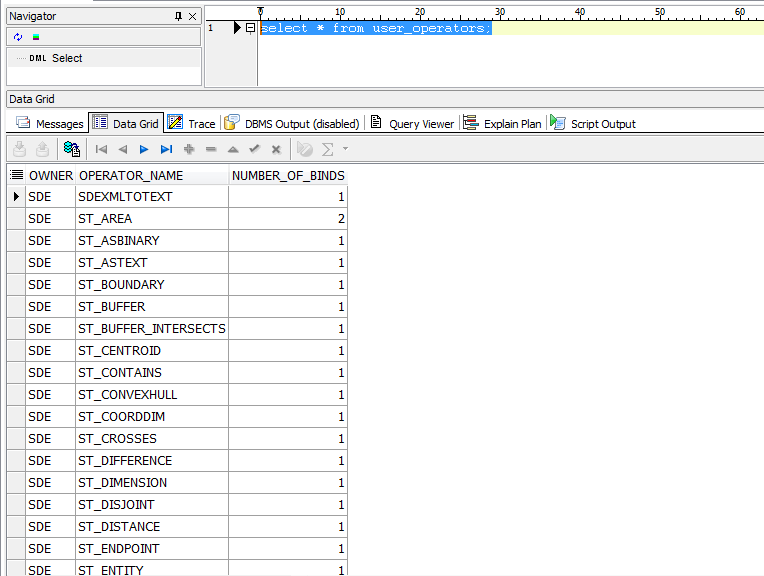
so i compared the list of operators between my current geodatabase that i need to upgrade to another 10.0 geodatabase instance, using the sql query: select * from user_operators;

Image


after comparing the two lists, i found out the “missing” operators and i have created them.

In order to extract the sql definition of the operator use the following query as an example:

select dbms_metadata.get_ddl(‘OPERATOR’,’ST_WITHIN’) from dual;

after creating all missing operators, try executing the previous sql query mentioned: “CREATE OR REPLACE INDEXTYPE “SDE”.”ST_SPATIAL_INDEX

then use the following sql, to check indextype was created:

select * from user_indextypes;

Image

I re-ran the upgrade again, and it was SUCCESSFUL !

SQL Query Reference:

Query Reference:

select * from user_operators;

select * from user_indextypes;

select dbms_metadata.get_ddl(‘INDEXTYPE’,’ST_SPATIAL_INDEX’) from dual;

select dbms_metadata.get_ddl(‘OPERATOR’,’ST_WITHIN’) from dual;