I have an already existing virtual machine with oracle linux 8 in-place, so the next step is to download the RPM package for oracle 23ai from this website:
Specify a password to be used for database accounts. Oracle recommends that the password entered should be at least 8 characters in length, contain at least 1 uppercase character, 1 lower case character and 1 digit [0-9]. Note that the same password will be used for SYS, SYSTEM and PDBADMIN accounts:
Confirm the password:
dummy password used====> 23ai#2024
After that set your environment variables as follows:
DBMS_DICTIONARY_CHECK package has been back-ported from 23c to oracle 19c when applying January 2024 RU [19.22]. The package is a read-only PL/SQL package procedure that helps you identify Oracle Database dictionary. its in some sense the evolution of hcheck.sql script that you need to download and install, this is not needed anymore … this package is now available as built-in is really a positive move.
To Run the Package to examine your database state:
SQL> set serveroutput on size unlimited SQL> execute dbms_dictionary_check.full;
A detailed report will be generated as shown below:
To Check “Critical” Findings and the status:
SQL> execute dbms_dictionary_check.critical
The following are the 3 main areas that package will consider and flag “Critical”and should be in “PASS” or valid state otherwise it has negative impact and will require your attention/fix:
UndoSeg: Checks that undo segment has a valid entry in SEG$ (My Oracle Support Note 1360527.1) MaxControlfSeq: Checks if Control Seq is near the limit (My Oracle Support Note 2128446.1) InvalidTSMaxSCN: Checks for invalid SCN entries in tablespaces (My Oracle Support Note 1360208.1)
To Run a FULL Repair for the reported findings:
SQL> set serveroutput on size unlimited SQL> EXECUTE dbms_dictionary_check.full(repair=>TRUE);
My Final Post in 2023, weird issue was faced where a database system after Linux operating system reboot startups in a defect way. when you attempt to connect through Bequeath Protocol:
ERROR: ORA-12547: TNS:lost contact
After investigation….The Solution:
cat /etc/oratab
current entry was the following:
ORCLCDB:/opt/oracle/product/19c/dbhome_1/:Y
changed it to:
ORCLCDB:/opt/oracle/product/19c/dbhome_1:Y
the extra ‘/‘ was causing the problem !
Typo’s can cause serious problems…it took some time to figure out the problem.
Prior to Oracle 23c release you have two options for OPEN_MODE with pluggable databases either read/write (default mode) or read only.
With read-only mode all types of accounts (local PDB accounts) or common-user accounts can perform read-only operations on the pluggable database tables.
In oracle 23c a new mode is introduced which is hybrid read-only mode…(local PDB accounts) can perform ONLY read operations against tables while common-user accounts can performed read/write operations against tables in the pluggable database system.
Let us check the traditional v$pdbs view to check my current 23c pluggable databases OPEN_MODE
SQL> select name, open_mode from v$pdbs;
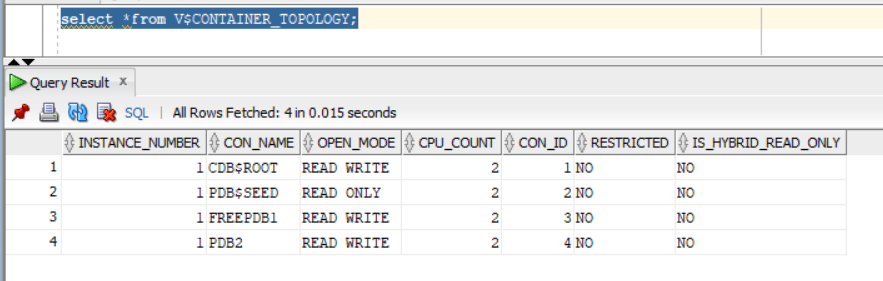
Also, let us explore the NEW database view V$CONTAINER_TOPOLOGY that includes the column IS_HYBRID_READ_ONLY:
SQL> select *from V$CONTAINER_TOPOLOGY;
— will create common user called C##DBA granted DBA role
SQL> CREATE USER C##DBA IDENTIFIED BY test123 CONTAINER=ALL;
SQL> grant dba to C##DBA CONTAINER=ALL;
SQL> alter user C##DBA default role all;
— will create local user in pluggable database PDB2 with the name dba1
SQL> create user dba1 identified by test123;
SQL> grant dba to dba1;
SQL> alter user dba1 default role all;
Now, Let us enable hybrid read only mode:
sqlplus / as sysdba
SQL> ALTER PLUGGABLE DATABASE PDB2 CLOSE IMMEDIATE;
Pluggable database altered.
SQL> ALTER PLUGGABLE DATABASE PDB2 OPEN HYBRID READ ONLY;
Pluggable database altered.
Checking from container level the pluggable database PDB2 is now open with “Hybrid Read Only”mode:
Let us test the expected functionality:
As local user I will be able to perform “SELECT” queries only….any data modification queries such as insert,update,delete will not work:
sqlplus “dba1/test123″@PDB2
SQL> select * from hr.table1;
FNAME LANAME
——————– ——————–
EMAD AL-MOUSA
Tim Allen
SQL> insert into hr.table1 values (‘Adam’,’Smith’);
insert into hr.table1 values (‘Adam’,’Smith’)
*
ERROR at line 1:
ORA-16000: Attempting to modify database or pluggable database that is open for
read-only access.
Now, let us try with common-user C##DBA….the account should be able to do all kind of operations (SELECT,INSERT,UPDATE,DELETE) unlike “local”database account:
sqlplus “C##DBA/test123″@PDB2
SQL> select * from hr.table1;
FNAME LANAME
——————– ——————–
EMAD AL-MOUSA
Tim Allen
SQL> insert into hr.table1 values (‘Adam’,’Smith’);
1 row created.
SQL> commit;
Commit complete.
Someone would ask…nice feature but what benefits does it provide ?
It will help with “maintenance” activities where you want to restrict application account from performing any data modifications for some time and only DBA container level can modify data.
It will help with patching especially with datapatch step where SQL code modification is required to be done with NO locking in-place.
It can help with forensics activities and investigation, to limit accounts within pluggable database level from performing any data modification while analysis and investigation is in-place.
PATH_PREFIX is a parameter used while pluggable database is being created to ensure user-level directories are created in a certain pre-defined directory in the operating system. The parameter is optional and must be specified during database creation.
How to know the parameter value of PATH_PREFIX in a pluggable database….you can know that using cdb_properties view in a pluggable database level:
sqlplus / as sysdba
SQL> alter session set container=PDB2;
SQL> select * from cdb_properties where PROPERTY_NAME=’PATH_PREFIX’;
The parameter was introduced in Oracle 12cR2 as a security in enhancement in CDB architecture.
Interesting part when you apply the RU (Release Update) (implicit re-linking of the database binaries happen) which impacts extjob binary executable ownership and permission.
so, after patching its highly recommended that your run root.sh script again (either through sudo or ask your OS admin to run it)
As shown below the executable is now owned by root with 4750 permission





 Geodata Master