**** CHECKING UP SQL COMMANDS:
SQL> archive log list
****No ArchiveLog Mode:
shutdown immediate;
startup mount;
alter database noarchivelog;
alter database open;
**** CHECKING UP SQL COMMANDS:
SQL> archive log list
****No ArchiveLog Mode:
shutdown immediate;
startup mount;
alter database noarchivelog;
alter database open;
i tried to drop an oracle user and i faced the following error:
the resolution:
use the following query to find where the lock is occurring
SELECT O.OBJECT_NAME, S.SID, S.SERIAL#, P.SPID, S.PROGRAM,S.USERNAME,
S.MACHINE,S.PORT , S.LOGON_TIME,SQ.SQL_FULLTEXT
FROM V$LOCKED_OBJECT L, DBA_OBJECTS O, V$SESSION S,
V$PROCESS P, V$SQL SQ
WHERE L.OBJECT_ID = O.OBJECT_ID
AND L.SESSION_ID = S.SID AND S.PADDR = P.ADDR
AND S.SQL_ADDRESS = SQ.ADDRESS;
check the results and kill whatever sessions that is causing the lock.
if you need to change a field in a feature class from “Number” to “Text” you can not do that on the Fly…..
my recommendation: create an empty duplicate feature class, while defining the new column field to “Text”, then upload the data from the original feature class.
Hope This Helps 😉
Regards,
For All ArcSDE Geodatabase administrators, i have tested running the ArcSDE application server while Oracle listener was down , and ……….IT WORKS FINE.
The below errors were faced while trying to edit layers (feature classes):
Could not load data from the data source.If you can correct the problem, press the refresh button to reload data.Possible problems can include bad network connection, invalid field,etc.
Underlying DBMS error [Error executing stored procedure <schema>.logfile_util.logfile_pool_get_id::ORA-01403: no data found]
underlying DBMS error[ORA-01536:space quota exceeded for tablespace ‘TS_SDE_LOG_DATA_01’
have been fixed by changing the parameter “maxblobsize” under “SERVER_CONFIG” table in SDE schema.
The command to use:
sdeconfig -o alter -u sde -v maxblobsize=5000000 -i XXXX -s XX
XXXX: sde port number
XX: your server name (hosting your SDE)
The following are the steps in lengthy details for first timers:
The oracle user schema geodatabase (XXXX) should have the following privileges:
GRANT DBA TO XXXX;
GRANT CREATE TYPE TO XXXX;
GRANT CREATE ANY TRIGGER TO XXXX;
GRANT EXECUTE ANY PROCEDURE TO XXXX;
GRANT GRANT ANY ROLE TO XXXX;
GRANT CREATE ANY SEQUENCE TO XXXX;
GRANT CREATE ANY VIEW TO XXXX;
GRANT DROP ANY TABLE TO XXXX;
GRANT DROP ANY PROCEDURE TO XXXX;
GRANT CREATE OPERATOR TO XXXX;
GRANT CREATE ANY PROCEDURE TO XXXX;
GRANT CREATE VIEW TO XXXX;
GRANT ANALYZE ANY TO XXXX;
GRANT CREATE PUBLIC SYNONYM TO XXXX;
GRANT CREATE LIBRARY TO XXXX;
GRANT CREATE PROCEDURE TO XXXX;
GRANT CREATE ANY INDEX TO XXXX;
GRANT GRANT ANY OBJECT PRIVILEGE TO XXXX;
GRANT GRANT ANY PRIVILEGE TO XXXX;
GRANT DROP ANY SEQUENCE TO XXXX;
GRANT CREATE SEQUENCE TO XXXX;
GRANT DROP ANY VIEW TO XXXX;
GRANT DROP PUBLIC SYNONYM TO XXXX;
GRANT ALTER ANY INDEX TO XXXX;
GRANT CREATE ANY TABLE TO XXXX;
GRANT CREATE TABLE TO XXXX;
GRANT ADMINISTER DATABASE TRIGGER TO XXXX;
GRANT CREATE TRIGGER TO XXXX;
GRANT SELECT ANY SEQUENCE TO XXXX;
GRANT DROP ANY INDEX TO XXXX;
GRANT SELECT ANY TABLE TO XXXX;
GRANT ALTER ANY TABLE TO XXXX;
GRANT CREATE SESSION TO XXXX;
GRANT CREATE INDEXTYPE TO XXXX;
GRANT EXECUTE ON SYS.DBMS_LOCK TO SSDGDB;
GRANT EXECUTE ON SYS.DBMS_PIPE TO SSDGDB;
where XXXX is the user schema geodatabase.
you need to export your DBTUNE file and change the parameter DATA_DICTIONARY.
sdedbtune -o export -f DBTUNE_XXX -i 5151 -u sde
after exporting replace the DATA_DICTIONARY section with the following:
##DATA_DICTIONARY
UI_TEXT “”
XML_IDX_INDEX_STRING “PCTFREE 0 INITRANS 4 NOLOGGING”
XML_IDX_INDEX_PK “PCTFREE 0 INITRANS 4 NOLOGGING”
XML_IDX_INDEX_ID “PCTFREE 0 INITRANS 4 NOLOGGING”
XML_IDX_INDEX_DOUBLE “PCTFREE 0 INITRANS 4 NOLOGGING”
XML_DOC_VAL_LOB_STORAGE “NOCACHE NOLOGGING CHUNK 4K PCTVERSION 5 DISABLE STORAGE IN ROW”
XML_DOC_UNCOMPRESSED_TYPE “BLOB”
XML_DOC_TEXT_TYPE “LONGRAW”
XML_DOC_STORAGE “PCTFREE 0 INITRANS 4”
XML_DOC_MODE “COMPRESSED”
XML_DOC_LOB_STORAGE “NOCACHE NOLOGGING CHUNK 4K PCTVERSION 5 DISABLE STORAGE IN ROW”
XML_DOC_INDEX “PCTFREE 0 INITRANS 4 NOLOGGING”
XML_COLUMN_STORAGE “SDE_XML”
S_STORAGE “PCTFREE 10 PCTUSED 90 INITRANS 4 STORAGE (FREELISTS 4 MINEXTENTS 1 PCTINCREASE 0)”
S_INDEX_SP_FID “PCTFREE 10 INITRANS 4 STORAGE (FREELISTS 4 MINEXTENTS 1 PCTINCREASE 0) NOLOGGING”
S_INDEX_ALL “PCTFREE 10 INITRANS 4 STORAGE (FREELISTS 4 MINEXTENTS 1 PCTINCREASE 0) NOLOGGING”
RASTER_STORAGE “BLOB”
RAS_STORAGE “PCTFREE 10 PCTUSED 90 INITRANS 4 STORAGE ( MINEXTENTS 1 MAXEXTENTS UNLIMITED PCTINCREASE 0 FREELISTS 4)”
RAS_INDEX_ID “PCTFREE 10 INITRANS 4 STORAGE ( MINEXTENTS 1 MAXEXTENTS UNLIMITED PCTINCREASE 0 FREELISTS 4) NOLOGGING”
GEOMETRY_STORAGE “SDEBINARY”
F_STORAGE “PCTFREE 10 PCTUSED 90 INITRANS 4 STORAGE (FREELISTS 4 MINEXTENTS 1 PCTINCREASE 0)”
F_INDEX_LEN “PCTFREE 10 INITRANS 4 STORAGE (FREELISTS 4 MINEXTENTS 1 PCTINCREASE 0) NOLOGGING”
F_INDEX_FID “PCTFREE 10 INITRANS 4 STORAGE (FREELISTS 4 MINEXTENTS 1 PCTINCREASE 0) NOLOGGING”
F_INDEX_AREA “PCTFREE 10 INITRANS 4 STORAGE (FREELISTS 4 MINEXTENTS 1 PCTINCREASE 0) NOLOGGING”
D_STORAGE “PCTFREE 10 PCTUSED 90 INITRANS 4 STORAGE (FREELISTS 4 MINEXTENTS 1 PCTINCREASE 0)”
D_INDEX_STATE_ROWID “PCTFREE 10 INITRANS 4 STORAGE (FREELISTS 4 MINEXTENTS 1 PCTINCREASE 0) NOLOGGING”
D_INDEX_DELETED_AT “PCTFREE 10 INITRANS 4 STORAGE (FREELISTS 4 MINEXTENTS 1 PCTINCREASE 0) NOLOGGING”
BND_STORAGE “PCTFREE 10 PCTUSED 90 INITRANS 4 STORAGE ( MINEXTENTS 1 MAXEXTENTS UNLIMITED PCTINCREASE 0 FREELISTS 4)”
BND_INDEX_ID “PCTFREE 10 INITRANS 4 STORAGE ( MINEXTENTS 1 MAXEXTENTS UNLIMITED PCTINCREASE 0 FREELISTS 4) NOLOGGING”
BND_INDEX_COMPOSITE “PCTFREE 10 INITRANS 4 STORAGE ( MINEXTENTS 1 MAXEXTENTS UNLIMITED PCTINCREASE 0 FREELISTS 4) NOLOGGING”
BLK_STORAGE “PCTFREE 10 PCTUSED 90 INITRANS 4 STORAGE ( MINEXTENTS 1 MAXEXTENTS UNLIMITED PCTINCREASE 0 FREELISTS 4)”
BLK_INDEX_COMPOSITE “PCTFREE 10 INITRANS 4 STORAGE ( MINEXTENTS 1 MAXEXTENTS UNLIMITED PCTINCREASE 0 FREELISTS 4) NOLOGGING”
B_INDEX_XML “PCTFREE 0 INITRANS 4 NOLOGGING”
B_INDEX_TO_DATE “PCTFREE 0 INITRANS 4 NOLOGGING”
B_INDEX_SHAPE “PCTFREE 10 INITRANS 4 STORAGE (FREELISTS 4 MINEXTENTS 1 PCTINCREASE 0) NOLOGGING”
B_INDEX_RASTER “PCTFREE 0 INITRANS 4 NOLOGGING”
AUX_STORAGE “PCTFREE 10 PCTUSED 90 INITRANS 4 STORAGE ( MINEXTENTS 1 MAXEXTENTS UNLIMITED PCTINCREASE 0 FREELISTS 4)”
AUX_INDEX_COMPOSITE “PCTFREE 10 INITRANS 4 STORAGE ( MINEXTENTS 1 MAXEXTENTS UNLIMITED PCTINCREASE 0 FREELISTS 4) NOLOGGING”
A_STORAGE “PCTFREE 10 PCTUSED 90 INITRANS 4 STORAGE (FREELISTS 4 MINEXTENTS 1 PCTINCREASE 0)”
A_INDEX_XML “PCTFREE 0 INITRANS 4 NOLOGGING”
A_INDEX_USER “PCTFREE 10 INITRANS 4 STORAGE (FREELISTS 4 MINEXTENTS 1 PCTINCREASE 0) NOLOGGING”
A_INDEX_STATEID “PCTFREE 10 INITRANS 4 STORAGE (FREELISTS 4 MINEXTENTS 1 PCTINCREASE 0) NOLOGGING”
A_INDEX_SHAPE “PCTFREE 10 INITRANS 4 STORAGE (FREELISTS 4 MINEXTENTS 1 PCTINCREASE 0) NOLOGGING”
A_INDEX_ROWID “PCTFREE 10 INITRANS 4 STORAGE (FREELISTS 4 MINEXTENTS 1 PCTINCREASE 0) NOLOGGING”
A_INDEX_RASTER “PCTFREE 0 INITRANS 4 NOLOGGING”
ATTRIBUTE_BINARY “BLOB”
MVTABLES_MODIFIED_INDEX “INITRANS 4 TABLESPACE SDE STORAGE (INITIAL 2M) NOLOGGING “
VERSIONS_INDEX “INITRANS 4 TABLESPACE SDE STORAGE (INITIAL 128K) NOLOGGING “
VERSIONS_TABLE “INITRANS 4 TABLESPACE SDE STORAGE (INITIAL 256K) “
STATES_TABLE “INITRANS 4 TABLESPACE SDE STORAGE (INITIAL 1M) “
STATE_LINEAGES_INDEX “PCTFREE 0 INITRANS 4 TABLESPACE SDE STORAGE (INITIAL 5M) NOLOGGING “
B_INDEX_USER “PCTFREE 0 INITRANS 4 TABLESPACE SDE STORAGE (INITIAL 40K) NOLOGGING “
B_STORAGE “PCTFREE 0 INITRANS 4 TABLESPACE SDE STORAGE (INITIAL 40K) “
XMLDB_INDEX_TAG “YES”
XMLDB_INDEX_FULLTEXT “NO”
XML_IDX_TEXT_UPDATE_METHOD “NONE”
XML_IDX_TEXT_UPDATE_MEMORY “”
XML_IDX_TEXT_TAG_STORAGE “”
XML_IDX_STORAGE “PCTFREE 0 INITRANS 4”
XML_IDX_INDEX_TEXT “”
XML_IDX_INDEX_TAG “PCTFREE 0 INITRANS 4 NOLOGGING”
XML_INDEX_TAGS_INDEX “INITRANS 5 TABLESPACE SDE STORAGE (INITIAL 1M) “
XML_INDEX_TAGS_TABLE “INITRANS 4 TABLESPACE SDE STORAGE (INITIAL 1M) “
MVTABLES_MODIFIED_TABLE “INITRANS 4 TABLESPACE SDE STORAGE (INITIAL 2M) “
STATES_INDEX “INITRANS 5 TABLESPACE SDE STORAGE (INITIAL 128K) NOLOGGING “
STATE_LINEAGES_TABLE “PCTFREE 0 INITRANS 4 TABLESPACE SDE STORAGE (INITIAL 7M) “
B_INDEX_ROWID “PCTFREE 0 INITRANS 4 TABLESPACE SDE STORAGE (INITIAL 40K) NOLOGGING “
END
Then Import the DBTUNE file again:
sdedbtune -o import -f DBTUNE_XXX -i 5151 -u sde
after that you can proceed with executing the sdesetup command to create the user schema geodatabse:
sdesetup –o install –d ORACLE11G –u XXXX –i 5151:XXXX
Where XXXX: is the schema geodatabase name
Then Execute the following SDE Command:
sdesetup –o install –d ORACLE11G –u XXXX –i 5151:XXXX
XXXX: is your user schema geodatabase
Notes:
If for some reason the geodatabase was not successfully created. You can deleted it using:
sdesetup -o delete -d ORACLE11G -u XXXX -i 5151:XXXX
You Need to check under your SDE Schema that the system table “INSTANCE” has a new entry with your new user schema geodatabase “XXXX”.
Also you need to check under the newly created user schema geodatbase “XXXX” that in the system table “VERSIONS” has an entry:
NAME – OWNER – VERSION_ID – STATUS – STATE_ID – DESCRIPTION
DEFAULT XXXX 1 1 0 Instance default version.
The new schema’s created under the user schema geodatabase should be created using “SDE” user. you can grant the schema the following privileges:
GRANT RESOURCE TO “schema”
ALTER USER “schema”DEFAULT ROLE ALL;
GRANT CREATE TABLE TO “schema”;
GRANT CREATE SESSION TO “schema”;
you can create multiple schemas under your user schema geodatbase, and those will be isolated from the master SDE schema geodatabase. if you look under “TABLE_REGISTRY” in your user schema geodatbase you will find only the tables and objects you have created under the schema user geodatabase.
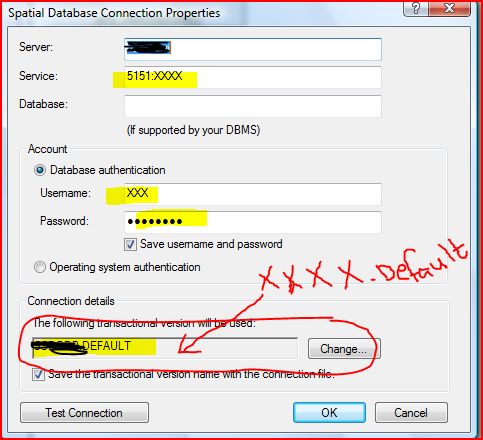
The below image shows how to connect in ArcCatalog 10.0 for user schema geodatabase:
For ArcCatalog 10.2 the connection is described in this link:
http://resources.arcgis.com/en/help/main/10.2/index.html#//002n00000031000000
One of the things i have found by coincidence in Oracle 11g is when you try to create a materialized view by a non-schema user (even if he has a ‘DBA‘ privilege), you will face the following error:
ERROR at line 1: ORA-01031: insufficient privileges
although the user is powerful but he could not create the materialized view under any schema (in the following example the schema name is “sico“).
SQL> CREATE MATERIALIZED VIEW sico.test_mv AS SELECT * FROM dual;
CREATE MATERIALIZED VIEW sico.test_mv AS SELECT * FROM dual
*
ERROR at line 1:
ORA-01031: insufficient privileges
you can create a materialized view using the schema owner after granting him the “create table” privilege.
check it and see !!!
I personally faced this in Oracle 11gR2.
Table (SICO.T_DUMMY) was found in GDB_ObjectClasses, but does not exist in the database. Skipping.
DBMS table not found [ORA-04043: object SICO.T_DUMMY does not exist]
This “warning” message is being displayed in the log while running the “pre-requisite” upgrade option in ArcCatalog.
You can still proceed with the upgrade since it’s an “orphan issue” . Remark: warning message are displayed in “Green” color in ArcGIS Desktop.
Solution:
Through SQLPLUS or other database management tools (TOAD, Sql Developer), re-create the table using sql command.
In our example case: CREATE TABLE SICO.T_DUMMY ( OBJECTID INTEGER NOT NULL );
Then connect in ArcGIS Desktop (ArcCatalog) using the schema owner where the table is stored in (in our example schema name is “SICO”).
You will find the table T_DUMMY , then delete it. This will clean SDE metadata.
Reference Links:
http://support.esri.com/en/knowledgebase/techarticles/detail/34050
http://forums.arcgis.com/threads/72827-Clean-up-orphaned-records-in-the-SDE-repository-tables
While dropping the tablespace the following error occurred:
Connected to:
Oracle Database 11g Enterprise Edition Release 11.2.0.3.0 – 64bit Production
With the Partitioning, OLAP, Data Mining and Real Application Testing options
SQL> DROP TABLESPACE TS_XXX_DATA_01 INCLUDING CONTENTS AND DATAFILES;
DROP TABLESPACE TS_XXX_DATA_01 INCLUDING CONTENTS AND DATAFILES
*
ERROR at line 1:
ORA-00604: error occurred at recursive SQL level 1
ORA-02429: cannot drop index used for enforcement of unique/primary key
Solution:
Use the command:
DROP TABLESPACE TS_XXX_DATA_01 INCLUDING CONTENTS AND DATAFILES cascade constraints;
If you still face issues:
Use this query to find out where are the constraint exists within your tablespace:
select * from dba_segments where tablespace_name= ‘TS_XXX_DATA_01’;
Google has released a ‘connector’ between “Google Map Engine” and ArcGIS Desktop. This will enable end-users to utilize ArcGIS Desktop capabilities with Google Content.
reference links:
https://github.com/googlemaps/mapsengine-arcgis-connector
http://blogs.esri.com/esri/arcgis/2013/10/22/googles-arcgis-toolbar-for-the-cloud/