My Final Post in 2023, weird issue was faced where a database system after Linux operating system reboot startups in a defect way. when you attempt to connect through Bequeath Protocol:
ERROR: ORA-12547: TNS:lost contact
After investigation….The Solution:
cat /etc/oratab
current entry was the following:
ORCLCDB:/opt/oracle/product/19c/dbhome_1/:Y
changed it to:
ORCLCDB:/opt/oracle/product/19c/dbhome_1:Y
the extra ‘/‘ was causing the problem !
Typo’s can cause serious problems…it took some time to figure out the problem.
Prior to Oracle 23c release you have two options for OPEN_MODE with pluggable databases either read/write (default mode) or read only.
With read-only mode all types of accounts (local PDB accounts) or common-user accounts can perform read-only operations on the pluggable database tables.
In oracle 23c a new mode is introduced which is hybrid read-only mode…(local PDB accounts) can perform ONLY read operations against tables while common-user accounts can performed read/write operations against tables in the pluggable database system.
Let us check the traditional v$pdbs view to check my current 23c pluggable databases OPEN_MODE
SQL> select name, open_mode from v$pdbs;
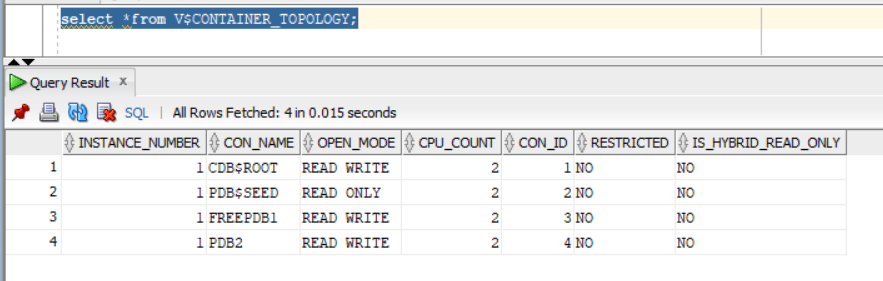
Also, let us explore the NEW database view V$CONTAINER_TOPOLOGY that includes the column IS_HYBRID_READ_ONLY:
SQL> select *from V$CONTAINER_TOPOLOGY;
— will create common user called C##DBA granted DBA role
SQL> CREATE USER C##DBA IDENTIFIED BY test123 CONTAINER=ALL;
SQL> grant dba to C##DBA CONTAINER=ALL;
SQL> alter user C##DBA default role all;
— will create local user in pluggable database PDB2 with the name dba1
SQL> create user dba1 identified by test123;
SQL> grant dba to dba1;
SQL> alter user dba1 default role all;
Now, Let us enable hybrid read only mode:
sqlplus / as sysdba
SQL> ALTER PLUGGABLE DATABASE PDB2 CLOSE IMMEDIATE;
Pluggable database altered.
SQL> ALTER PLUGGABLE DATABASE PDB2 OPEN HYBRID READ ONLY;
Pluggable database altered.
Checking from container level the pluggable database PDB2 is now open with “Hybrid Read Only”mode:
Let us test the expected functionality:
As local user I will be able to perform “SELECT” queries only….any data modification queries such as insert,update,delete will not work:
sqlplus “dba1/test123″@PDB2
SQL> select * from hr.table1;
FNAME LANAME
——————– ——————–
EMAD AL-MOUSA
Tim Allen
SQL> insert into hr.table1 values (‘Adam’,’Smith’);
insert into hr.table1 values (‘Adam’,’Smith’)
*
ERROR at line 1:
ORA-16000: Attempting to modify database or pluggable database that is open for
read-only access.
Now, let us try with common-user C##DBA….the account should be able to do all kind of operations (SELECT,INSERT,UPDATE,DELETE) unlike “local”database account:
sqlplus “C##DBA/test123″@PDB2
SQL> select * from hr.table1;
FNAME LANAME
——————– ——————–
EMAD AL-MOUSA
Tim Allen
SQL> insert into hr.table1 values (‘Adam’,’Smith’);
1 row created.
SQL> commit;
Commit complete.
Someone would ask…nice feature but what benefits does it provide ?
It will help with “maintenance” activities where you want to restrict application account from performing any data modifications for some time and only DBA container level can modify data.
It will help with patching especially with datapatch step where SQL code modification is required to be done with NO locking in-place.
It can help with forensics activities and investigation, to limit accounts within pluggable database level from performing any data modification while analysis and investigation is in-place.
PATH_PREFIX is a parameter used while pluggable database is being created to ensure user-level directories are created in a certain pre-defined directory in the operating system. The parameter is optional and must be specified during database creation.
How to know the parameter value of PATH_PREFIX in a pluggable database….you can know that using cdb_properties view in a pluggable database level:
sqlplus / as sysdba
SQL> alter session set container=PDB2;
SQL> select * from cdb_properties where PROPERTY_NAME=’PATH_PREFIX’;
The parameter was introduced in Oracle 12cR2 as a security in enhancement in CDB architecture.
Interesting part when you apply the RU (Release Update) (implicit re-linking of the database binaries happen) which impacts extjob binary executable ownership and permission.
so, after patching its highly recommended that your run root.sh script again (either through sudo or ask your OS admin to run it)
As shown below the executable is now owned by root with 4750 permission
Datapump bundle patches are special patches for datapump component of the Oracle database system, and can be applied “AFTER” the main database patch is applied…The RU (release update) patch needs to be already applied on the Oracle DB System.
its important to mention that this patch is considered “Non-Binary Online Patch” which means you can apply it while database is up and running fine. However, you need to make sure no datapump jobs are currently running while applying the patch.
The benefits of applying this patch are many…for example bug fixes for datapump component will be fixed, it will speed up datapump operations…etc.
First, check there are No pre-requisite conflicts:
Then, go to the directory where the datapump patch is located:
cd /var/DATAPUMP_BUNDLE_PATCH_19.19.0.0.0/35261302
After that, apply the patch through OPATCH utility (use latest one)
[oracle@oracle-19c]$ $ORACLE_HOME/OPatch/opatch apply Oracle Interim Patch Installer version 12.2.0.1.37 Copyright (c) 2023, Oracle Corporation. All rights reserved.
Oracle Home : /opt/oracle/product/19c/dbhome_1 Central Inventory : /opt/oracle/oraInventory from : /opt/oracle/product/19c/dbhome_1/oraInst.loc OPatch version : 12.2.0.1.37 OUI version : 12.2.0.7.0 Log file location : /opt/oracle/product/19c/dbhome_1/cfgtoollogs/opatch/opatch2023-04-20_15-38-36PM_1.log
Verifying environment and performing prerequisite checks… OPatch continues with these patches: 35261302
Do you want to proceed? [y|n] y User Responded with: Y All checks passed. Backing up files… Applying interim patch ‘35261302’ to OH ‘/opt/oracle/product/19c/dbhome_1’
Then, go to the OPATCH directory location and run datapatch perl script:
cd $ORACLE_HOME/OPatch
./datapatch -verbose
Log file for this invocation: /opt/oracle/cfgtoollogs/sqlpatch/sqlpatch_4829_2023_04_21_11_13_37/sqlpatch_invocation.log
Connecting to database…OK Gathering database info…done
Note: Datapatch will only apply or rollback SQL fixes for PDBs that are in an open state, no patches will be applied to closed PDBs. Please refer to Note: Datapatch: Database 12c Post Patch SQL Automation (Doc ID 1585822.1)
Bootstrapping registry and package to current versions…done Error: prereq checks failed! verify_queryable_inventory returned ORA-20001: Latest xml inventory is not loaded into table Prereq check failed, exiting without installing any patches.
Please refer to MOS Note 1609718.1 and/or the invocation log /opt/oracle/cfgtoollogs/sqlpatch/sqlpatch_4829_2023_04_21_11_13_37/sqlpatch_invocation.log
And, that’s it….its online operation without the need to be done in maintenance windows (database services shutdown activity).
Oracle has introduced a very good and much needed feature which is the ability to grant object level permissions on schema level scope. In the past if you have a schema with many tables under it and you want to grant the application account SELECT permission on these tables…you have 2 options:
Option 1: performing the grant select explicitly on each table in the schema…so if you have 300 tables in your schema “HR”…you will execute : GRANT SELECT on HR.XXXX to HR_APP for each table. And any newly introduced set of tables will require the re-grant operation against them.
Option 2: granting the application account “HR_APP” select any table permissions….which is very excessive permission and violates the security boundary if you are in a multi-hosting environment as the account will have access to tables in other schemas.
Let us explore 23c feature:
I will create two tables in HR schema and populate it with dummy data.
insert into HR.DEPARTMENTS values(‘IT’,’CG981258′,320,’IT-1′);
commit;
insert into HR.DEPARTMENTS values(‘FINANCE’,’CG96251′,166,’FIN-1′);
commit;
insert into HR.DEPARTMENTS values(‘AUDIT’,’CG400311′,320,’AUD-1′);
commit;
Now, using the new SQL command feature:
SQL> grant select any table on schema HR to HR_APP;
When accessing the database using application account HR_APP , the account will be able to view the data for the two existing tables:
This is great….and this will be applied automatically to newly created tables….I will create a dummy table based on departments table and HR_APP will be able to view the data:
SQL> create table HR.DUMMY as select * from HR.DEPARTMENTS;
In Oracle database there is a component called “Automatic Workload Repository” (AWR). AWR collects, processes, and maintains performance statistics for the database.
Moreover, AWR is taken by default on hourly basis and these snapshots are by default stored in SYSAUX tablespace. One of the reasons why you would like to offload AWR to a different tablepsace is because you might have many components in your database and they are installed in SYSAUX so you would like to have a separate space for it.
In this blog post, I will illustrate how can you store AWR in user-tablespace instead of SYSAUX:
First, I will create a user tablespace and will call it TS_AWR
Then, execute the following dbms_workload_repository package to change database snapshot settings, to find DBID for a pluggable database [select dbid from v$pdbs]:
Oracle database patching is one of the major processes/actions if you are a DBA/System Admin handling huge oracle database platform…patching is a must to protect your organizations data as serious security vulnerabilities will be fixed/mitigated with these patches. Oracle releases quarterly patches (every 3 months) and they are called RU (release updates) and they are cumulative patches. So, if you “miss”one the next one will contain fixes from previous patches. And recently Oracle release MRP’s (Monthly Recommended Patches) on top of your base RU for fixing operational bugs that you might face afterwards.
For Non-DBA readers the process of patching takes two phases:
Phase 1: Patching the database on binary level
Phase 2: Patching the database it-self from SQL level
Of course there are pre-requisite steps such as downloading the patch itself, downloading the latest OPatch utility (java based utility)…I have blogged many times about “patching process”and you can check my old posts about this topic:
The new thing I want to shed-light about in this blog/article is the datapatch parameters (really useful) that most technical analysts are not aware of….since by default and based on standard procedure in “Phase 2” we run the following datapatch command while the database is up and running:
cd $ORACLE_HOME/OPatch
./datapatch -verbose
Instead run the help command:
./datapatch –help
And there is a long list of parameters with their explanation….one parameter that is really helpful and interesting is sanity_checks
It will report to you if your database environment is ready for SQL patching or not….this is great to know in advance before any maintenance window you are planning to patch your database system in.
cd $ORACLE_HOME/OPatch
./datapatch -sanity_checks
A long list of output will be generated and displayed and will report to you warning messages …for example in my sandbox environment PDB2 pluggable database is in “mount”state :
Interesting part also, it will check third party security products that are used as for multiple purposes such as DAM (database activity monitoring) and VA (Vulnerability Assessment Scans) and they are IBM Guardium and Imperva
Oracle database listener is the TCP/IP communication protocol that end-connections from different sources (Applications, Services, Client Apps….etc) use to connect to the back-end Oracle database system.
The listener logs every authentication taking place in a listener log file (XML, and TEXT) formats. The listener log text format accumulates in size over time and with the growth of the size of this file this…..it might impact your database authentication performance. In addition, Listener log file is a good source for “forensic” investigation . So, it must be retained some time based on your internal policies and needs.
How to rotate your listener log file ?
Add the following 2 parameters in your listener.ora file ( located traditional in the following path $ORACLE_HOME/network/admin )