Enhancing Oracle Database System IO Performance: filesystemio_options Parameter

There is an Oracle database parameter filesystemio_options that I found out most DBA’s are not aware of.  First, this parameter can be used if your environment is NOT based on ASM setup.

In default behaviour…In buffered I/O, the Operating System maintains its own cache of disk data. Rather than directly reading to or writing from a process buffer, data is read from the disk into the cache and copied to the process buffer or copied from the process into the cache and written from there to the disk. Moreover, read requests are processed through cached data without having to read it again from the disk and can prefetch data from the disk into the cache before processes request it, speeding reads for data.

The catch here is that Oracle database system is already has in-place buffer cache for (read,write) to disk operations, so there will be “double” operations going on from DB & OS and will cause CPU performance overhead. However, direct IO will bypass the double buffering overhead.

Add the following parameter in init.ora and re-start the database instance:

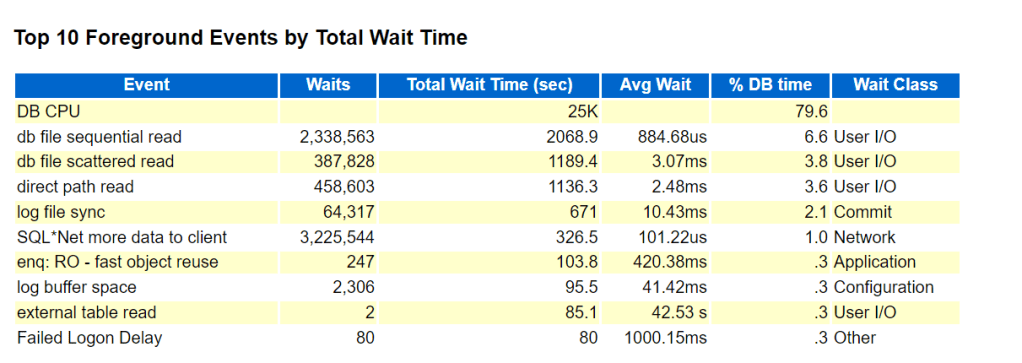
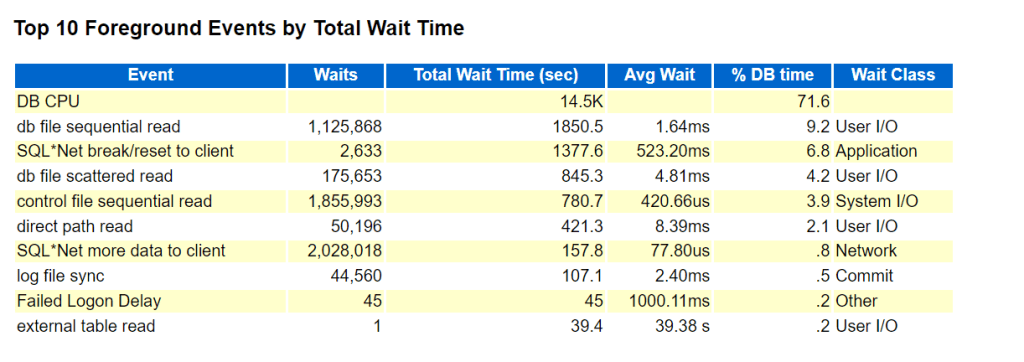
To observe the performance boost, generate AWR report before setting the parameter ( period of 1 week) and compare it after setting the parameter for 1 week report generation…..and the findings:

BEFORE PARAMETER SET:

AFTER PARAMETER SET:

DB CPU, db file sequential read, direct path read wait events are drastically improved as shown in BEFORE/AFTER figures.

Oracle VPD (Virtual Private Database) – row level security in 19c and 26ai

Introduction:

A virtual private database (VPD) is a security feature that masks data so that only a subset of the data appears to exist, without actually segregating data into different tables, schemas or databases.

Whenever a SQL query is executed, the relevant predicates for the involved tables are transparently collected and query results are returned with “filtered” rows based on database account session context.

By Default “DBA”role is not granted EXEMPT ACCESS POLICY system privilege.

SQL> select * from dba_sys_privs where privilege like ‘%EXEMPT ACCESS POLICY%’;

In 23ai the following are granted EXEMPT ACCESS POLICY system privilege:

Steps for the VPD setup Simulation:

SQL> CREATE USER sh1 IDENTIFIED BY sh1

DEFAULT TABLESPACE users TEMPORARY TABLESPACE temp;

GRANT connect, resource TO sh1;

alter user sh1 quota unlimited on users;

SQL> CREATE USER tbrooke IDENTIFIED BY tbrooke

DEFAULT TABLESPACE users TEMPORARY TABLESPACE temp;

GRANT connect, resource TO tbrooke;

SQL> CREATE USER owoods IDENTIFIED BY owoods

DEFAULT TABLESPACE users TEMPORARY TABLESPACE temp;

GRANT connect, resource TO owoods;

SQL>  CREATE USER sysadmin_vpd IDENTIFIED BY vpd CONTAINER = CURRENT;

GRANT CREATE SESSION, CREATE ANY CONTEXT, CREATE PROCEDURE, CREATE TRIGGER, ADMINISTER DATABASE TRIGGER TO sysadmin_vpd;

GRANT EXECUTE ON DBMS_SESSION TO sysadmin_vpd;

GRANT EXECUTE ON DBMS_RLS TO sysadmin_vpd;

SQL>  CREATE TABLE sh1.customers (

 cust_no    NUMBER(4),

 cust_email VARCHAR2(20),

 cust_name  VARCHAR2(20));

SQL> INSERT INTO sh1.customers VALUES (1234, ‘TBROOKE’, ‘Thadeus Brooke’);

SQL> INSERT INTO sh1.customers VALUES (5678, ‘OWOODS’, ‘Oberon Woods’);

SQL> commit;

SQL> CREATE TABLE sh1.orders_tab (

  cust_no  NUMBER(4),

  order_no NUMBER(4));

SQL> INSERT INTO sh1.orders_tab VALUES (1234, 9876);

SQL> INSERT INTO sh1.orders_tab VALUES (5678, 5432);

SQL> commit;

SQL>  GRANT READ ON sh1.customers  TO tbrooke, owoods;

SQL>  GRANT READ ON sh1.orders_tab TO tbrooke, owoods;

SQL> GRANT READ ON sh1.customers TO sysadmin_vpd;

sqlplus sysadmin_vpd/vpd@ORCLPDB1

SQL>  CREATE OR REPLACE CONTEXT orders_ctx USING orders_ctx_pkg;

SQL>  CREATE OR REPLACE PACKAGE orders_ctx_pkg IS

  PROCEDURE set_custnum;

 END;

/

SQL>  CREATE OR REPLACE PACKAGE BODY orders_ctx_pkg IS

  PROCEDURE set_custnum

  AS

    custnum NUMBER;

  BEGIN

     SELECT cust_no INTO custnum FROM SH1.CUSTOMERS

        WHERE cust_email = SYS_CONTEXT(‘USERENV’, ‘SESSION_USER’);

     DBMS_SESSION.SET_CONTEXT(‘orders_ctx’, ‘cust_no’, custnum);

  EXCEPTION

   WHEN NO_DATA_FOUND THEN NULL;

  END set_custnum;

END;

/

SQL>  CREATE OR REPLACE TRIGGER set_custno_ctx_trig AFTER LOGON ON DATABASE

 BEGIN

sysadmin_vpd.orders_ctx_pkg.set_custnum;

 END;

/

sqlplus tbrooke/tbrooke@ORCLPDB1

SQL> SELECT SYS_CONTEXT(‘orders_ctx’, ‘cust_no’) custnum FROM DUAL;

CUSTNUM

——————————————————————————–

1234

sqlplus sysadmin_vpd/vpd@ORCLPDB1

SQL>  CREATE OR REPLACE FUNCTION get_user_orders(

  schema_p   IN VARCHAR2,

  table_p    IN VARCHAR2)

 RETURN VARCHAR2

 AS

  orders_pred VARCHAR2 (400);

 BEGIN

  orders_pred := ‘cust_no = SYS_CONTEXT(”orders_ctx”, ”cust_no”)’;

 RETURN orders_pred;

END;

/

// Important Note: in 23ai you can’t define DBMS_RLS policy using sysadmin_vpd account, you can do that in 23ai using SYS account only….if you try in 23ai execute the below package an error [ORA-01031: insufficient privileges] will be thrown:

SQL>  BEGIN

 DBMS_RLS.ADD_POLICY (

  object_schema    => ‘sh1’,

  object_name      => ‘orders_tab’,

  policy_name      => ‘orders_policy’,

  function_schema  => ‘sysadmin_vpd’,

  policy_function  => ‘get_user_orders’,

  statement_types  => ‘select’,

  policy_type      => DBMS_RLS.CONTEXT_SENSITIVE,

  namespace        => ‘orders_ctx’,

  attribute        => ‘cust_no’);

END;

/

SQL> SELECT * FROM sh1.orders_tab;

   CUST_NO   ORDER_NO

———- ———-

      1234       9876

sqlplus owoods/owoods@ORCLPDB1

SQL> SELECT * FROM sh1.orders_tab;

   CUST_NO   ORDER_NO

———- ———-

      5678       5432

To Disable VPD policy:

BEGIN

DBMS_RLS.ENABLE_POLICY(‘SH1’, ‘ORDERS_TAB’, ‘ORDERS_POLICY’,FALSE);

END;

/

Oracle database datapatch ERROR SYS.KUPU$UTILITIES

After running datapatch…the following messages will be printed out:

ERROR:

Connecting to database…OK

Gathering database info…done

Bootstrapping registry and package to current versions…done

Error: prereq checks failed!

verify_queryable_inventory returned ORA-20001: Latest xml inventory is not loaded into table

Prereq check failed, exiting without installing any patches.

// After that let us check:

SQL> select * from OPATCH_XML_INV ;

ERROR:

ORA-29913: error in executing ODCIEXTTABLEOPEN callout

ORA-04063: ORA-04063: package body “SYS.KUPU$UTILITIES” has errors

ORA-06508: PL/SQL: could not find program unit being called:

“SYS.KUPU$UTILITIES”

ORA-06512: at line 1

has errors

First, check database components that ALL of them are VALID and OK:

select * from dba_registry;

Then,

SQL> @?/rdbms/admin/prvthpui.plb

SQL> @?/rdbms/admin/prvtbpui.plb

SQL> alter package KUPW$WORKER compile body;

Then Try again Querying The table again:

SQL> select * from opatch_xml_inv ;

SQL> select dbms_sqlpatch.verify_queryable_inventory from dual;

SQL> exit

SQL> select object_name,STATUS from dba_objects where object_name=’KUPU$UTILITIES’;

worst case scenario copy the object SQL code definition from a database where the object is “valid” in it and run it against the database system.

re-run datapatch again.

I hope this will help.

Enjoy your 2024 summer 🙂

Installing and Setting Up Oracle 23ai database release

I have an already existing virtual machine with oracle linux 8 in-place, so the next step is to download the RPM package for oracle 23ai from this website:

https://www.oracle.com/sa/database/free/get-started

Download the following RPM: oracle-database-free-23ai-1.0-1.el8.x86_64.rpm

As “root”user will start executing the following commands:

dnf install -y oracle-database-preinstall-23ai –skip-broken

dnf install -y /vagrant/oracle-database-free-23ai-1.0-1.el8.x86_64.rpm

Then executed the command:

/etc/init.d/oracle-free-23ai configure

Specify a password to be used for database accounts. Oracle recommends that the password entered should be at least 8 characters in length, contain at least 1 uppercase character, 1 lower case character and 1 digit [0-9]. Note that the same password will be used for SYS, SYSTEM and PDBADMIN accounts:

Confirm the password:

dummy password used====> 23ai#2024

After that set your environment variables as follows:

export ORACLE_BASE=/opt/oracle

export ORACLE_HOME=/opt/oracle/product/23ai/dbhomeFree

export ORACLE_SID=FREE

export PATH=$PATH:$ORACLE_HOME/bin

Then connect as sysdba:

sqlplus / as sysdba

dbms_dictionary_check package back-ported to 19c [19.22]

DBMS_DICTIONARY_CHECK package has been back-ported from 23c to oracle 19c when applying January 2024 RU [19.22]. The package is a read-only PL/SQL package procedure that helps you identify Oracle Database dictionary. its in some sense the evolution of hcheck.sql script that you need to download and install, this is not needed anymore … this package is now available as built-in is really a positive move.

To Run the Package to examine your database state:

SQL> set serveroutput on size unlimited
SQL> execute dbms_dictionary_check.full;

A detailed report will be generated as shown below:

To Check “Critical” Findings and the status:

SQL> execute dbms_dictionary_check.critical

The following are the 3 main areas that package will consider and flag “Critical”and should be in “PASS” or valid state otherwise it has negative impact and will require your attention/fix:

To Run a FULL Repair for the reported findings:

SQL> set serveroutput on size unlimited
SQL> EXECUTE dbms_dictionary_check.full(repair=>TRUE);

For further reference documentation: https://docs.oracle.com/en/database/oracle/oracle-database/23/arpls/dbms-dictionary-check.html#GUID-BD44F6AB-437B-4351-9CAE-9190675FAD21

Oracle 26ai Boolean Data Type

In Oracle 23c release you can now have a boolean data type in your table column, to illustrate:

I will create a dummy table and insert different values…note NULL is acceptable:

SQL> CREATE TABLE hr.example (id NUMBER, c1 BOOLEAN, c2 BOOL);

SQL> INSERT INTO hr.example VALUES (1, TRUE, NULL);

SQL> INSERT INTO hr.example VALUES (2, TRUE, 0);

SQL> INSERT INTO hr.example VALUES (3, TRUE, False);

SQL> INSERT INTO hr.example VALUES (4, 0, 1);

SQL> commit;

querying the table:

Filtering with TRUE values:

more information can be found here:

https://docs.oracle.com/en/database/oracle/oracle-database/23/sqlrf/Data-Types.html#GUID-285FFCA8-390D-4FA9-9A51-47B84EF5F83A

Oracle Export DataPump in Cloud Autonomous Environment

using your ADMIN account in Oracle Autonomous database environment you have two methods to export data using export datapump:

Oracle SQL Developer

DBMS_DATAPUMP API

Here I am going to simulate using DBMS_DATAPUMP API method:

First, I will create a user defined directory called “RAMBO” this directory will be appended automatically in the DBFS file system.

After that, I will use DBMS_DATAPUMP API to run export datapump job:

set scan off
set serveroutput on
set escape off
whenever sqlerror exit
DECLARE
h1 number;
s varchar2(1000):=NULL;
errorvarchar varchar2(100):= ‘ERROR’;
tryGetStatus number := 0;
success_with_info EXCEPTION;
PRAGMA EXCEPTION_INIT(success_with_info, -31627);
begin
h1 := dbms_datapump.open (operation => ‘EXPORT’, job_mode => ‘FULL’, job_name => ‘EXP_SD1’, version => ‘COMPATIBLE’);
tryGetStatus := 1;
dbms_datapump.set_parameter(handle => h1, name => ‘COMPRESSION’, value => ‘ALL’);
dbms_datapump.set_parallel(handle => h1, degree => 1);
dbms_datapump.add_file(handle => h1, filename => ‘EXPDAT-‘||to_char(sysdate,’hh24_mi_ss’)||’.LOG’, directory => ‘RAMBO’, filetype => 3);
dbms_datapump.set_parameter(handle => h1, name => ‘KEEP_MASTER’, value => 1);
dbms_datapump.add_file(handle => h1, filename => ‘EXPDAT%U-‘||to_char(sysdate,’hh24_mi_ss’)||’.DMP’, directory => ‘RAMBO’, filesize => ‘500M’, filetype => 1);
dbms_datapump.set_parameter(handle => h1, name => ‘INCLUDE_METADATA’, value => 1);
dbms_datapump.set_parameter(handle => h1, name => ‘DATA_ACCESS_METHOD’, value => ‘AUTOMATIC’);
dbms_datapump.set_parameter(handle => h1, name => ‘ESTIMATE’, value => ‘BLOCKS’);
dbms_datapump.start_job(handle => h1, skip_current => 0, abort_step => 0);
dbms_datapump.detach(handle => h1);
errorvarchar := ‘NO_ERROR’;
EXCEPTION
WHEN OTHERS THEN
BEGIN
IF ((errorvarchar = ‘ERROR’)AND(tryGetStatus=1)) THEN
DBMS_DATAPUMP.DETACH(h1);
END IF;
EXCEPTION
WHEN OTHERS THEN
NULL;
END;
RAISE;
END;
/

To list files (dump file and log file) generated:

SELECT * FROM DBMS_CLOUD.list_files(‘RAMBO’);

Oracle 19c Instillation in Linux Redhat 9

You can install Oracle 19c in Linux Redhat version 9, while running the installer command…errors were thrown:

./runInstaller 

There are missing library packages that requires instillation in your OS:

dnf install -y libnsl
dnf install -y libnsl.i686
dnf install -y libnsl2
dnf install -y libnsl2.i686

I Hope this helps…

ORA-12547: TNS:lost contact After Operating System Restart

My Final Post in 2023, weird issue was faced where a database system after Linux operating system reboot startups in a defect way. when you attempt to connect through Bequeath Protocol:

ERROR:
ORA-12547: TNS:lost contact

After investigation….The Solution:

cat /etc/oratab

current entry was the following:

ORCLCDB:/opt/oracle/product/19c/dbhome_1/:Y

changed it to:

ORCLCDB:/opt/oracle/product/19c/dbhome_1:Y

Typo’s can cause serious problems…it took some time to figure out the problem.

oracle database JAVA Patch Error: [javavm_refresh] Error 127

While patching oracle 19c database JAVA component , the following errors were thrown:

Patching component oracle.javavm.client, 19.0.0.0.0…
Make failed to invoke “/usr/bin/make -f ins_rdbms.mk javavm_refresh ORACLE_HOME=/opt/oracle/product/19c/dbhome_1 OPATCH_SESSION=apply”….’make: perl: Command not found
make: *** [javavm_refresh] Error 127

NApply was not able to restore the home. Please invoke the following scripts:

  • restore.[sh,bat]
  • make.txt (Unix only)
    to restore the ORACLE_HOME. They are located under
    “/opt/oracle/product/19c/dbhome_1/.patch_storage/NApply/2023-11-01_14-06-22PM”

UtilSession failed: Re-link fails on target “javavm_refresh”.

Log file location: /opt/oracle/product/19c/dbhome_1/cfgtoollogs/opatch/opatch2023-11-01_14-06-22PM_1.log

OPatch failed with error code 73

The first thing I will do is to restore the oracle database binaries to a consistent state:

cd /opt/oracle/product/19c/dbhome_1/.patch_storage/NApply/2023-11-01_14-06-22PM

./restore.sh

The second step is to add perl location in your $PATH environment variable $ORACLE_HOME/perl/bin and test it after profile reload:

echo $PATH

env | grep perl

After that using OPatch utility try to apply java patch again….should be successful !