Performing Import Data Pump with EXCLUDE=STATISTICS

some DBA’s use EXCLUDE=STATISTICS parameter in their import datapump command in order to speed up the import process.

*** example of impdp command:
impdp power_user/power43b Directory=DUMP_DIR Dumpfile=Exp_schema.dmp Logfile=Exp.log EXCLUDE=STATISTICS
However, in reality indexes created while importing are “analyzed” automatically, and this is performed by design. Only tables that are not going to be “analyzed” while importing.

the reason behind that is there is a hidden parameter called “_optimizer_compute_index_stats” is set to “TRUE“.
its not advisable that you manipulate Oracle hidden parameters, you need to consult Oracle and open SR with them in case you need their consultation.

to check that indexes were analyzed after the import, use the sql query:

SQL> select OWNER, INDEX_NAME, TABLE_NAME, LAST_ANALYZED from dba_indexes where OWNER=’power_user’;

Have A Nice Summmmmmmer…

Summer-Sun-3

ORA-00604: error occurred at recursive SQL level 1 ORA-06598: insufficient INHERIT PRIVILEGES privilege ORA-06512: at “XDB.DBMS_CSX_INT”, line 1 while upgrading to 12c

while upgrading your database to 12c , its very important that you monitor your alert.log file to check for errors and potential problems.

to find out the location of you alert log file, query the following:

SQL> select * form v$diag_info;

one of the databases that i have upgraded, i found the following error being thrown in the alert.log file:

XDB SGA reset to NULL.

ORA-00604: error occurred at recursive SQL level 1

ORA-06598: insufficient INHERIT PRIVILEGES privilege

ORA-06512: at “XDB.DBMS_CSX_INT”, line 1

this error can be ignored, to ensure that your XDB component is ok run the utilrip after the upgrade is completed:

SQL>@?/rdbms/admin/utlrp.sql

make sure that the XDB is fine by querying:

SQL> select COMP_NAME,VERSION,STATUS from dba_registry;

so basically the error is not dangerous but you need to verify that everything is fine.

*************************************** …….*****************************************   🙂

TRANSFORM=DISABLE_ARCHIVE_LOGGING in Oracle 12c

a new parameter was introduced in Oracle 12c  for the datapump operations. this parameter is TRANSFORM=DISABLE_ARCHIVE_LOGGING

To explore this parameter let me first start importing a schema in my database without specifying the parameter:

my current database is in “archive log mode”

select LOG_MODE , force_logging from v$database;

query for archive log mode

The time taken for this import was 2 hours !!!

And, 55 GB of archive storage was generated during the import.

Now, i will re-import again using the parameter TRANSFORM=DISABLE_ARCHIVE_LOGGING in my below command:

nohup $ORACLE_HOME/bin/impdp “‘/as sysdba ‘”  DIRECTORY=EXP_DIR DUMPFILE=SCHEMA_JUNE28.dmp transform=disable_archive_logging:y logfile=IMP_disable_archive.log  &

the time taken to finish the import was 1 hour 28 minutes !!! half an hour less the the normal standard import operation.

And, the storage of the archive log was around 30 GB.

The conclusion of this exercise is that the new parameter introduced in 12c will benefit in 2 things:

  • faster import process completion
  • less storage for archive generation

Remark: make sure that when you use this parameter ,that if you have a logical standby setup for the database, that the database is in “archive log mode” and “force logging” is enabled.

Presenting at the Saudi National GIS Symposium in 2014

last year i have presented at the ” 9th Saudi National GIS Symposium“.  In this conference i talked about GIS Database Security which is a unique topic, as it mixes IT & GIS fields in enterprise systems.

The presentation tackled many topics such as : the architecture of Security layers in enterprise IT GIS system, implementing best security practices in GIS database using Oracle Security products (Network Encryption, Label Security, Access Controls).

عماد الموسى

عماد الموسى - مؤتمر

http://www.saudigis.org/

Creating 12c database using DBCA (Database Configuration Assistant)

In this blog article i am providing overview steps in creating a fresh “NEW” oracle 12c database in Unix environment.

After installing oracle database 12c binaries successfully, proceed with the following steps and there are 2 paths for the database creation you can follow one of them depending on your requirements.

PATH Number 1

cd $ORACLE_HOME/bin

export DISPLAY=PC_machine_name:0.0

/usr/bin/X11/xclock

dbca

The database configuration assistant will be invoked with “Create Database” option.

1

Click “Next”

Choose and insert the required information such as:

Global Database Name:

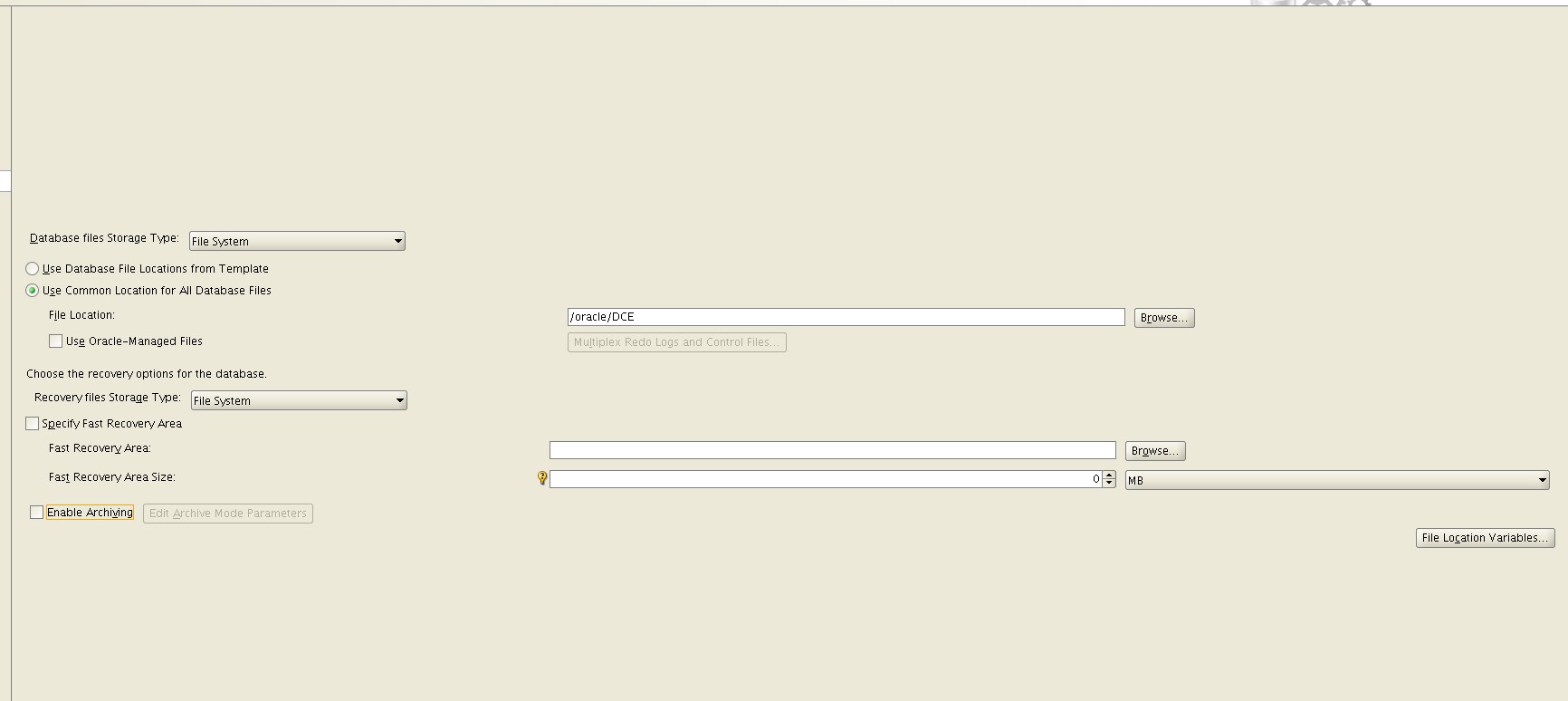
Storage Type: “File System” for Non-ASM environment.

Database Files Location:

Character Set (be careful and choose the correct one, once you create the database you can’t change the default character set of the database).

2

3

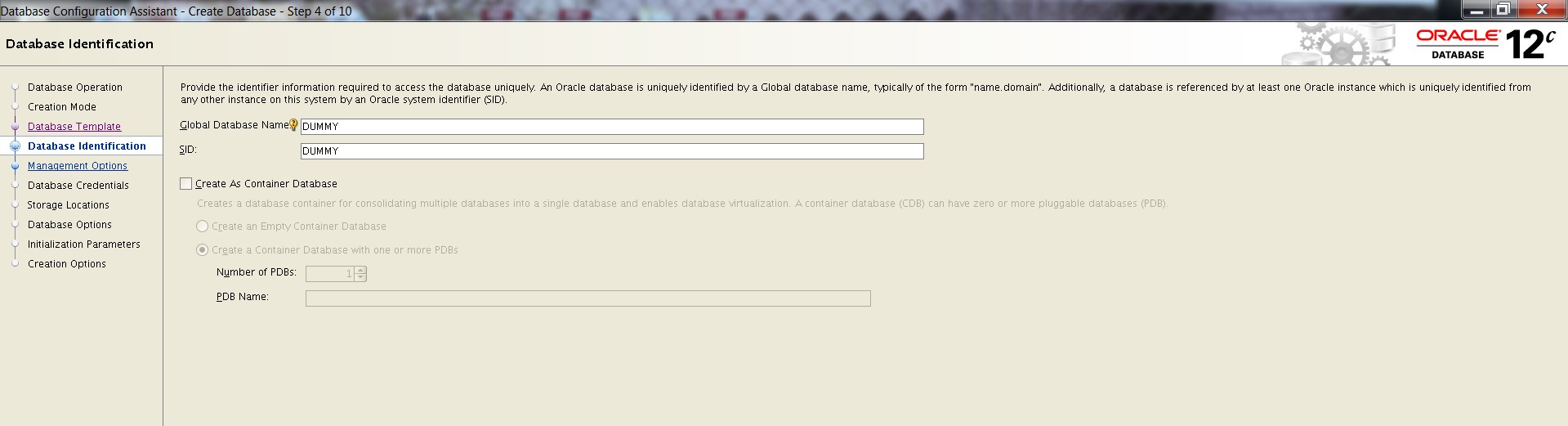
Now, if you want to choose the “Advanced Mode”

PATH Number 2

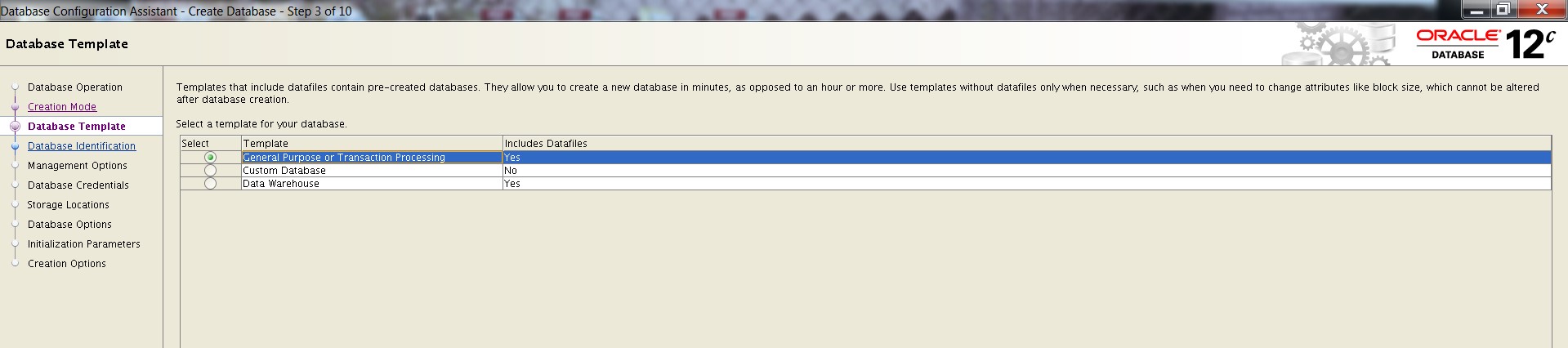
You will choose a template based on type of applications working against your database.

The General Purpose or Transaction template and the Data Warehouse template create a database with the COMPATIBLE initialization parameter set to 12.1.0.2.0

1

2

3

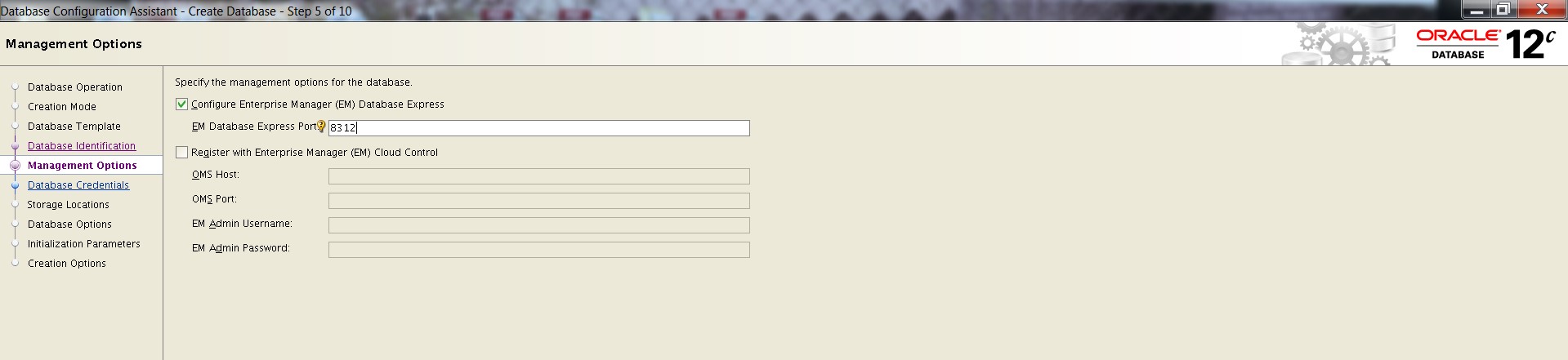
You can either choose to configure enterprise manager or not.

4

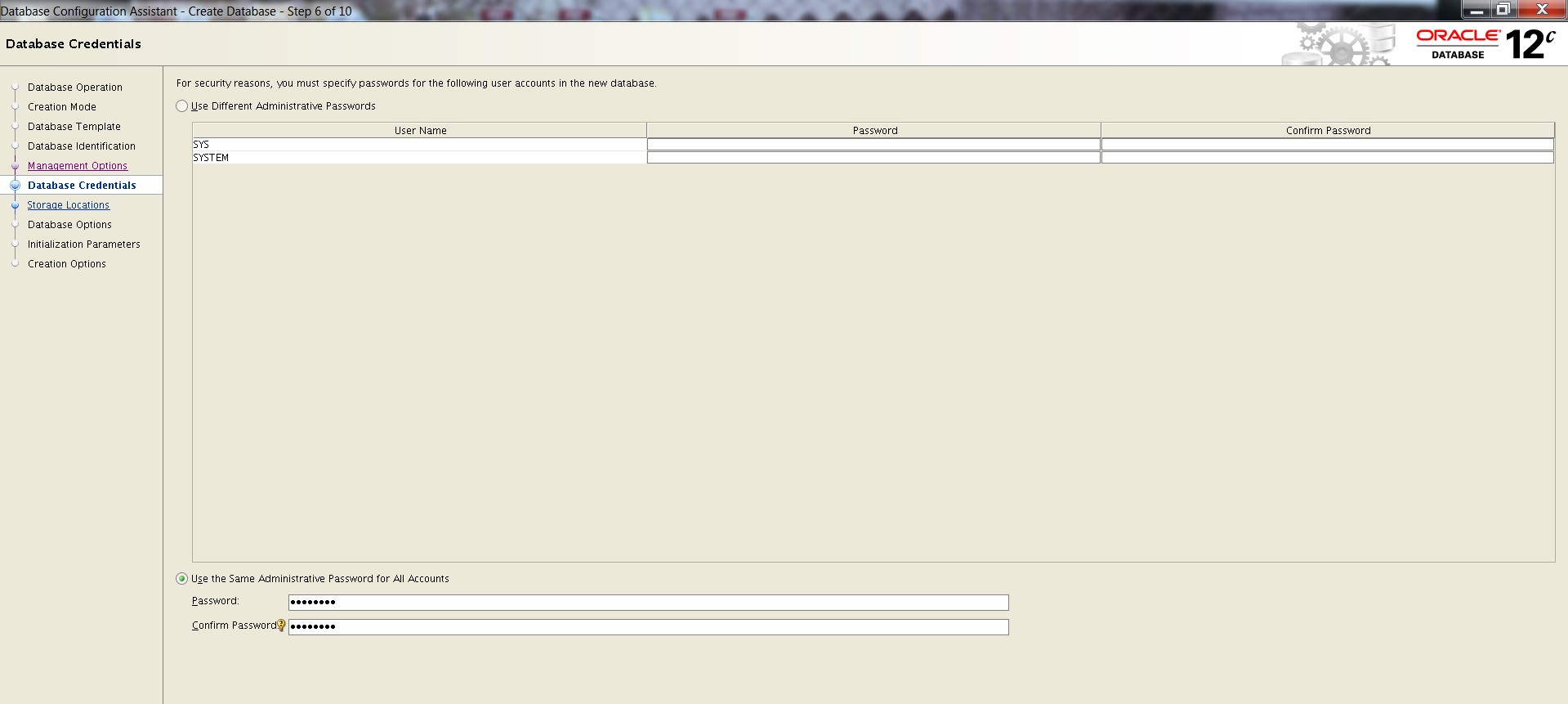
I choose to have both “SYS” and “SYSTEM” having the same password (you can change system password later on if you want to)

5 6 7

You can enable database vault or label security while creating the database

8

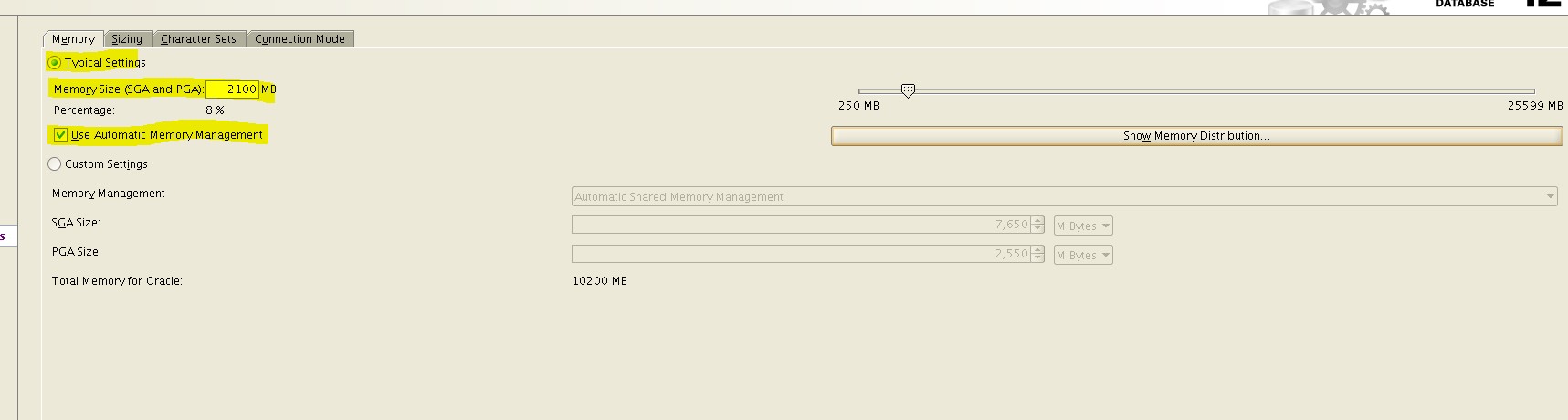
For memory setup I choose “automatic memory management”

9

For process I choose the default one (300 processes)

10

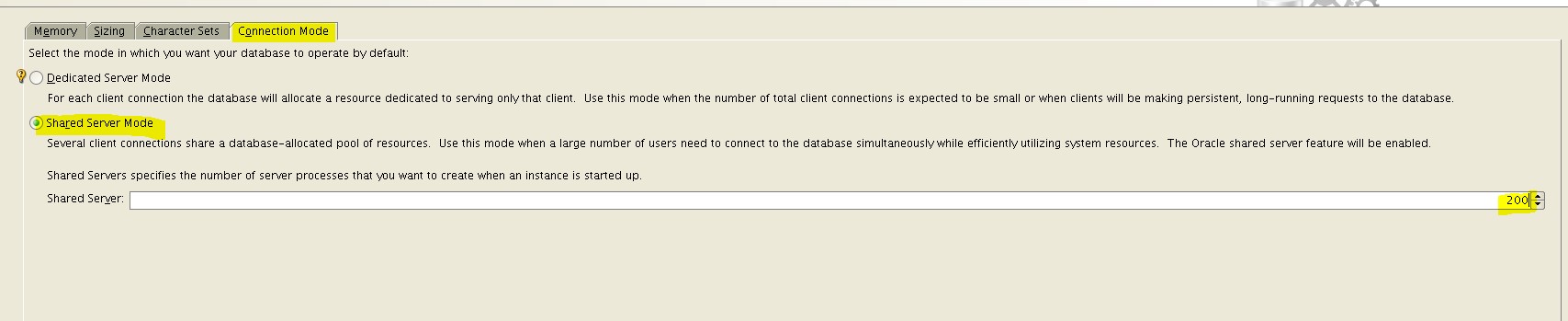
For connection mode I choose “Shared Server Mode” to serve multiple application simultaneously

11

Choose the “create database” and I have chosen to “generate database creation script” for reference.

12

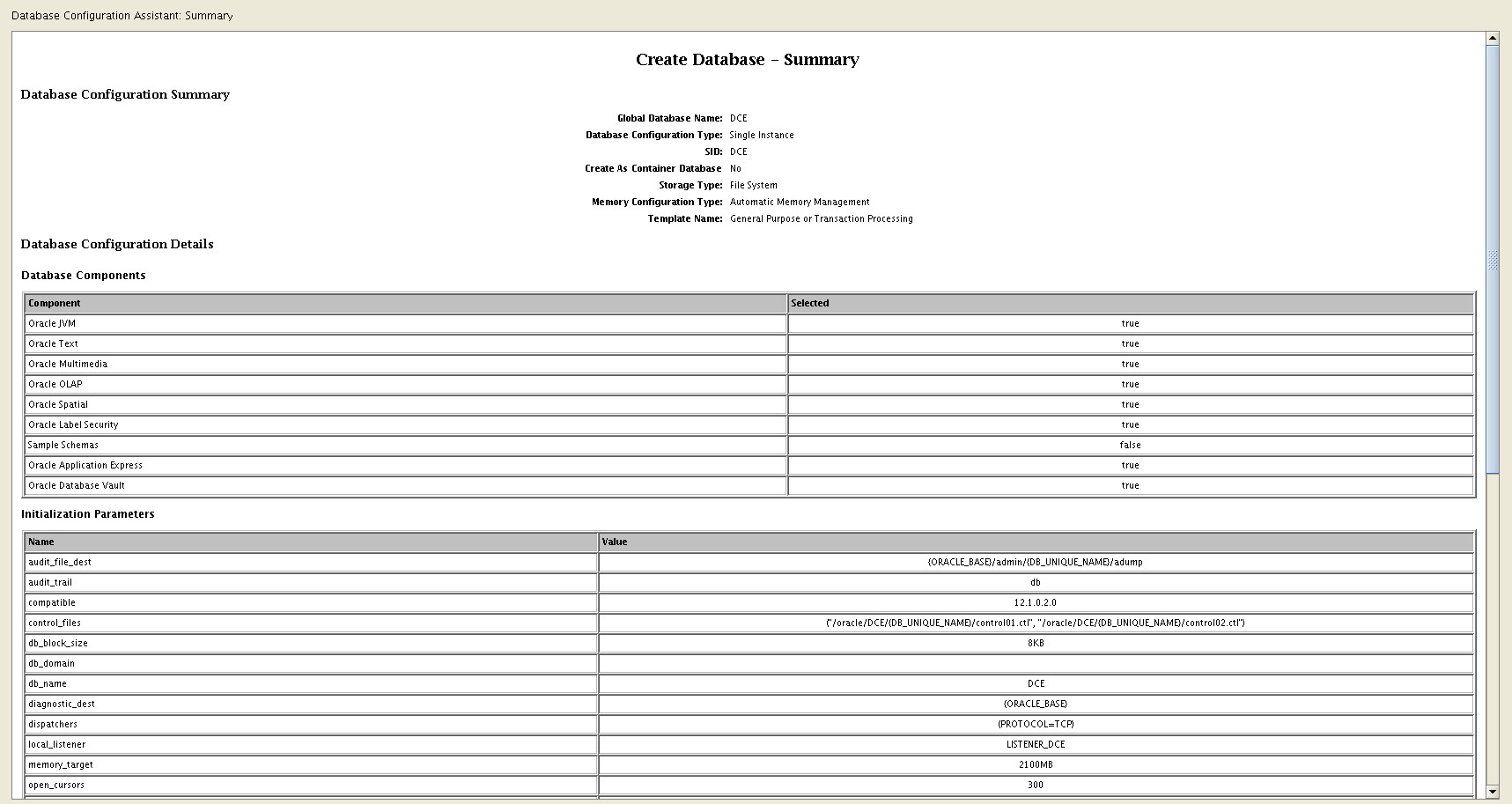
Review the database creation summary

13

Exploring Multithreading Setup For Oracle 12c in UNIX environment

Normally when we execute the grep unix command to list oracle processes, you will find all “detailed” oracle process:

ps -ef | grep [o]ra_

unix-oracle-process

this is the normal process architecture in Oracle database hosted on Unix environment prior to 12c release.

In oracle 12c you can switch to Multi-threaded architecture by adding a new parameter in your init.ora file.

go to $ORACLE_HOME/dbs  and edit your init.ora (text init file in case you are not configuration SPFILE) and add the parameter:

threaded_execution=TRUE

threaded_executtion parameter

Then, create a password file per the documentation: https://geodatamaster.wordpress.com/2015/05/25/oracle-12c-database-password-file/

Then bounce the Oracle instance (shutdown/startup) the database.

Please note that the OS authentication won’t’ work anymore after changing the mode to “multi-threading”, and you will receive the below error:

sqlplus error

If you face problems connecting to the database, you can connect internally through Bequeath protocol: http://www.dbi-services.com/index.php/blog/entry/multithreaded-12c-and-connect-as-sysdba

After enabling multi-threading, the oracle process on the server  will look like this:

unix oracle process multithreading

Interesting part that in IBM AIX environment the Oracle database process using topas command shows the database is consuming around 97% of the CPU ….. This will requires more investigation from my side 😐

IBM AIX topas for multithreading

Unplugging a database

Here i am exploring the concept of unplugging a database in 12c multi-tenant setup architecture.

SQL> alter pluggable database pdb2 unplug into ‘/oracle/DCE/pdb2_unplug.xml’;

unplug sql query

If you query:

select * from cdb_pdbs;

database status changed to —–> UNPLUGGED

database status unplugged

The database is unplugged but not dropped and you can still see it any many data dictionary views:

v$pdb

To drop pluggable database:

SQL> DROP PLUGGABLE DATABASE PDB2 INCLUDING DATAFILES;

drop pluggale database

Checking the data dictionary, the pluggable database doesn’t exist anymore:

query fo pluggable status

***** Its important to know that unplugging the database could cause problems while patching/upgrading, so its better to drop your database before applying any patches to avoid problems.

Hope this information is useful.

impdp ORA-1775 Looping Chain Of Synonyms

After importing my dump file, I have reviewed my log file and found the below error being thrown multiple times:

ORA-01775: looping chain of synonyms

My oracle version where I faced the problem is: 11.2.03

To resolve this problem:

SQL> select owner, object_name, object_type, status from dba_objects where object_name like ‘%SYS_IMPORT_SCHEMA_01%’;

The result of the query:

master tables

So I have dropped these tables:

SQL> drop table SYS.SYS_IMPORT_SCHEMA_01 purge;

Table dropped.

SQL> drop  table SYSTEM.SYS_IMPORT_SCHEMA_01 purge;

Table dropped.

Then, try to re-run impdp command again.

Remark: Those tables are orphan master tables due to the interruption of the impdp process. Normally master tables would be “dropped” after finishing the impdp.

Applying Patches on Oracle 12c Guide

This is an overview procedure on how to apply Oracle Patches (PSU) on Oracle 12cR1 databases (12.1.0.2). Its very important that you read the official documentation (readme.html) that is being provided with the patch being released in case oracle is listing new requirements.

********* STEPS for Applying PSU on 12c in Unix environment:

1.first collect preliminary database information and spool it in a file.

make a directory and call it before_patch: mkdir before_patch

cd before_patch

sqlplus ‘/as sysdba’

set pages 300
set lines 250
col owner for a17;
col object_name for a35;
col object_type for a20;
col action for a15;
col comments for a40;
col comp_name for a40;
col version for a15;

spool before_patch.log
SELECT NAME FROM V$DATABASE;
SELECT * from V$VERSION;
SELECT ACTION,VERSION,COMMENTS FROM SYS.REGISTRY$HISTORY;
SELECT * from dba_registry_sqlpatch;
SELECT COMP_NAME,VERSION,STATUS FROM DBA_REGISTRY;
select count(*) from dba_objects where status = ‘INVALID’;
select owner, count(*) from dba_objects where status <>’VALID’ group by owner order by 1;
Select owner, object_type, object_name
from dba_objects where status <>’VALID’ order by 1,2,3;
spool off

2. edit your Oracle inventory and make sure its pointing to the right location

3.shutdown listener and shutdown the database.

you can check the database listener name in your server by executing the unix command: ps -ef |  gep inh

or going directly to $ORACLE_HOME/network/admin and executing the command: lsnrctl stop listener_db1

4. in 12c the patches are being setup depending if you have JAVA component in your database or not.

For 12.1.0.2 if there is no JAVA component
go to the location of the patch:

cd ../20834354/20299023
then execute the OPatch utiltiy
OPatch/opatch apply -invPtrLoc /etc/oraInst.loc

For 12.1.0.2 if JAVA component exists
cd ../20834354/20415564
Opatch/12.1.0.1.7/OPatch/opatch apply -invPtrLoc /etc/oraInst.loc

*** the output will be similar to this:

Do you want to proceed? [y|n]
Y
Email address/User Name:
Press enter

You have not provided an email address for notification of security issues.
Do you wish to remain uninformed of security issues ([Y]es, [N]o) [N]:
Yes

Is the local system ready for patching? [y|n]
Y

5. Run Bundle

##### To run the bundle for 12.1.0.2 FOR NON-JAVA
sqlplus ‘/as sysdba’
STARTUP
exit
cd $ORACLE_HOME/OPatch
./datapatch -verbose
—–Please make sure you receive the following message “Patch 20299023 apply: SUCCESS
sqlplus ‘/as sysdba’
col PRODUCT for a60;
col VERSION for a10;
col STATUS for a15;
col description for a60;
col action_time for a30;
set lines 133
select patch_id, version, status, description, action_time from dba_registry_sqlpatch order by 1;

##### To run the bundle for 12.1.0.2 FOR JAVA
sqlplus ‘/as sysdba’
STARTUP UPGRADE
QUIT
cd $ORACLE_HOME/OPatch
./datapatch –verbose
sql
shutdown immediate
STARTUP

6. Post Patching
cd
mkdir after_patch
cd after_patch
sql
sqlplus ‘/as sysdba’
col action for a15;
col comments for a40;
col comp_name for a40;
col version for a15;
set pages 300
set lines 300

spool after_patch.log
select name from v$database;
select * from v$version;
select ACTION,VERSION,COMMENTS from sys.registry$history;
select COMP_NAME,VERSION,STATUS from dba_registry;
select * from dba_registry_sqlpatch;
select count(*) from dba_objects where status = ‘INVALID’;
select owner, count(*) from dba_objects where status <>’VALID’ group by owner order by 1;
Select owner, object_type, object_name
from dba_objects where status <>’VALID’ order by 1,2,3;
spool off