My Blog was featured in it:

First, the case of UNDO tablespace:
In Oracle 12cR1 the undo tablespace was common and shared between all container databases, so features like flashback was only feasible on the container-level.
In 12cR2 this is changed as you create a local undo tablespace.
By executing the following query:
SQL> SELECT con_id, tablespace_name
FROM cdb_tablespaces
WHERE tablespace_name LIKE ‘UNDO%’
ORDER BY con_id;
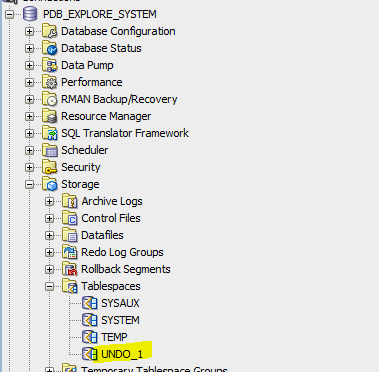
Only the root container has UNDO tablespace

An existing pluggable database with no local undo tablespace

To enable Local Undo Tablespace:
Access the database as sysdba to the root container CBD$ROOT
SQL>shutdown immediate;
SQL> startup upgrade;
SQL> alter database local undo on;
SQL> shutdown immediate;
SQL>startup;
To check that its successful, execute the following query:
SQL>set pages 1000
SQL>set lines 300
SQL> SELECT property_name, property_value
FROM database_properties
WHERE property_name = ‘LOCAL_UNDO_ENABLED’;

To Enable Flash Back:
Configure flash recovery area:
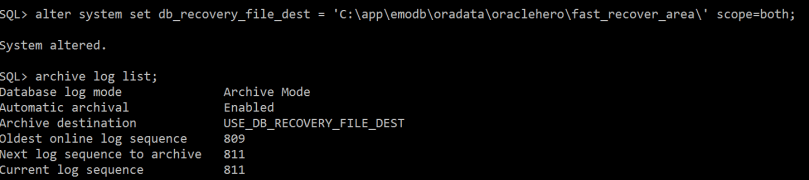
SQL> alter system set db_recovery_file_dest = ‘C:\app\emodb\oradata\oraclehero\fast_recover_area\’ scope=both;
SQL> archive log list;
SQL> alter system set db_flashback_retention_target = 2880 scope = both;
**retention specified will be for 2 days 2880 minutes
Second, Enable flashback from CDB$root level:
SQL> alter database flashback on;
If you try to enable flashback from pluggable database level you will receive the following error:
SQL> alter session set container=PDB_EXPLORE;
SQL> alter database flashback on;
alter database flashback on
*
ERROR at line 1:
ORA-03001: unimplemented feature
Important remark: it’s important to enable force logging on the pluggable database level:
SQL> select pdb_name, force_logging, force_nologging from cdb_pdbs where pdb_name=’PDB_EXPLORE’;
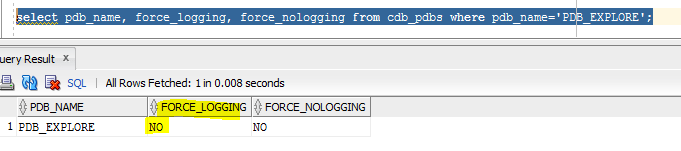
To enable it:
SQL> alter session set container=PDB_EXPLORE;
SQL> alter pluggable database pdb_explore enable force logging;

Also, check that tablespaces are configured for flash back for pluggable database PDB_EXPLORE:
select name,flashback_on from v$tablespace;

Now to explore recover we can do it from different perspectives:
SQL> Select dbms_flashback.get_system_change_number from dual;
GET_SYSTEM_CHANGE_NUMBER
————————
13524572
SQL> select to_char (sysdate, ‘mm-dd-yyyy hh24: mi: ss’) cdate from dual;
CDATE
———————
05-12-2017 12: 53: 35
SQL> create restore point test_flash guarantee flashback database;
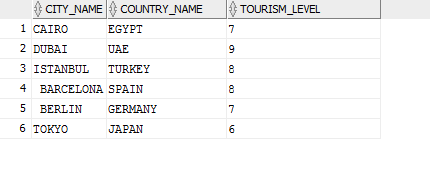
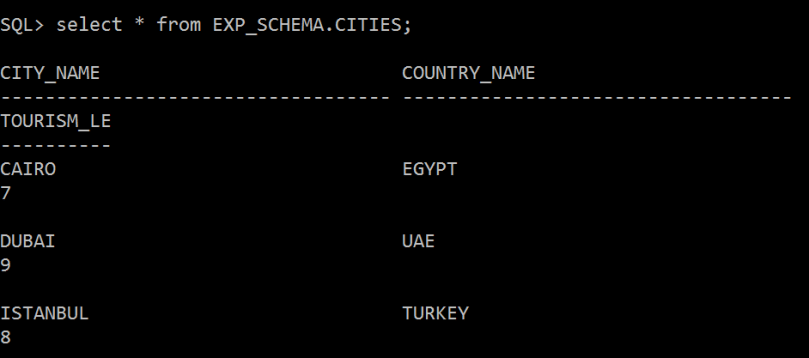
Now to explore it, current Table called CITIES has the current data:

*** insert new records in the table:
INSERT INTO “EXP_SCHEMA”.”CITIES” (CITY_NAME, COUNTRY_NAME, TOURISM_LEVEL) VALUES (‘ BARCELONA’, ‘SPAIN’, ‘8’);
INSERT INTO “EXP_SCHEMA”.”CITIES” (CITY_NAME, COUNTRY_NAME, TOURISM_LEVEL) VALUES (‘ BERLIN’, ‘GERMANY’, ‘7’);
INSERT INTO “EXP_SCHEMA”.”CITIES” (CITY_NAME, COUNTRY_NAME, TOURISM_LEVEL) VALUES (‘TOKYO’, ‘JAPAN’, ‘6’);
Commit;

SQL> alter pluggable database pdb_explore close;
SQL> flashback pluggable database PDB_EXPLORE to restore point test_flash;
SQL> alter pluggable database pdb_explore open resetlogs;
Now check the table data again , its back as it was !!!
In Oracle RAC environment , if you face the below error:
ORA-46362: Could not translate variable ORACLE_BASE
*** Solution:
Modify the database resource:
srvctl setenv database -db [DBNAME] -env ORACLE_BASE=$ORACLE_BASE
One of the new exciting new security features in Oracle 12cR2 (12.2.0.1) , is the ability to encrypt your tablespaces “online“. In the past Implementing TDE required creating a new encrypted tablespace and then moving the data from the original tablespace to the encrypted tablespace (export/import data pump operations), which means a down time of your systems unless you use active data guard which minimizes TDE conversion implementation.
Let us now explore and simulate:
Current environment is: Oracle 12cR2 (Container Database Architecture) in Windows OS
Current ORACLE_HOME=C:\app\emodb\product\12.2.0\dbhome_2
Create a directory for the key store:
C:\app\emodb\product\12.2.0\dbhome_2\key_store
Go to sqlnet.ora file and add the below lines:
ENCRYPTION_WALLET_LOCATION=
(SOURCE=
(METHOD=file)
(METHOD_DATA=
(DIRECTORY=C:\app\emodb\product\12.2.0\dbhome_2\key_store)))
SQL> ALTER SYSTEM SET COMPATIBLE = ‘12.2.0.0’ SCOPE = SPFILE;
Then execute:
SQL> ADMINISTER KEY MANAGEMENT CREATE KEYSTORE ‘C:\app\emodb\product\12.2.0\dbhome_2\key_store’ IDENTIFIED BY super_mario$88;

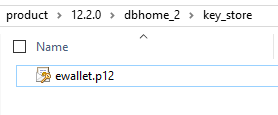
ewallet will be created:

Open the key store by executing:
SQL> ADMINISTER KEY MANAGEMENT SET KEYSTORE OPEN IDENTIFIED BY super_mario$88;

Now I will create the Master Key:
SQL> ADMINISTER KEY MANAGEMENT SET ENCRYPTION KEY IDENTIFIED BY super_mario$88 WITH BACKUP USING ‘mario_bck7’;

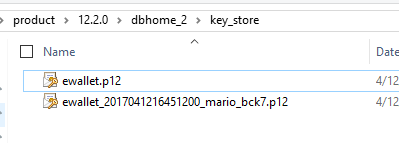
Backup of key store generated (it’s better to place it in a different directory)

I have already created and activated a master key in the root container and, one in each of the pluggable databases. Now I will create local master key for pluggable database
SQL>alter session set container=PDBORCL;
SQL>ADMINISTER KEY MANAGEMENT SET KEYSTORE OPEN IDENTIFIED BY super_mario$88;
SQL>ADMINISTER KEY MANAGEMENT SET KEY IDENTIFIED BY super_mario$88 WITH BACKUP;
Now the interesting part…..the online tablespace conversion:
I will run the alter tablespace command to encrypt an existing tablespace named “COMPANY_INFO_TS”:
SQL>ALTER TABLESPACE COMPANY_INFO_TS ENCRYPTION ONLINE USING ‘AES256’ ENCRYPT FILE_NAME_CONVERT = (‘COMPANY_INFO.DBF’, ‘COMPANY_INFO_ENC.DBF’);

If you don’t specify the encryption algorithm, the default encryption will be AES128
Encrypted new data file is generated:

of course you need to increase the tablespace size before your start the conversion, as the conversion process will require more space allocation.
You can use DataWalker for Oracle to test viewing the data file blocks that is not encrypted, and encrypted one:
http://www.toolswatch.org/2014/03/new-tool-datawalker-for-oracle-v1-0-in-the-wild/
Useful queries:
** to check wallet status
SELECT * FROM v$encryption_wallet;
** to check encryption keys created 1 in CDB and the other in PDB database:
SELECT con_id, key_id FROM v$encryption_keys;
If you face this error while creating materialized view:
ORA-30373: Object Data Types Are Not Supported In This Context
This means you are trying to create a Materialized View that references columns data types such as XMLTYPE or SDO_GEOMETRY or ESRI ST_GEOMETRY. This is a 12c limitation.
On the other hand, if you try to crate a materialized view with ST_GEOMETRY column this won’t be allowed.The workaround is not including the ST_GEOMETRY attribute in the materialized view.
This error is received in 11g release, but fixed in 12c release :
ORA-29532: Java call terminated by uncaught Java exception: java.lang.RuntimeException
ORA-06512: at “MDSYS.SDO_UTIL”, line 196
is there any workaround for this problem in 11g …. YES:
1. Drop the spatial index on the geometry table
2. Run the update
3. Rebuild the spatial index
When installing Oracle 12cR2 binaries there are 2 methods:
Here I am going to choose option 1 which using OUI GUI
After installing the zip file from Oracle website, unzip it and run setup.exe file

Then choose “Next”:

Choose “Yes”

Here I am going to choose “Upgrade an existing database” option

I will choose “Enterprise Edition”


To explain these options:
In previous release you didn’t have option number one which is “virtual account” option. The virtual account is a feature that has been introduced since windows releases (Windows 7 & Windows Server 2008 R2).
Option1: Virtual accounts are locally managed accounts that has No password management requirement, and the ability to access, Oracle is recommending to use it so….use it especially for fresh new database creation.
Option2: using existing account which is a managed active directory domain account created by Active Directory Administrators.
Option3: is for creating a new local windows server account and setting the password for it.
Option4: is the built in SYSTEM windows account, which is not preferred option for security reasons.
*** Warning: if you are upgrading an already existing database, then use the service account you have already configured previously. This what i am going to choose in my illustration and practice. Otherwise you will face the below error when using “virtual account” option:

To continue…

choose “install”


specify the service account and password:

Pre-upgrade check will be running


Here I am facing 2 problems that I need to resolve:
SQL> purge dba_recylebin;
After fixing the errors, we can proceed as shown below:


In case of upgrade failure, I have chosen “RMAN” technique for restore, you can use “flash back”if you prefer but you need to make sure you have set flash recovery area in your init.ORA:


Verifying by querying v$version view:

And that’s it …. Good Luck.
This could be known and primitive to many people, however i am putting it to help the community in general from different technical-levels.
when you initiate sqlplus and trying to connect to your database instance you face the following error:
ORA-12560: TNS:protocol adapter error
if you are using windows OS, you need to check the following:
set ORACLE_HOME=D:\app\db33\product\12.1.0\dbhome_33
set ORACLE_SID= ORACLE33
set PATH=D:\app\db33\product\12.1.0\dbhome_33\bin
to check that its reflected, execute the following to verify the value of ORACLE_HOME:
echo %ORACLE_HOME%

now try initiating sqlplus and it will be working 🙂
Before Oracle 12c release, an Invoker Rights unit always ran with the privileges of its invoker. If its invoker had higher privileges than its owner (for example, SYS, SYSTEM, or account with DBA role) then the IR unit might perform operations unintended by, or not authorized by the owner.
To explore first the behavior of invoker rights in 11g release, I have performed the following simulation test:
Oracle Database Release: 11.2.0.4.161018
Created a new user called “developer” with limited privileges:
CREATE USER developer
IDENTIFIED BY dodo_983
DEFAULT TABLESPACE TS_USER_DATA_01
TEMPORARY TABLESPACE TS_TEMP_DATA_01
PROFILE DEFAULT
ACCOUNT UNLOCK;
grant create session to developer ;
grant create procedure to developer ;
then the account will create a procedure:
CREATE OR REPLACE PROCEDURE priv_up AUTHID CURRENT_USER AS
PRAGMA AUTONOMOUS_TRANSACTION;
BEGIN
EXECUTE IMMEDIATE ‘GRANT DBA TO developer’;
EXCEPTION
WHEN OTHERS THEN
NULL;
END;
/
Now the developer asks the DBA to execute multiple procedures under the schema (to trick him):
As SYS account you execute the SQL statement:
SQL> execute developer.priv_up();

And developer account now has DBA role !!!
Now this is a big security problem and its called “Privilege Escalation” …if your are a DBA and dealt with many third party applications, many of them provide *.sql scripts (tens of them sometimes) and you don’t have the time to inspect all sql code, this very difficult and hectic job.
In 12c This has been changed Invoker Rights unit can run with the privileges of its invoker only if its owner has either the INHERIT PRIVILEGES privilege on the invoker or the INHERIT ANY PRIVILEGES privilege.
A new account “developer” with the following definition:
CREATE USER developer
IDENTIFIED BY dodo_983
DEFAULT TABLESPACE TS_USER_DATA_01
TEMPORARY TABLESPACE TS_TEMP_DATA_01
PROFILE DEFAULT
ACCOUNT UNLOCK;
grant create session to developer ;
grant create procedure to developer ;
Now the developer creates a new function and a procedure (that has embedded SQL statement for granting):
CREATE OR REPLACE PROCEDURE priv_up AUTHID CURRENT_USER AS
PRAGMA AUTONOMOUS_TRANSACTION;
BEGIN
EXECUTE IMMEDIATE ‘GRANT DBA TO developer’;
EXCEPTION
WHEN OTHERS THEN
NULL;
END;
/
A new account “super_user” with the following definition:
CREATE USER super_user
IDENTIFIED BY roro_983
DEFAULT TABLESPACE TS_USER_DATA_01
TEMPORARY TABLESPACE TS_TEMP_DATA_01
PROFILE DEFAULT
ACCOUNT UNLOCK;
grant create session to super_user ;
grant dba to super_user ;
SELECT grantee FROM dba_role_privs WHERE granted_role = ‘DBA’ ORDER BY grantee ;

Connecting now as “superuser” account:
The powerful account “super_user” was tricked to execute the procedure:
SQL> execute developer.priv_up();
Now “developer” account has the “DBA” role!!!!

SQL> REVOKE INHERIT PRIVILEGES ON USER super_user FROM PUBLIC;

Now if the super user tries to execute the procedure he will receive the below error:

So, the procedure called by super_user wants to exercise one of super_user account privileges that the creator of the procedure (developer user) lacks.
its worth mentioning also, that if you try perform export data pump backup for schema using SYS user after revoking INHERIT PRIVILEGE from all accounts from public, you will receive in the export log the below error:
ORA-06598: insufficient INHERIT PRIVILEGES privilege
To fix this export error:
SQL> GRANT INHERIT PRIVILEGES ON USER SYS TO schema_Account;
This is a very nice security enhancement in 12c …..Thank You Oracle
while installing Oracle Enterprise Manager 13c Cloud Control i have faced the below errors:
ORA-01722: invalid number
ORA-06512: at “SYSMAN.EM_TARGET”, line 9634
ORA-06512: at “SYSMAN.EM_TARGET”, line 10403
ORA-06512: at “SYSMAN.EM_SYSTEM”, line 324
ORA-06512: at “SYSMAN.EM_SYSTEM”, line 242
ORA-06512: at “SYSMAN.MGMT_SYSTEM”, line 32
ORA-06512: at “SYSMAN.CFW_LIFECYCLE”, line 90
ORA-06512: at “SYSMAN.CFW_SERVICE_FAMILY”, line 58
ORA-06512: at line 15
To resolve this:
Set the following parameter:
SQL> alter system set optimizer_mode=all_rows scope=both;
Cheers ! 🙂