Oracle 12c Database Data Redaction – DBMS_REDACT

With Oracle Database 12c, Oracle has introduced a new PL/SQL package called DBMS_REDACT to support data masking or data redaction. This new feature is also back ported to Oracle version 11.2.0.4.

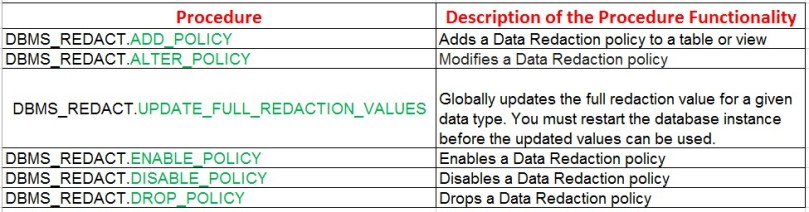
DBMS_REDACT Package has the following procedures that perform different actions:

dbms_redact-proc

I will now explore it with an example:

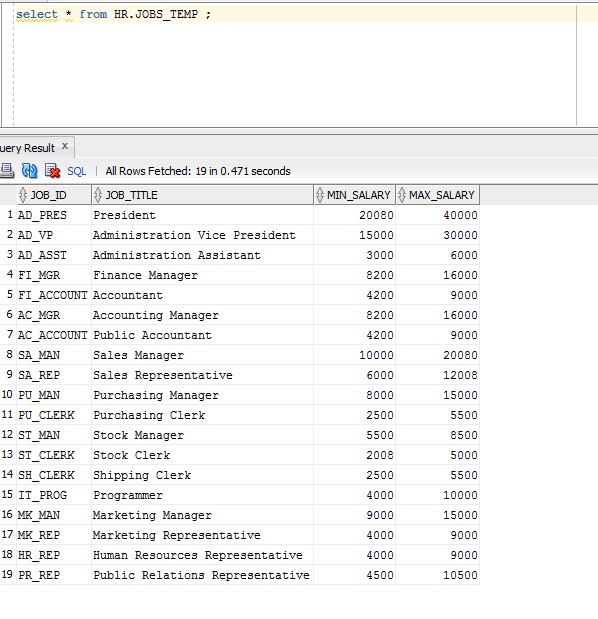
Querying the original table:

SQL> select * from HR.JOBS_TEMP ;

jobs_temp-table-data

Execute the following as SYS:

begin
       dbms_redact.add_policy(
       object_schema => ‘HR’,
       object_name   => ‘JOBS_TEMP’,
       column_name   => ‘MIN_SALARY’,
       policy_name   => ‘redect_jobs_min_salary’,
       function_type => DBMS_REDACT.FULL,
       expression    => ‘1=1’);
  end;

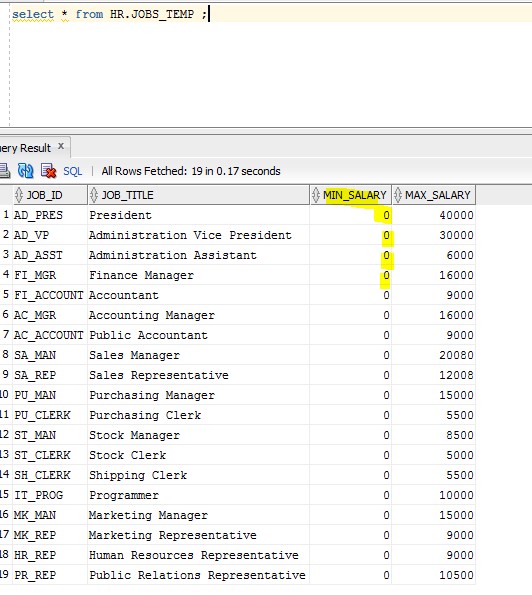
Re-executing the query  with an account that has “SELECT” permission on the table will illustrate “FULL REDACTION” of the column values:

jobs_temp-table-redact

To disable a policy:

BEGIN

  DBMS_REDACT.DISABLE_POLICY (

    object_schema  => ‘HR’,

    object_name    => ‘JOBS_TEMP’,

    policy_name    => ‘redect_jobs_min_salary’);

END;

/

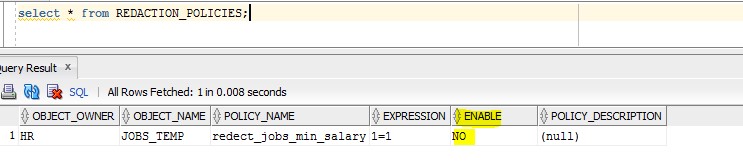
The following query will list the current configured redaction policy:

SQL> select * from REDACTION_POLICIES;

query-to-list-redact-policies

The following query will list currently redacted columns:

SQL> select * from REDACTION_COLUMNS;

query-to-list-redact-columns

The following policy will mask the data for un-authorized users, so non-HR users won’t be able to see the maximum salary using expression statement:

BEGIN

 DBMS_REDACT.ADD_POLICY(

   object_schema   => ‘HR’,

   object_name     => ‘JOBS_TEMP’,

   column_name     => ‘MAX_SALARY’,

   policy_name     => ‘JOBS_TEMP_MAX_SAL’,

   function_type   => DBMS_REDACT.FULL,

   expression      => ‘SYS_CONTEXT(”USERENV”, ”SESSION_USER”)!= ”HR”’);

END;

/

Important remark: only 1 policy can be applied on a table or a view. Trying to create another policy on the same table will result with the following errors:

ORA-28069: A data redaction policy already exists on this object.

ORA-06512: at “SYS.DBMS_REDACT_INT”, line 3

ORA-06512: at “SYS.DBMS_REDACT”, line 42

ORA-06512: at line 2

To add other columns to the current policy, use DBMS_REDACT.ALTER_POLICY and add DBMS_REDACT.ADD_COLUMN.

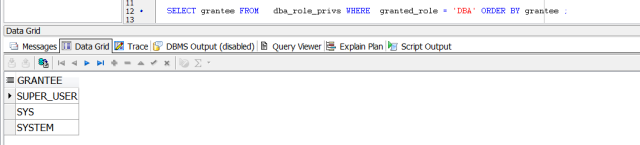
of course redacting data in a column won’t provide protection against “SYS” account , or user granted “DBA” role from viewing the real data.

physical standby errors ORA-00600 ORA-10567 ORA-10564 ORA-01110 ORA-10561

The following errors were thrown while trying to sync physical standby database with the primary database:

ORA-00600: internal error code, arguments: [3020], [239], [13749],
[1002452405], [], [], [], [], [], [], [], []
ORA-10567: Redo is inconsistent with data block (file# 239, block# 13749, file
offset is 112631808 bytes)
ORA-10564: tablespace SYSAUX
ORA-01110: data file 211: ‘/database/orcl07/SYSAUX01.ORA’
ORA-10561: block type ‘TRANSACTION MANAGED INDEX BLOCK’, data object# 2877779

To resolve this you have 2 approaches …..choose one:

******************** First Approach *********************************

1. on the primary database

RMAN> rman target /

run
{
ALLOCATE CHANNEL ch1 DEVICE TYPE DISK format ‘/database/orcl07/backup/inc_SYSYAUX_%U’;
backup datafile 211;
release channel ch1;
}

—-  after executing the above rman command a backup of set for the data file will be generated and will require copying to the physical standby database server

scp inc_SYSYAUX_m7robspv_1_1 standby_server:/database/orcl07/backup/

2. on the standby database:

RMAN> catalog start with ‘/oradbp21/export/bkp/’;
RMAN> shutdown immediate;
RMAN> startup mount;
RMAN> restore datafile 239;
RMAN> exit;

SQL> RECOVER AUTOMATIC STANDBY DATABASE;

******************** Second Approach *********************************

1. on the standby database:

SQL> shutdown immediate;

2. on the primary database:

SQL> ALTER tablespace SYSAUX begin backup;

scp /database/orcl07/SYSAUX01.ORA standby_server:/database/orcl07/SYSAUX01.ORA

SQL> ALTER tablespace SDE end backup ;

3. on the standby database:
SQL> STARTUP NOMOUNT
SQL> ALTER DATABASE MOUNT STANDBY DATABASE;
SQL> RECOVER AUTOMATIC STANDBY DATABASE;


Applying Patches on Oracle 12c database in Windows Environment

On windows environment the patch type to be applied on Oracle is BP (Bundle Patch)

Set your PATH setting as follows:

set PATH=%ORACLE_HOME%\perl\bin;%PATH%

set-path

listener


shutt-down

Ensure that Oracle database services in windows are stopped


winodws-services


Stop the Distributed Transaction Coordinator service:

net stop msdtc

stop-msdtc

set-oracle-home


Go to the location of your patch directory.

** Important Remark: download the latest Opatch utility from Oracle MOS and place it under your Oracle Home location.

Now apply the patch by executing the following command:

C:\app\emodb\product\12.1.0\dbhome_3\OPatch\opatch apply

Successful patch message would look like this:


opatch-succeeded

In a Multitenant environment CDB/PDB follow the following steps:

Start up the listener:

lsnrctl start LISTENER

startup all Oracle Services:

startup-windows-services

alter pluggable database all open;

alter-pluggable-database-open

cd %ORACLE_HOME%/OPatch

datapatch -verbose

opatch-apply-verbose

******* It’s advisable to recompile all database objects after patching and ensure that all database components are “VALID”;

cd $ORACLE_HOME/rdbms/admin

SQL>@utlrp.sql

dba_registry.png


To check that the database patch applied successfully use the following query:

SQL> select * from dba_registry_sqlpatch ;

As shown below the patch applied 12.1.0.2.161018 (18th October 2016 Patch released for Oracle 12c)

dba_registry_sqlpatch

You can perform the same query on one of the pluggable databases:

SQL> alter session set container=PDB_TEST;

SQL> select ACTION,STATUS, DESCRIPTION,LOGFILE from dba_registry_sqlpatch ;

The log file references the pluggable database name.


ACCESSIBLE BY in Oracle 12c PL/SQL

New security enhancement has been introduced in Oracle 12c that will implement “white listing” on the PL/SQL code that will provide an isolation level.

The new keyword ACCESSIBLE BY can be used with the following database objects only:  function, package, procedure, and type.

To illustrate… I have created the following 2 packages under DUMMY_TEST schema:

CREATE OR REPLACE PACKAGE dummy1_pkg

IS

PROCEDURE do_action1;

END;

/

CREATE OR REPLACE PACKAGE BODY dummy1_pkg

IS

PROCEDURE do_action1

IS

BEGIN

dummy2_pkg.do_action2;

dummy2_pkg.do_action3;

END;

END;

/


CREATE OR REPLACE PACKAGE dummy_test.dummy2_pkg  

ACCESSIBLE BY (dummy1_pkg)

IS

PROCEDURE do_action2;


PROCEDURE do_action3;

END;

/


CREATE OR REPLACE PACKAGE BODY

dummy2_pkg

IS

PROCEDURE do_action2

IS

BEGIN

DBMS_OUTPUT.put_line (‘Hi Action 2’);

END;


PROCEDURE do_action3

IS

BEGIN

DBMS_OUTPUT.put_line (‘Hi Action 3’);

END;

END;

/


sqlplus

sql-account

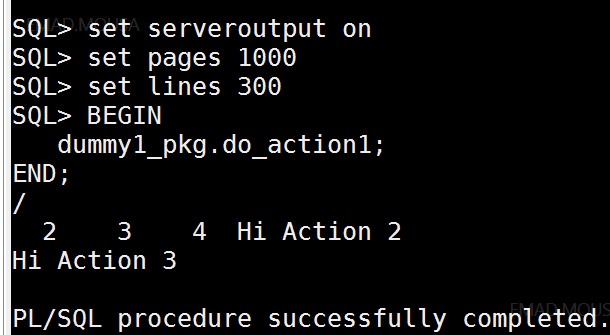
I was able to execute dummy1 package with no problems as shown below, by executing:

BEGIN

dummy1_pkg.do_action1;

END;

/

execute-package-1


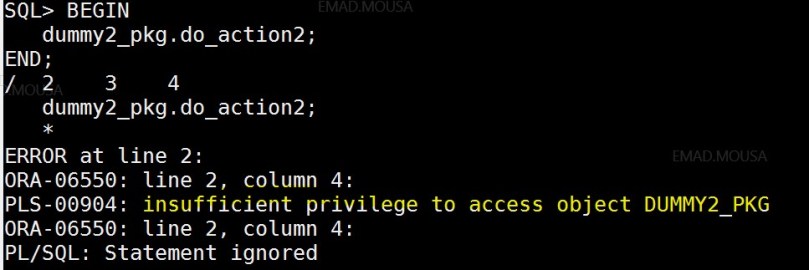
When I try to directly execute the other package dummy2_pckg by executing the query:

BEGIN

dummy2_pkg.do_action2;

END;

/

The following error is thrown: PLS-00904: insufficient privilege to access object DUMMY2_PKG

execute package 2 error.jpg

Remark: you can specify a package or a procedure in the accessible by clause while even if this package/procedure is not yet created, so you will not face any errors at compilation time.


ORA-01110 ORA-01157

******* PROBLEM:

a data file was added on the primary database table space and the standby database was configured with

MANUAL” file management:

SQL> show parameter standby

NAME                                 TYPE        VALUE

———————————— ———– ——————————

standby_archive_dest                 string      ?/dbs/arch

standby_file_management              string      MANUAL


this will lead to the following errors being thrown while applying archive logs (syncing the database with standby database):


ORA-01110: data file 2: ‘F:\ORACLE\PRODUCT\12.1.0\DB_1\DATABASE\UNNAMED00002’

ORA-01157:cannot identify/lock data file 2 – see DBWR trace file

ORA-01111: name for data file 2 is unknown – rename to correct file

******* SOLUTION:

execute the following query to find out the data file location on the primary database:

SQL> select file#,name from v$datafile where file#=2;


execute the following on the standby database:

SQL> alter database create datafile ‘F:\ORACLE\PRODUCT\12.1.0\DB_1\DATABASE\UNNAMED00002’ as ‘G:\DATAFILE\DBF2\ORAD12D01.ORA’ ;


then put the database on automatic file management mode on the standby (if you are using init.ora text file add the entry to ensure consistency in restarts):

SQL> alter system set standby_file_management=AUTO;


How to Roll Back (De-Install) Database Patch in 11.2.0.4

The following procedure is for Non-RAC environment and in the below example I am rolling back July 2016 PSU :

Double check that under $ORACLE_HOME/rdbms/admin

that there is a file with the naming convention catbundle_PSU_DBSID_ROLLBACK.sql

If this file doesn’t exist then you need to execute the following:

cd $ORACLE_HOME/rdbms/admin

sqlplus /nolog

SQL> CONNECT / AS SYSDBA

SQL> STARTUP

SQL> @catbundle.sql psu apply

SQL> @utlrp.sql

SQL> QUIT


Shutdown the database

SQL> shutdown immediate;

Execute opatch utility to rollback the patch:

opatch rollback -id 23054359

Remark: the patch number 23054359 is supplied with HTML document that comes with the patch downloaded.

cd $ORACLE_HOME/rdbms/admin

SQL> CONNECT / AS SYSDBA

SQL> STARTUP

SQL> @catbundle_PSU_ORAT772_ROLLBACK.sql

SQL> @utlrp.sql

SQL> QUIT

For Java component:

Shutdown the database

SQL> shutdown immediate;


Execute opatch utility to roll back the patch:

opatch rollback -id 23177551

cd $ORACLE_HOME/sqlpatch/23177551


SQL> CONNECT / AS SYSDBA

SQL> startup upgrade

SQL> @postdeinstall.sql

SQL> shutdown

SQL> startup

SQL> @utlrp.sql

SQL> QUIT


export data pump errors ORA-39014 ORA-39029 ORA-31671 ORA-04030

While performing an export database export dump the following errors where generated:

ORA-39014: One or more workers have prematurely exited.
ORA-39029: worker 1 with process name “DW00” prematurely terminated
ORA-31671: Worker process DW00 had an unhandled exception.
ORA-04030: out of process memory when trying to allocate 2328 bytes (kxs-heap-c,temporary memory)
ORA-06512: at “SYS.KUPW$WORKER”, line 1887
ORA-06512: at line 2


Solution:

ORA-4030 indicates a limit has been reached with respect to the Oracle process private memory allocation


check max_map_count  and increase it in a Linux environment.

more /proc/sys/vm/max_map_count
sysctl -w vm.max_map_count=200000


Converting an Oracle 12c Clusterware Standard Cluster to an Oracle Flex Cluster

The following is a summarized procedure in how to convert from Oracle 12c standard Cluster to Oracle New Flex cluster.


  1. Execute the following command to check your current cluster mode:

crsctl get cluster mode status

    cluster is running in “standard” mode

  1. Run the command to check that GNS is configured with fixed IP:

srvctl config gns

** if GNS  is not configured then you need to do so by executing the following command as “root” after making sure that GNS IP entry is added in DNS server:

srvctl add gns -vip vipname | ip_address

                 srvctl start gns


  1. Set the mode of the cluster to “flex” by executing the below command as “root”:

crsctl set cluster mode flex

Cluster mode set to “flex”


  1. Stop/Start the cluster so the new mode takes affect:

 crsctl stop crs

                   crsctl start crs

Status of cluster mode is “FLEX”


Important Final Remarks:

  • The cluster conversion is one direction from standard===> Flex  ONLY.


  • GNS is required with fixed IP address for Flex setup.


  • Oracle Flex cluster works ONLY with Oracle Flex ASM, while Oracle Flex ASM can work with either standard or Flex cluster.


                   Oracle Flex Cluster Architecture


oracle-flex-architecture